
Važne sigurnosne informacije
Please read all safety and operating instructions carefully before using this VCR. Retain this manual for future reference.
- Izvor napajanja: Connect the VCR only to the power supply indicated on the label.
- Ventilacija: Osigurajte odgovarajuću ventilaciju. Ne blokirajte ventilacijske otvore.
- Voda i vlaga: Do not expose the VCR to rain or moisture. Do not place objects filled with liquids on the VCR.
- Čišćenje: Unplug the VCR from the wall outlet before cleaning. Use a dry cloth.
- Servisiranje: Ne pokušavajte sami servisirati ovaj proizvod. Sve servise prepustite kvalificiranom servisnom osoblju.
Proizvod gotovview
The Sharp VC-A422 is a 4-head VCR designed for reliable playback and recording of VHS tapes. It features a user-friendly interface for easy operation.
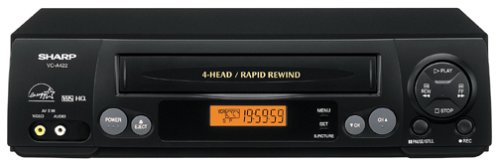
Slika: prednja strana view of the Sharp VC-A422 4-Head VCR, showing the tape slot, display, and control buttons.
Postavljanje
1. Raspakiranje i postavljanje
- Carefully remove the VCR from its packaging.
- Place the VCR on a stable, level surface. Ensure there is adequate space around the unit for ventilation.
- Avoid placing the VCR near heat sources, direct sunlight, or areas with high humidity.
2. Spajanje na televizor
To connect your VCR to a television, you will typically use RCA audio/video cables (red, white, yellow) or a coaxial cable.
- RCA Connection (Recommended for best quality):
- Connect the yellow video output jack on the VCR to the yellow video input jack on your TV.
- Connect the white audio output jack on the VCR to the white audio input jack on your TV.
- Connect the red audio output jack on the VCR to the red audio input jack on your TV.
- Select the corresponding AV input on your television (e.g., Video 1, AV1, Input 1).
- Koaksijalni priključak:
- Connect a coaxial cable from the "RF Out" or "Antenna Out" jack on the VCR to the "Antenna In" or "RF In" jack on your TV.
- Connect your antenna or cable TV signal to the "RF In" or "Antenna In" jack on the VCR.
- Tune your television to channel 3 or 4 (depending on the VCR's output setting) to receive the VCR signal.
3. Priključak za napajanje
- Plug the VCR's power cord into a standard electrical outlet.
- The VCR should enter standby mode, indicated by a clock display or power light.
Upute za rad
1. Osnovna reprodukcija
- Ensure the VCR is powered on and your TV is set to the correct input.
- Insert a VHS tape into the tape slot. The VCR will automatically load the tape.
- Pritisnite tipku IGRATI gumb na videorekorderu ili daljinskom upravljaču.
- Za zaustavljanje reprodukcije pritisnite STOP dugme.
- Za pauziranje reprodukcije pritisnite PAUZA gumb. Pritisnite ponovno za nastavak.
- Za brzo premotavanje naprijed ili unatrag pritisnite FF (Brzo premotavanje unaprijed) ili REW (Rewind) button. Press IGRATI za nastavak normalne reprodukcije.
- Za izbacivanje vrpce pritisnite IZBACITI dugme.
2. Programi za snimanje
The Sharp VC-A422 allows for recording television programs. Ensure a blank or recordable VHS tape is inserted and its safety tab is intact.
- Tune the VCR to the desired channel using the VCR's tuner.
- Pritisnite tipku SNIMITI gumb. Videorekorder će započeti snimanje.
- Za zaustavljanje snimanja pritisnite STOP dugme.
- For timed recordings, refer to the VCR's on-screen programming guide (if available) or consult the full manual for detailed timer recording instructions.
Održavanje
Proper maintenance ensures the longevity and optimal performance of your VCR.
- Vanjsko čišćenje: Wipe the exterior of the VCR with a soft, dry cloth. Do not use liquid cleaners or abrasive materials.
- Čišćenje glave: If picture quality degrades (e.g., snowy picture, lines), the video heads may be dirty. Use a dry-type VCR head cleaning cassette sparingly. Excessive use can wear down the heads.
- Njega trake: Store VHS tapes in their cases, away from dust, direct sunlight, and strong magnetic fields. Avoid exposing tapes to extreme temperatures.
- Ventilacija: Keep the VCR's ventilation slots clear of obstructions to prevent overheating.
Rješavanje problema
If you encounter issues with your Sharp VC-A422 VCR, refer to the following common problems and solutions:
| Problem | Mogući uzrok | Otopina |
|---|---|---|
| Nema struje | Kabel za napajanje isključen; utičnica nije aktivna. | Provjerite priključak kabela za napajanje. Isprobajte utičnicu s drugim uređajem. |
| Nema slike ni zvuka | Incorrect TV input selected; A/V cables loose or incorrectly connected. | Select correct TV input (e.g., AV1, Video 1). Ensure A/V cables are securely connected to matching color ports. |
| Snowy or distorted picture | Dirty video heads; poor tape quality; incorrect channel for coaxial connection. | Use a VCR head cleaning cassette. Try a different tape. If using coaxial, ensure TV is on channel 3 or 4. |
| Tape will not eject | Power failure; mechanical issue. | Ensure VCR is powered on. If problem persists, seek professional service. |
| Nije moguće snimiti | Tape's safety tab removed; VCR not tuned to a channel. | Check if the safety tab on the VHS tape is intact (cover the notch with tape if removed). Ensure VCR tuner is set to the desired channel. |
Tehnički podaci
- Marka: Oštar
- Model: VC-A422
- Glave: 4-Head (Video)
- Težina artikla: 6 funti
- Dimenzije paketa: 15.55 x 11.02 x 5.24 inča
- ASIN: B00005LABU
- Datum prve dostupnosti: 4. rujna 1999
Napomena: Specifikacije se mogu promijeniti bez najave.
Informacije o jamstvu
This Sharp product is covered by a limited warranty. For specific details regarding warranty coverage, duration, and terms, please refer to the warranty card included with your purchase or visit the official Sharp webstranicu. Sačuvajte dokaz o kupnji za slučaj reklamacije.
Korisnička podrška
For further assistance, technical support, or service inquiries, please contact Sharp customer support. You can find contact information on the official Sharp webweb-mjestu ili u dokumentaciji koja je priložena uz vaš proizvod.
Visit the official Sharp store for more information: Sharpova službena trgovina
Pravno odricanje od odgovornosti
UPOZORENJE ZA POTROŠAČE: Ovaj televizijski prijemnik ima samo analogni tuner za emitiranje i trebat će mu pretvarač nakon 17. veljače 2009. za prijem emitiranog signala s antenom zbog prelaska SAD-a na digitalno emitiranje. Televizori koji primaju samo analogni signal trebali bi nastaviti raditi kao i prije s kabelskim i satelitskim televizijskim uslugama, igraćim konzolama, videorekorderima, DVD playerima i sličnim proizvodima. Za više informacija nazovite Federalnu komisiju za komunikacije na 1-888-225-5322 (TTY: 1-888-835-5322) ili posjetite odjel za digitalnu televiziju komisije. Web stranica na: www.dtv.gov.