
VTech T2451
VTech t2451 2.4 GHz analogni bežični telefon s telefonskom sekretaricom i identifikacijom pozivatelja Korisnički priručnik
Model: T2451
Uvod
This manual provides comprehensive instructions for the setup, operation, and maintenance of your VTech t2451 2.4 GHz Analog Cordless Phone with Answering System and Caller ID. Please read this manual thoroughly before using your new phone system to ensure proper functionality and to take full advantage njegovih značajki.
Key features of your VTech t2451 include:
- 2.4 GHz analog reception for clear communication.
- Digital answering system with 3 mailboxes and 15 minutes of recording time.
- 50 name/number phonebook directory for easy contact management.
- 99 name/number Caller ID history to review propušteni pozivi.
- Headset compatibility (2.5 mm jack) for hands-free operation.
- Hold function, page/handset locator, and selectable ring tones.
- Wall-mountable design for flexible placement.
Postavljanje
Follow these steps to set up your VTech t2451 cordless phone system.
- Raspakiranje: Carefully remove all components from the packaging. Ensure you have the cordless handset, base unit, AC power adapter, telephone line cord, and battery pack.
- Ugradnja baterije: Open the battery compartment on the back of the cordless handset. Connect the battery pack connector to the jack inside the compartment, ensuring correct polarity. Place the battery pack into the compartment and close the cover.
- Spajanje bazne jedinice:
- Connect one end of the telephone line cord to the TEL LINE jack on the base unit and the other end to a telephone wall jack.
- Connect the small end of the AC power adapter to the DC IN 9V jack on the base unit. Plug the large end of the AC power adapter into a standard electrical outlet.
- Punjenje slušalice: Place the cordless handset in the base unit's charging cradle. The charge indicator on the handset should illuminate, indicating that the battery is charging. Allow the handset to charge for at least 12 hours before initial use.
- Montaža na zid (opcionalno): The base unit is designed to be wall-mountable. Refer to the included wall-mount bracket and instructions for secure installation.
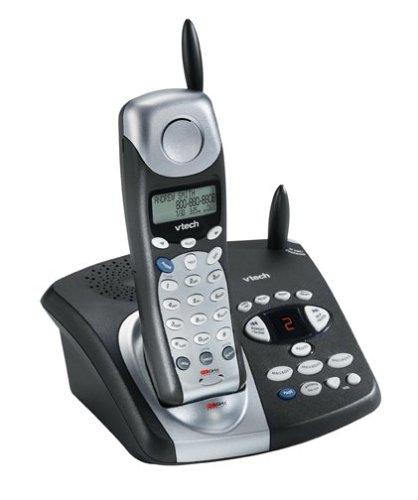
Image: The VTech t2451 cordless phone system, showing the black base unit with the silver and black handset docked in its charging cradle. The base unit features an integrated digital answering system with controls and a display.
Upute za rad
Upućivanje i primanje poziva
- Za upućivanje poziva: Pritisnite tipku RAZGOVOR button, wait for a dial tone, then dial the phone number.
- Za primanje poziva: Kada telefon zazvoni, pritisnite tipku RAZGOVOR button or any key on the keypad (Any Key Answer).
- Za završetak poziva: Pritisnite tipku KRAJ button or place the handset back in the base unit.
- Funkcija zadržavanja: Tijekom poziva pritisnite DRŽI gumb za stavljanje poziva na čekanje. Pritisnite RAZGOVOR ponovno za nastavak poziva.
Digitalni telefonski sustav
Your phone system includes a digital answering system with 3 mailboxes and 15 minutes of recording time.
- Reproduciranje poruka: Pritisnite tipku IGRATI gumb na baznoj jedinici za preslušavanje novih poruka.
- Snimanje odlazne poruke (OGM): Follow the voice prompts to record a personalized outgoing message.
- Mailbox Management: The system supports up to 3 distinct mailboxes. Refer to the detailed instructions in the full user guide for setting up and accessing individual mailboxes.
Caller ID and Phonebook
- ID pozivatelja: When subscribed to Caller ID service, the handset display will show the caller's name and number. Press the CID gumb za ponovnoview the 99-name/number Caller ID history.
- Imenik imenika: Store up to 50 names and numbers in the phonebook. Use the navigation buttons to scroll through entries and the IZBORNIK/ODABIR button to add or edit entries.
Ostale funkcije
- Page/Handset Locator: Pritisnite tipku STRANICA button on the base unit to locate a misplaced handset.
- Ringer Tones: Customize your phone's ringer by selecting from various available tones. Refer to the handset settings menu.
- Upotreba slušalica: Connect a 2.5 mm compatible headset to the headset jack on the side of the handset for hands-free communication.
Održavanje
Proper care ensures the longevity of your VTech t2451 phone system.
- Čišćenje: Očistite telefon i baznu jedinicu mekom,amp tkanina. Ne koristite jake kemikalije ili abrazivna sredstva za čišćenje.
- Njega baterije:
- Always return the handset to the base unit when not in use to ensure it remains charged.
- Ako se telefon neće koristiti dulje vrijeme, izvadite bateriju iz slušalice.
- Replace the battery when its performance significantly degrades. Use only the specified replacement battery pack.
- Uvjeti okoliša: Izbjegavajte izlaganje telefona ekstremnim temperaturama, izravnoj sunčevoj svjetlosti ili vlazi.
Rješavanje problema
If you experience issues with your VTech t2451, try these common troubleshooting steps.
| Problem | Otopina |
|---|---|
| Nema tona biranja. |
|
| Slab prijem ili statički šum. |
|
| Slušalica se ne puni. |
|
| Telefonska sekretarica ne snima poruke. |
|
Tehnički podaci
| Značajka | Detalj |
|---|---|
| Marka | VTECH |
| Broj modela | T2451 |
| Vrsta telefona | Bežični |
| Frekvencija | 2.4 GHz Analog |
| Vrsta sustava sekretarice | Digitalni |
| Kapacitet snimanja | 15 minuta |
| Mailboxes | 3 |
| Telefonski imenik | 50 names/numbers |
| Memorija ID-a pozivatelja | 99 names/numbers |
| Kompatibilnost slušalica | 2.5 mm utičnica |
| Izvor napajanja | Električni na kabel |
| Dimenzije proizvoda | 7.1 x 8.5 x 5.1 inča |
| Težina artikla | 2.19 funti |
| Proizvođač | Vtech |
Jamstvo i podrška
For warranty information, please refer to the warranty card included with your product packaging or visit the official VTech website. VTech provides customer support for product inquiries, technical assistance, and service. Contact information can typically be found on the VTech webweb-mjestu ili u originalnoj dokumentaciji proizvoda.
Proizvođač: VTECH