
1. Uvod
The Samson S-com 4 is a versatile single-rack space audio device designed for dynamics processing. It features four independent channels, each equipped with an Expander/Gate and a Compressor/Limiter. This unit is engineered to provide high-quality audio control for various applications, from studio recording to live sound reinforcement. The channels can operate independently or be linked in stereo pairs, offering flexibility for different audio setups.
Key features include multi-segment LED metering for input/output levels and gain reduction, continuously variable Threshold controls for both expander/gate and compressor/limiter sections, and an Enhancer switch to restore high frequencies that may be reduced during heavy compression. The S-com 4 also incorporates a Smart Knee Detector circuit, which automatically adjusts compression characteristics based on the input signal level.
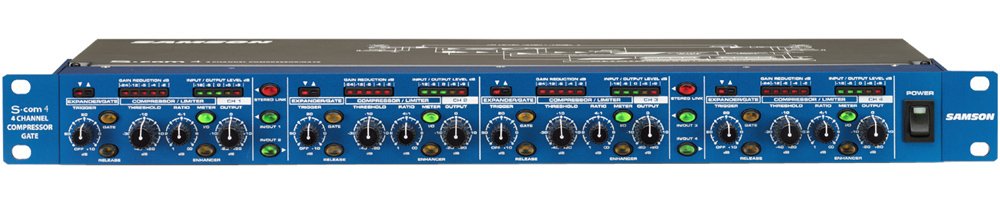
Slika: Prednja ploča view of the Samson S-com 4 Four Channel Compressor/Gate, showing controls and metering for all four channels.
2. Sigurnosne informacije
Please read and adhere to the following safety guidelines to ensure safe operation and prevent damage to the unit or injury to yourself.
- Izvor napajanja: Connect the unit only to the specified power supply (9V DC, 500mA). Ensure the power outlet matches the required voltage.
- Ventilacija: Do not block any ventilation openings. Ensure adequate airflow around the unit, especially if rack-mounted, to prevent overheating.
- Voda i vlaga: Do not expose this unit to rain, moisture, dripping, or splashing liquids. Never place objects filled with liquids on the unit.
- Izvori topline: Držite uređaj dalje od izvora topline kao što su radijatori, grijalice, peći ili drugi uređaji (uključujući amplifiers) koji proizvode toplinu.
- Čišćenje: Prije čišćenja isključite uređaj iz električne utičnice. Koristite samo suhu krpu.
- Servisiranje: Ne pokušavajte sami servisirati ovaj uređaj. Za sve servisne radove obratite se kvalificiranom servisnom osoblju. Servisiranje je potrebno kada je uređaj oštećen na bilo koji način, primjerice ako je oštećen kabel za napajanje ili utikač, ako je tekućina prolivena ili su u uređaj upali neki predmeti, ako je uređaj bio izložen kiši ili vlazi, ako ne radi normalno ili je pao.
3. Postavljanje
3.1 Raspakiranje i pregled
Carefully unpack your S-com 4 and inspect it for any signs of damage that may have occurred during shipping. If damage is present, contact your dealer immediately. Retain the packing materials for future use if you need to transport the unit.
3.2 Montaža u stalak
The S-com 4 is designed as a single-rack space unit. It can be mounted into any standard 19-inch equipment rack. Ensure there is sufficient ventilation around the unit, especially if other heat-generating equipment is mounted nearby.
3.3 Priključak za napajanje
Connect the supplied 9V DC, 500mA power adapter to the power input jack on the rear panel of the S-com 4. Plug the adapter into a suitable AC power outlet. Always ensure the unit is powered off before making or breaking power connections.
3.4 Audio veze
The S-com 4 provides balanced XLR and 1/4" TRS input and output connectors for each of its four channels. These connections allow for flexible integration into various audio systems.
- Ulazni priključci: Connect the audio source (e.g., mixer insert send, microphone preamplifier output) to the desired channel's input. Use balanced XLR or 1/4" TRS cables for optimal signal integrity.
- Izlazne veze: Connect the output of the S-com 4 channel to the next device in your signal chain (e.g., mixer insert return, power amplifier ulaz).
- Stereo povezivanje: Channels can be linked in stereo pairs (1/2 and 3/4). When linked, the controls of the odd-numbered channel (1 or 3) will control both channels in the pair, and the processing will be applied equally to maintain the stereo image.
4. Upute za rad
Each of the four channels on the S-com 4 features independent controls for its Expander/Gate and Compressor/Limiter sections.
4.1 Sekcija ekspandera/ulaza
- Prag: This control sets the level below which the gate will attenuate the signal. Adjust it to eliminate unwanted noise or bleed between signals. Signals above the threshold pass through unaffected.
- Release (Fast/Slow Switch): This switch determines how quickly the gate closes once the signal falls below the threshold. 'Fast' is suitable for percussive sounds, while 'Slow' can be used for smoother transitions or sustained instruments.
4.2 Sekcija kompresora/limitera
- Prag: This control sets the level above which compression begins. Signals exceeding this threshold will be compressed according to the Ratio setting.
- Omjer: This control determines the amount of compression applied. A ratio of 2:1 means that for every 2dB the input signal goes above the threshold, the output will only increase by 1dB. Higher ratios result in more aggressive compression.
- Izlazna razina: This control adjusts the overall output level of the channel after compression. Use it to compensate for any gain reduction caused by compression.
- Enhancer Switch: Engaging this switch restores high frequencies that can sometimes be diminished during heavy compression, helping to maintain clarity and presence in the audio signal.
- Smart Knee Detector: The S-com 4 features an automatic Smart Knee Detector circuit. This circuit intelligently switches between soft-knee and hard-knee compression characteristics based on the input signal level, providing smooth and musical dynamics processing without requiring manual adjustment.
4.3 Mjerenje
Each channel is equipped with multi-segment LED meters that display both input/output signal levels and gain reduction. Monitor these meters to observe the effect of your dynamics processing and ensure optimal signal levels.
5. Održavanje
The Samson S-com 4 is designed for reliable operation with minimal maintenance. Follow these guidelines to ensure its longevity:
- Čišćenje: Regularly wipe the unit with a soft, dry cloth to remove dust and grime. Do not use liquid cleaners or solvents, as they may damage the finish or internal components.
- Ventilacija: Ensure that the ventilation slots are clear of obstructions to prevent overheating.
- Skladištenje: Kada se uređaj ne koristi dulje vrijeme, pohranite ga na suho mjesto bez prašine.
6. Rješavanje problema
If you encounter issues with your S-com 4, refer to the following common problems and solutions:
- Nema zvuka:
- Check that the unit is powered on and the power adapter is securely connected.
- Verify all audio cables are correctly connected to the inputs and outputs.
- Ensure input and output levels on the S-com 4 and connected devices are appropriately set.
- Check the Expander/Gate Threshold; if set too high, it may be gating out the entire signal.
- Bypass the S-com 4 (if your system allows) to determine if the issue lies with the unit or other equipment.
- Izobličen zvuk:
- Reduce the input level to the S-com 4 to prevent clipping.
- Check the Compressor/Limiter Ratio; very high ratios can lead to noticeable distortion if not managed carefully.
- Ensure the output level is not too high, causing clipping in subsequent devices.
- Pretjerana buka:
- Adjust the Expander/Gate Threshold to effectively remove unwanted background noise.
- Verify proper gain staging throughout your audio chain.
- Provjerite jesu li svi kabeli u dobrom stanju i pravilno zaštićeni.
- Uređaj se osjeća vrućim:
- It is normal for electronic equipment to generate some heat during operation. Ensure adequate ventilation around the unit, especially if rack-mounted. If the unit becomes excessively hot or exhibits unusual behavior, discontinue use and contact support.
If these steps do not resolve your issue, please contact Samson customer support for further assistance.
7. Specifikacije
| Značajka | Specifikacija |
|---|---|
| Broj modela | SA-SCOM4 |
| Dimenzije proizvoda | 23.5 x 11 x 4.25 inča |
| Format signala | Analog |
| Voltage | 9 volti |
| Ampdoba | 500 Miliamps |
| Kanali | 4 (independent or stereo linkable) |
| Priključci | Balanced XLR & 1/4" Inputs/Outputs |
8. Jamstvo i podrška
Samson Technologies provides a limited warranty for its products. For specific warranty terms and conditions, please refer to the warranty card included with your product or visit the official Samson webstranicu. Sačuvajte dokaz o kupnji za slučaj reklamacije.
For technical support, service, or questions regarding your Samson S-com 4, please contact Samson customer support through their official website or the contact information provided in your product documentation. When contacting support, please have your model number (SA-SCOM4) and purchase date available.