
Uvod
The D-Link DSM-320 Wireless Media Player is designed to stream digital media files from your personal computer to your home entertainment system. This device supports 802.11g wireless standards, enabling transfer speeds up to 54 Mbps. It is compatible with various audio, video, and image formats, allowing you to enjoy your digital content on your television and stereo system. The DSM-320 integrates with your network to provide access to stored media and online content through a user-friendly interface and included remote control.
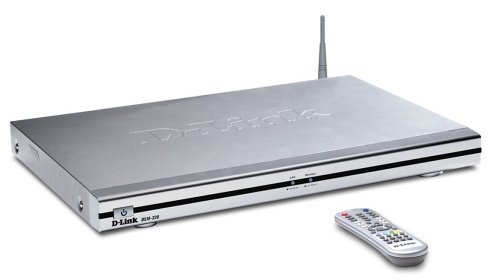
Image: D-Link DSM-320 Wireless Media Player. This image shows the front of the media player unit along with its remote control, illustrating its compact design.
Ključne značajke
- Supports 802.11g wireless standards for data transfer speeds up to 54 Mbps.
- Compatible with popular media formats including MP3, WAV, WMA (audio); MPEG-1, MPEG-2, MPEG-4, AVI, DivX4/5, QuickTime, Xvid (video); and JPEG, GIF, BMP, PNG, JPEG2000, TIFF (images).
- Enables access to digital media content stored on your PC, allowing browsing of music files, watching videos, and displaying photos on your television.
- Offers connectivity via 802.11g wireless or Ethernet.
- Compatible with Windows 98SE, Me, 2000, or XP operating systems.
- Adheres to Universal Plug and Play (UPnP) AV specification and Intel Networked Media Product Requirements (INMPR).
Sadržaj paketa
Provjerite sadrži li vaš paket sljedeće stavke:
- D-Link DSM-320 Wireless Media Player
- Daljinski upravljač
- Adapter napajanja
- Bežična antena
- Audio/Video Cables (e.g., Video-S cable, RCA stereo cables)
- Installation CD (containing media server software)
- Kratki vodič za instalaciju (nije uključen u ovaj digitalni priručnik)
Postavljanje
1. Hardverska veza
- Connect the Wireless Antenna: Attach the included wireless antenna to the designated port on the back of the DSM-320 unit.
- Spajanje na televiziju:
- For video, connect a Video-S cable (included) from the Video-S port on the back of the DSM-320 to the Video-S input on your television.
- For audio, connect red/white RCA component cables from the audio output ports on the back of the DSM-320 to an available audio input (e.g., AUX-V) on your A/V receiver or television.
- Mrežna veza:
- Bežični: Ensure the wireless antenna is connected. The device will connect wirelessly during software setup.
- Žičano (opcionalno): If using a wired connection, connect an Ethernet cable from the DSM-320's Ethernet port to your network router or switch.
- Uključivanje: Plug the power adapter into the DSM-320 and then into a power outlet. Turn on your television and select the correct input source for the DSM-320.
2. Software Installation (Media Server)
The DSM-320 requires media server software to be installed on your personal computer to access your digital files. This software allows you to designate folders containing your music, photos, and videos for streaming.
- Insert the provided Installation CD into your computer's CD/DVD drive.
- Follow the on-screen instructions to install the D-Link Media Server software.
- During or after installation, configure the software to select the specific folders on your hard drive that contain the media files you wish to stream. You can add or remove folders later as needed.
3. Network Configuration (On-Screen Wizard)
After powering on the DSM-320 and selecting the correct TV input, an on-screen setup wizard will appear.
- Use the included remote control to navigate the setup wizard.
- The device will automatically scan for available wireless networks (SSIDs). Select your home network from the list.
- If your network is secured, you will be prompted to enter your wireless security key (e.g., WEP key) using the on-screen keyboard and remote control.
- Once connected, the DSM-320 will attempt to locate media servers on your network (your computer with the installed software).
- Confirm the connection and proceed to the main menu.
Operacija
Navigacija sučeljem
The DSM-320 features a user-friendly TV interface. Use the remote control to navigate through the main menu options, which typically include categories such as Photos, Music, and Video.
- Use the arrow keys on the remote to move between menu items.
- Press the 'OK' or 'Enter' button to select an item or enter a sub-menu.
- Use the 'Back' or 'Return' button to go to the previous screen.
Reprodukcija medija
Once you have selected a media category (e.g., Music), you can browse the files shared from your media server. Select a file za početak reprodukcije.
- Glazba: Browse by artist, album, genre, or folder. Select a track to play. You can create playlists or play music while viewpostavljanje fotografija.
- Fotografije: Browse by folder. Select an image to view, or initiate a slideshow. Ensure your TV's aspect ratio is set appropriately (e.g., 4:3 for older photos) for optimal viewing.
- Video zapisi: Browse by folder. Select a video file to play. The DSM-320 supports various video formats.
Funkcije daljinskog upravljanja
The remote control provides full control over the DSM-320's functions. Ensure a direct line of sight to the media player for optimal responsiveness.
- Vlast: Uključuje ili isključuje jedinicu.
- Navigacija (tipke sa strelicama, OK): Za navigaciju i odabir u izborniku.
- Playback Controls (Play, Pause, Stop, FF, Rew, Skip): Za upravljanje reprodukcijom medija.
- Volumen: Podešava glasnoću audio izlaza.
- Izbornik/Početna: Vraća se na glavni izbornik.
Održavanje
To ensure the longevity and optimal performance of your D-Link DSM-320, follow these maintenance guidelines:
- Čišćenje: Za čišćenje vanjske strane uređaja koristite meku, suhu krpu. Izbjegavajte korištenje tekućih sredstava za čišćenje ili abrazivnih materijala.
- Ventilacija: Ensure the unit is placed in a well-ventilated area, away from direct sunlight or heat sources, to prevent overheating.
- Ažuriranja firmvera: Periodically check the D-Link support website for available firmware updates. Updating the firmware can improve performance and add new features.
- Daljinski upravljač: Po potrebi zamijenite baterije u daljinskom upravljaču.
Rješavanje problema
This section addresses common issues you might encounter with your DSM-320 Wireless Media Player.
No Power / No Display on TV
- Ensure the power adapter is securely connected to both the DSM-320 and a working power outlet.
- Verify that your television is turned on and set to the correct input source (e.g., Video-S, AV1) where the DSM-320 is connected.
Cannot Connect to Wireless Network
- Confirm the wireless antenna is securely attached to the DSM-320.
- Double-check that you have entered the correct wireless security key (WEP/WPA) during the setup wizard. Security keys are case-sensitive.
- Ensure your wireless router is powered on and broadcasting its SSID.
- Move the DSM-320 closer to your wireless router to improve signal strength.
- If possible, try a wired Ethernet connection to rule out wireless issues.
Cannot Find Media Files / Media Server
- Ensure the D-Link Media Server software is running on your computer.
- Verify that the folders containing your media files are correctly selected and shared within the media server software.
- Check your computer's firewall settings to ensure they are not blocking communication with the DSM-320.
- Confirm that your computer and the DSM-320 are on the same network.
Video Playback Issues (Freezing, Choppy, Not Continuous)
- Ensure your wireless network has sufficient bandwidth. Large video files may require a strong and stable connection. Consider a wired Ethernet connection for demanding video streams.
- Verify that the video file format is supported by the DSM-320 (MPEG-1, -2, -4, AVI, DivX4/5, QuickTime, Xvid).
- Neki video files, particularly VOB files from DVDs, may not play continuously. You might need to manually select the next segment.
- Fast forward functionality may not work as expected with all video formats or media server configurations.
Daljinski upravljač ne reagira
- Ensure there is a clear, direct line of sight between the remote control and the front of the DSM-320 unit.
- Zamijenite baterije u daljinskom upravljaču.
Incorrect Photo Aspect Ratio
- Adjust your television's aspect ratio setting (e.g., to 4:3) before viewing photos to prevent stretching or cropping, especially for older images.
Tehnički podaci
| Marka | D-Link |
| Naziv modela | DSM-320 |
| Tehnologija povezivanja | Wireless (802.11g), Ethernet |
| Podržani audio formati | MP3, WAV, WMA |
| Podržani video formati | MPEG-1, MPEG-2, MPEG-4, AVI, DivX4/5, QuickTime, Xvid |
| Podržani formati slika | JPEG, GIF, BMP, PNG, JPEG2000, TIFF |
| Rezolucija video izlaza | Do 720p |
| Kompatibilni uređaji | televizija |
| Vrsta kontrolera | Daljinski upravljač |
| Težina artikla | 1.2 kilogram |
| Boja | Srebro |
| Proizvođač | D-Link Systems, Inc. |
| UPC | 790069267222, 790069267192 |
Jamstvo i podrška
Jamstvo: The D-Link DSM-320 Wireless Media Player comes with a 3-year limited warranty from the date of purchase. Please retain your proof of purchase for warranty claims. For detailed warranty terms and conditions, refer to the documentation included with your product or visit the official D-Link webmjesto.
Tehnička podrška: For technical assistance, product registration, or to download the latest drivers and firmware, please visit the official D-Link support webweb-mjesto. Resursi za podršku obično uključuju često postavljana pitanja, vodiče za rješavanje problema i kontaktne podatke za korisničku podršku.
Bilješka: Product specifications and warranty information are subject to change without notice. Always refer to the latest information provided by the manufacturer.