
1. Uvod
This manual provides comprehensive instructions for the safe and efficient use of your Logisys PS480D 480W ATX Power Supply. Please read this manual thoroughly before installation and operation to ensure proper functionality and to prevent damage to the unit or other components.

Figure 1: Logisys PS480D 480W ATX Power Supply, front view with cables bundled.
2. Sigurnosne informacije
UPOZORENJE: Power supplies contain high voltage komponente. Ne otvarajte napajanje casing. Unutra nema dijelova koje korisnik može sam servisirati.
- Prije instalacije ili održavanja provjerite je li napajanje isključeno iz AC utičnice.
- Always ground yourself to prevent electrostatic discharge (ESD) when handling internal computer components.
- Ne koristite napajanje u mokrom iliamp uvjetima.
- Osigurajte odgovarajuću ventilaciju oko izvora napajanja kako biste spriječili pregrijavanje.
- Use only the provided power cables and connectors.
3. Značajke proizvoda
The Logisys PS480D is a 480W ATX power supply designed for personal computers. Key features include:
- Visoka učinkovitost
- Low Noise & Ripple
- Preko Voltage Zaštita
- Zaštita od kratkog spoja
- Built-in EMI Filter
- Insulation Resistance 100MΩ min.
- Complies with FCC part 15J class B 115VAC operation and CISPR 22 230 VAC operation.
- Meets UL 1950, CSA 22.2 LEVEL 3 Requirement.
- 100% Burn-in test / Vibration test / Hi-pot test / Leakage current test.
- MTBF above 100,000 hours at 25 °C.

Figure 2: Rear panel of the power supply with fan, AC inlet, and power switch.
4. Postavljanje i instalacija
Follow these steps to install the Logisys PS480D power supply into your computer system.
- priprema: Ensure your computer is completely powered off and unplugged from the wall outlet. Open your computer case according to its manufacturer's instructions.
- Uklonite stari izvor napajanja (ako je primjenjivo): Disconnect all cables from the old power supply to the motherboard, drives, and other components. Unscrew and remove the old power supply from the case.
- Instalirajte novo napajanje: Carefully place the Logisys PS480D into the power supply bay of your computer case. Secure it with screws.
- Spojite glavno napajanje: Connect the 20+4 pin ATX mainboard connector to your motherboard. If your motherboard uses a 20-pin connector, detach the 4-pin section. If it uses a 24-pin connector, connect both sections.
- Spojite napajanje procesora: Connect the 4-pin +12V power connector to the corresponding port on your motherboard.
- Connect Peripheral Power:
- Use the 4-pin standard drive connectors for HDDs and CD/DVD-ROM drives.
- Use the 4-pin 3.5" FDD or ZIP connectors for floppy disk drives or similar devices.
- Use the Serial ATA (SATA) connectors for SATA hard drives and SSDs.
- Uprava za kabele: Uredno provedite kablove kako biste osigurali pravilan protok zraka unutar kućišta.
- Zatvori slučaj: Once all connections are secure, close your computer case.
- Spojite AC napajanje: Plug the AC power cord into the power supply's AC inlet and then into a wall outlet.
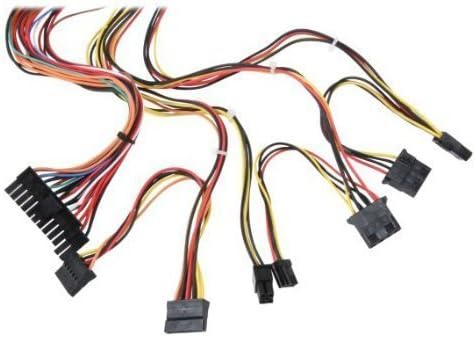
Slika 3: Gotovoview of power supply connectors.

Figure 4: Power supply dimensions and included AC power cord.
5. Upute za rad
After successful installation, you can power on your computer.
- Ensure the power switch on the rear of the power supply (Figure 2) is in the "ON" (I) position.
- Pritisnite gumb za napajanje na kućištu računala.
- The power supply will provide stable power to your system components.
- To power off, shut down your operating system normally. For complete power disconnection, switch the power supply to the "OFF" (O) position and unplug the AC cord.
6. Održavanje
Redovito održavanje pomaže u osiguravanju dugotrajnosti i optimalnih performansi vašeg napajanja.
- Čišćenje: Periodically clean dust from the power supply's fan and vents using compressed air. Ensure the power supply is unplugged before cleaning.
- Protok zraka: Ensure that the computer case has adequate airflow and that the power supply's fan is not obstructed.
- Integritet kabela: Periodically check all power cables for secure connections and signs of wear or damage.
7. Rješavanje problema
Ako naiđete na probleme s napajanjem, pogledajte sljedeće uobičajene korake za rješavanje problema:
- Bez napajanja:
- Provjerite je li kabel za napajanje izmjeničnom strujom sigurno priključen i u napajanje i u zidnu utičnicu.
- Ensure the power switch on the rear of the power supply is in the "ON" (I) position.
- Provjerite je li zidna utičnica funkcionalna tako da u nju priključite drugi uređaj.
- Check all internal power connections (20/24-pin ATX, 4-pin +12V, peripheral connectors) are firmly seated.
- Nestabilnost sustava/Nasumična isključenja:
- This could indicate an overloaded or failing power supply. Ensure your system's power requirements do not exceed the PS480D's 480W capacity.
- Check for proper ventilation and ensure the power supply fan is spinning. Overheating can cause instability.
- Neobična buka:
- A loud fan noise might indicate dust buildup or a failing fan bearing. Clean the fan as described in the Maintenance section.
If problems persist after attempting these steps, contact Logisys customer support or a qualified technician.
8. Specifikacije
| Značajka | Specifikacija |
|---|---|
| Marka | Logisys |
| Broj modela | PS480D |
| Izlaz Wattage | 480 vata |
| Form Factor | ATX |
| Dimenzije (DxŠxV) | 6" D x 5.5" Š x 3.25" V (15.24 x 13.97 x 8.25 cm) |
| Težina artikla | 2.06 funti (0.93 kg) |
| Konektor matične ploče | 1x 20+4 Pin ATX |
| Priključak za napajanje procesora | 1x 4 Pin +12V |
| Standard Drive Connectors | 4x 4 Pin (Molex) |
| FDD/ZIP Connectors | 1x 4 Pin 3.5" |
| Serijski ATA konektori | 1x SATA |
| Metoda hlađenja | Zrak |
| Zaštite | Preko Voltage Zaštita, Zaštita od kratkog spoja |
| Certifikati | FCC part 15J class B, CISPR 22, UL 1950, CSA 22.2 LEVEL 3 |
9. Jamstvo i podrška
For warranty information, technical support, or service inquiries, please refer to the official Logisys webweb-mjesto ili se obratite njihovoj službi za korisnike. Sačuvajte račun kao dokaz o kupnji.