
1. Uvod
Hvala na kupnjiasing the GPX CDP6806DT Personal CD Player. This manual provides important safety instructions, operational guidelines, and maintenance procedures to ensure optimal performance and longevity of your device. Please read this manual thoroughly before using the product and retain it for future reference.
2. Sigurnosne informacije
Važne sigurnosne upute
- Nemojte izlagati jedinicu vodi ili vlazi.
- Izbjegavajte postavljanje uređaja u blizinu izvora topline poput radijatora, grijalica, peći ili drugih uređaja (uključujući amplifiers) koji proizvode toplinu.
- Ne pokušavajte rastavljati ili modificirati uređaj. Za sve servisne radove obratite se kvalificiranom servisnom osoblju.
- Use only the specified batteries (2 x AA batteries). Ensure correct polarity when inserting batteries.
- Izvadite baterije ako uređaj nećete koristiti dulje vrijeme.
- Izbjegavajte slušanje na visokim razinama glasnoće dulje vrijeme kako biste spriječili oštećenje sluha.
- Čistite jedinicu samo suhom krpom.
3. Sadržaj paketa
Carefully unpack your GPX CDP6806DT Personal CD Player and ensure all items are present:
- GPX CDP6806DT Personal CD Player
- Korisnički priručnik (ovaj dokument)
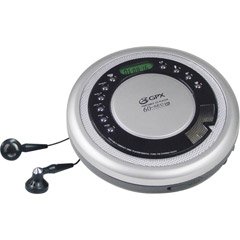
Figure 1: GPX CDP6806DT Personal CD Player. This image illustrates the compact design and general appearance of the device.
4. Kontrole i značajke
Familiarize yourself with the controls and features of your GPX CDP6806DT for optimal use.
- LCD zaslon: 6-digit display for track number, time, and FM frequency.
- REPRODUCIRAJ/PAUZIRAJ (►/−): Press to start or pause CD playback.
- STOP (■): Press to stop CD playback.
- SKIP/SEARCH (◀◀/▶▶): Press to skip tracks. Hold to search within a track.
- GLASNOĆA (+/-): Podešava razinu audio izlaza.
- MODE/PROG: Selects playback mode (Repeat, Random) or programs CD tracks.
- FM TUNER (ON/OFF/BAND): Switches to FM radio mode, turns FM on/off, or changes FM band.
- PRESET (+/-): Navigates saved FM radio presets.
- Odjeljak za CD-ove: Area for inserting audio CDs.
- Odjeljak za baterije: Located on the bottom, holds 2 AA batteries.
- Priključak za slušalice (3.5 mm): Connects headphones for private listening.
Figure 2: GPX CDP6806DT Controls Layout. This image provides a visual reference for the location of various buttons and ports on the device.
5. Postavljanje
5.1 Ugradnja baterije
The GPX CDP6806DT requires two (2) AA batteries (not included) for portable operation.
- Pronađite odjeljak za baterije na dnu uređaja.
- Otvorite poklopac pretinca za baterije.
- Umetnite dvije AA baterije, pazeći na ispravan polaritet (+ i -) kako je naznačeno unutar odjeljka.
- Čvrsto zatvorite poklopac odjeljka za baterije.
5.2 Spajanje slušalica
For private listening, connect your 3.5mm stereo headphones (not included) to the headphone jack located on the side of the unit.
6. Upute za rad
6.1 Reprodukcija CD-a
The unit supports CD and CD-R/RW disc formats.
- Open the CD compartment lid by gently pressing the OPEN button (if present, or lifting the lid).
- Postavite CD s naljepnicom okrenutom prema gore na središnju osovinu.
- Čvrsto zatvorite poklopac pretinca za CD dok ne klikne.
- Pritisnite tipku REPRODUCIRAJ/PAUZIRAJ (►/−) button to begin playback. The track number and elapsed time will appear on the LCD display.
- Za pauziranje reprodukcije pritisnite REPRODUCIRAJ/PAUZIRAJ (►/−). Pritisnite ponovno za nastavak.
- Za zaustavljanje reprodukcije pritisnite STOP (■) dugme.
- Za prelazak na sljedeću pjesmu pritisnite SKIP/SEARCH (▶▶).
- To go back to the beginning of the current track, press SKIP/SEARCH (◀◀) once. Press twice to go to the previous track.
- To search rapidly forward or backward within a track, hold down SKIP/SEARCH (▶▶) or (◀◀) odnosno.
- Podesite glasnoću pomoću GLASNOĆA (+/-) kontrole.
6.2 Rad FM radija
The unit features a digital FM tuner with station presets.
- Gurnite FM TJUNER switch to the ON position or press the BAND gumb za ulazak u FM mod.
- Pritisnite tipku SKIP/SEARCH (▶▶) or (◀◀) tipke za ručno podešavanje željene frekvencije.
- To auto-scan and save stations, hold down the REPRODUCIRAJ/PAUZIRAJ (►/−) button (or refer to specific instructions for auto-scan if available on the device).
- To recall saved presets, use the PRESET (+/-) gumbi.
6.3 CD Programming (24-Track)
Možete programirati do 24 pjesama za reprodukciju određenim redoslijedom.
- Dok je CD zaustavljen, pritisnite MODE/PROG gumb. Na zaslonu će bljeskati "PROG".
- Koristite SKIP/SEARCH (▶▶) or (◀◀) buttons to select the first track you wish to program.
- Pritisnite MODE/PROG again to confirm the selection. The display will show the program number and the next available program slot.
- Repeat steps 2 and 3 to add up to 24 tracks to your program.
- After programming all desired tracks, press REPRODUCIRAJ/PAUZIRAJ (►/−) za početak programirane reprodukcije.
- To clear the program, press the STOP (■) gumb dvaput.
6.4 Anti-Skip Protection (ASP)
The GPX CDP6806DT features a 60-second Anti-Skip Protection system. This system buffers audio data to minimize interruptions caused by minor shocks or vibrations during CD playback. The ASP activates automatically when a CD is playing.
7. Održavanje
7.1 Čišćenje jedinice
- Obrišite vanjski dio uređaja mekom, suhom krpom.
- Ne koristite abrazivna sredstva za čišćenje, voskove ili otapala.
- If the CD lens needs cleaning, use a specialized CD lens cleaner disc or a soft, lint-free cloth designed for optical lenses.
7.2 Njega baterija
- Izvadite baterije ako se uređaj ne koristi dulje vrijeme kako biste spriječili curenje.
- Nemojte miješati stare i nove baterije ili različite vrste baterija.
- Iskorištene baterije odložite odgovorno u skladu s lokalnim propisima.
8. Rješavanje problema
If you experience issues with your GPX CDP6806DT, please consult the following table for common problems and solutions.
| Problem | Mogući uzrok/rješenje |
|---|---|
| Jedinica se ne uključuje. | Check if batteries are inserted correctly with proper polarity. Ensure batteries are fresh and not depleted. |
| Nema zvuka iz slušalica. | Ensure headphones are fully plugged into the headphone jack. Increase the volume level. Test with another pair of headphones. |
| CD preskače ili je reprodukcija prekinuta. | Ensure the CD is clean and free of scratches or smudges. Clean the CD with a soft, lint-free cloth. Ensure the unit is on a stable surface or held steadily during use. |
| CD se ne reproducira. | Ensure the CD is inserted correctly with the label side up. Close the CD compartment lid completely. Check if the CD is a supported format (CD, CD-R/RW). |
| Prijem FM radija je slab. | Extend the headphone cable as it acts as the antenna. Try moving to a different location. |
9. Specifikacije
- Marka: GPX
- Model: CDP6806DT
- Podržani formati diskova: CD, CD-R / RW
- Zaštita od preskakanja: 60 sekundi
- Prikaz: LCD sa 6 znamenki
- Radio: Digital FM Tuner with Presets
- CD Programming: 24-staza
- Izvor napajanja: 2 x AA baterije (nisu uključene)
- Povezivost: 3.5mm Headphone Jack (Auxiliary)
10. Jamstvo i podrška
For detailed warranty information, please refer to the warranty card included with your original product packaging. For technical support, service inquiries, or to purchase replacement parts, please visit the official GPX webweb-mjesto ili se obratite njihovoj službi za korisnike koristeći kontaktne podatke navedene u dokumentaciji proizvoda.
Zadržite svoj dokaz o kupnji za jamstvene zahtjeve.