
1. Uvod
This manual provides instructions for the safe and effective use of your Canon PowerShot A640 digital camera. The PowerShot A640 is a 10-megapixel camera featuring a 4x optical zoom lens and a 2.5-inch vari-angle LCD screen, designed for versatile photography.

Slika 1: Prednji desni view of the Canon PowerShot A640 digital camera.
2. Što je u kutiji
Verify that all the following items are included with your Canon PowerShot A640:
- PowerShot A640 Camera Body
- AA-size Alkaline Batteries (x4)
- MultiMediaCard (32MB)
- Remen za zglob (WS-200)
- Digital Camera Solution CD-ROM
- Kabel USB sučelja (IFC-400PCU)
- AV kabel (AVC-DC300)
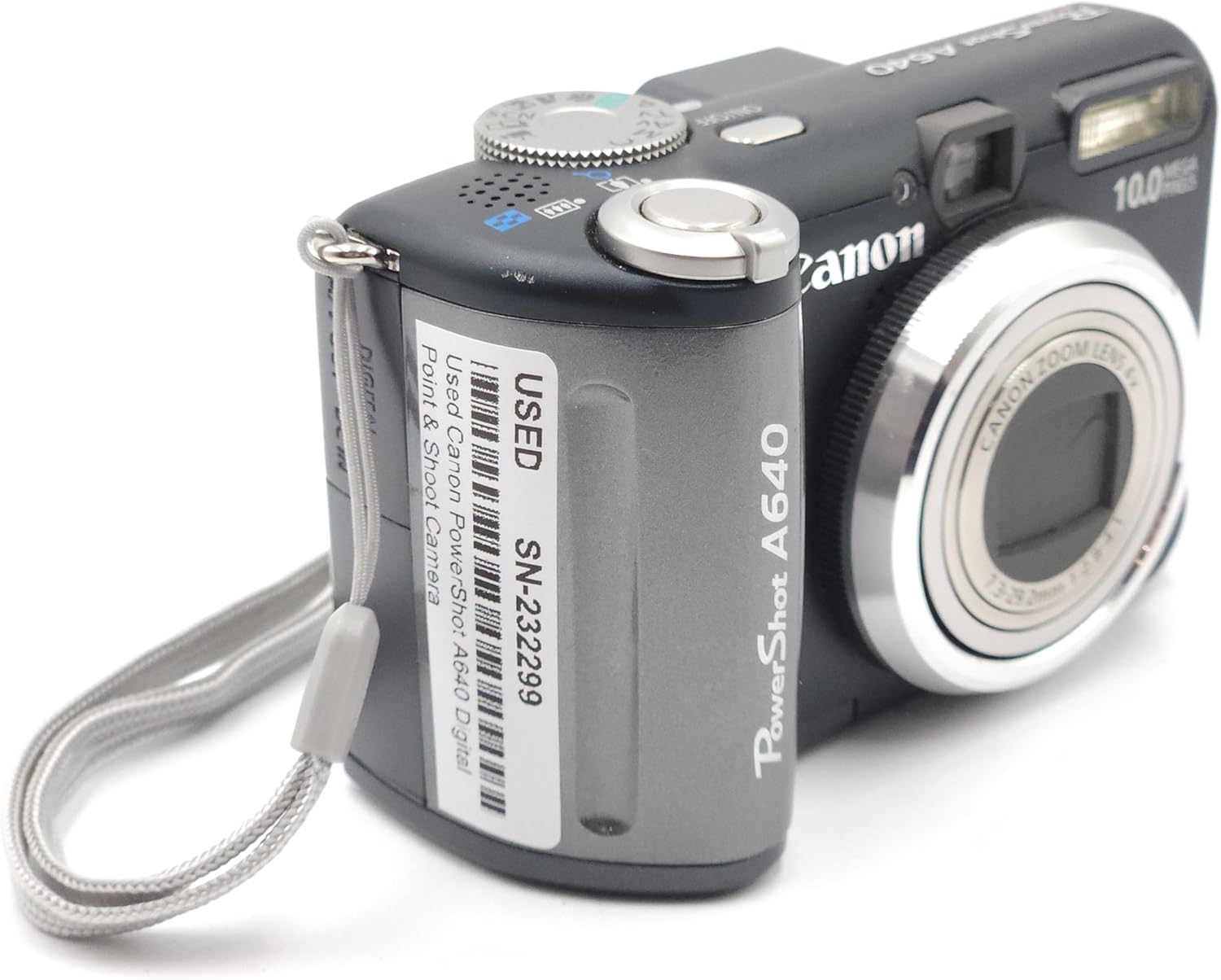
Image 2: Canon PowerShot A640 camera shown with accompanying user manuals.
3. Postavljanje
3.1. Instaliranje baterija
- Otvorite poklopac odjeljka za baterije koji se nalazi sa strane fotoaparata.
- Insert four AA-size alkaline batteries, ensuring correct polarity (+/-) as indicated inside the compartment.
- Čvrsto zatvorite poklopac odjeljka za baterije.
3.2. Umetanje memorijske kartice
- Otvorite poklopac utora za memorijsku karticu.
- Insert the MultiMediaCard (or an SD card) into the slot until it clicks into place. Ensure the card is facing the correct direction.
- Zatvorite poklopac utora za memorijsku karticu.
3.3. Početne postavke
Prilikom prvog uključivanja, fotoaparat vas može zatražiti da postavite datum, vrijeme i jezik. Slijedite upute na zaslonu za konfiguriranje ovih osnovnih postavki.
4. Upravljanje kamerom
4.1. Uključivanje/isključivanje
Pritisnite tipku UKLJUČENO/ISKLJUČENO gumb koji se nalazi na vrhu kamere za uključivanje ili isključivanje.

Image 3: Top-front view of the Canon PowerShot A640, highlighting the power button and mode dial.
4.2. Načini snimanja
Okrenite kotačić za odabir načina rada na vrhu fotoaparata kako biste odabrali željeni način snimanja:
- Program (P): Fotoaparat automatski postavlja otvor blende i brzinu zatvarača.
- Prioritet zatvarača (TV): Vi postavljate brzinu zatvarača, fotoaparat postavlja otvor blende.
- Prioritet otvora blende (Av): Vi postavljate otvor blende, fotoaparat postavlja brzinu zatvarača.
- Priručnik (M): Podešavate i otvor blende i brzinu zatvarača.
- Načini scene: Pre-set modes for specific situations (e.g., Portrait, Landscape, Night Scene).
4.3. Snimanje fotografija
- Select a shooting mode.
- Frame your shot using the 2.5-inch vari-angle LCD screen or the optical viewtražilo.
- Pritisnite okidač do pola za fokusiranje. Fotoaparat će potvrditi fokus.
- Pritisnite okidač do kraja kako biste snimili sliku.
4.4. Funkcija zumiranja
Use the zoom lever around the shutter button to adjust the focal length. The camera features a 4x optical zoom. For additional magnification without image quality loss at smaller resolutions, utilize the Safety Zoom feature. The Digital Teleconverter provides a constant digital zoom (1.4x/2.3x).
4.5. Fokusiranje
The camera uses a 9-point AiAF (Artificial Intelligence Autofocus) system to automatically select focus points. For manual control, use FlexiZone AF/AE to select a specific focus point within the frame.
4.6. ISO osjetljivost
Adjust the ISO setting to control the camera's sensitivity to light. Options include Auto, 80, 100, 200, 400, and 800. Higher ISO values allow for shooting in lower light conditions but may introduce more image noise.
4.7. LCD Screen and Display
The 2.5-inch vari-angle LCD screen can be rotated for flexible viewing angles. During shooting, you can enable a Grid Line display for composition assistance or a 3:2 ratio overlay to visualize standard print sizes.
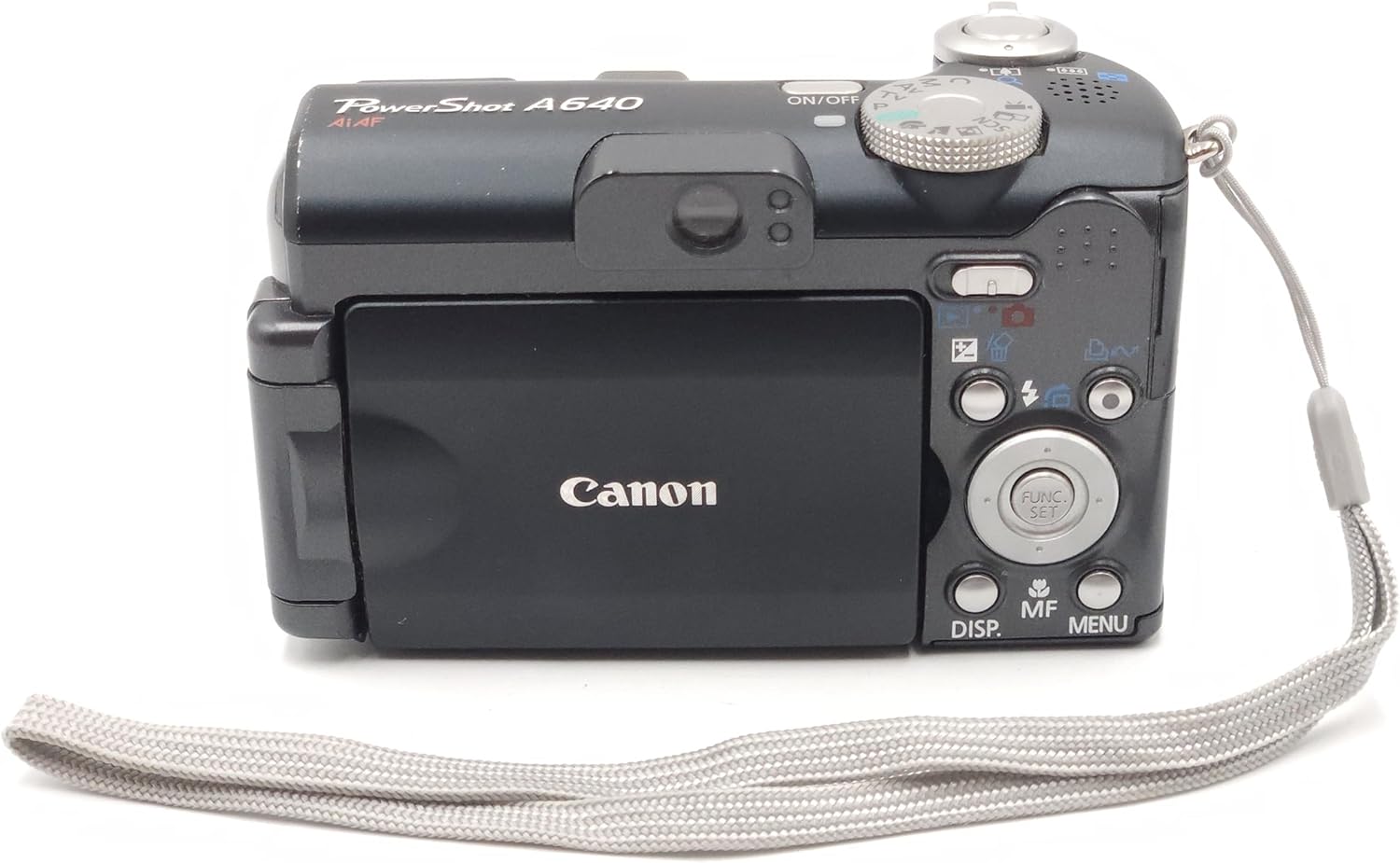
Slika 4: straga view of the Canon PowerShot A640, showing the vari-angle LCD and navigation controls.
4.8. Korištenje bljeskalice
The camera has a built-in flash. You can select various flash modes (e.g., Auto, Fill-in, Red-eye Reduction). Second Curtain Sync is available for creative flash exposures, such as capturing light trails.
4.9. Video snimanje
The PowerShot A640 can record VGA (640 x 480) quality movies at 30 frames per second (fps) with sound. Video recording will automatically stop when the file size reaches 1GB, which is approximately 9 minutes at 640x480/30fps. For longer recordings, consider lower resolutions or frame rates.
4.10. Reprodukcija i ponovnoview
Pritisnite tipku Reprodukcija gumb za ponovnoview captured images and videos. During playback, an overexposure warning feature can highlight areas that are too bright.
4.11. Moje boje
Apply artistic photo effects in-camera using the My Colors feature, either during or after shooting.
4.12. Printing and Downloading
Koristite Ispis/Dijeljenje button for direct printing to compatible Canon printers or for easy downloading of images to a computer via the USB interface cable.
5. Održavanje
- Čišćenje tijela fotoaparata: Za brisanje kućišta fotoaparata koristite meku, suhu krpu. Za tvrdokornu prljavštinu lagano jeampen krpu s vodom.
- Čišćenje leće: Use a lens brush or a soft, lint-free cloth specifically designed for camera lenses. Avoid touching the lens surface with your fingers.
- Njega baterije: Remove batteries when the camera will not be used for an extended period. Store batteries in a cool, dry place.
- Skladištenje: Fotoaparat čuvajte na suhom, dobro prozračenom mjestu, dalje od izravne sunčeve svjetlosti i ekstremnih temperatura.
6. Rješavanje problema
- Kamera se ne uključuje: Ensure batteries are correctly inserted and fully charged. Try new batteries.
- Slike su mutne: Check focus settings. Ensure sufficient lighting. Use a higher ISO or flash if necessary. Hold the camera steady or use a tripod.
- Greška memorijske kartice: Reinsert the memory card. Ensure the card is not locked. Format the card (this will erase all data).
- Snimanje videa neočekivano se zaustavlja: Video recording is limited to 1GB per file. This is a design specification, not a malfunction.
- Cannot transfer large video fileputem USB-a: Ako video files exceed 1GB, they may not transfer correctly via the camera's USB connection. Remove the SD card and use an external card reader for transfer.
- High-pitched squeal in video audio: This may indicate an internal issue. If persistent, contact Canon support.
- Difficulty with close-up focus: The camera's autofocus may struggle at very close distances. Try moving the subject slightly further away and using the optical zoom. Manual focus is digital and may not provide the desired precision for extreme close-ups.
- Settings reset after power-off: The camera's power save feature may reset certain settings. For persistent settings, use the Custom mode if available, or re-apply settings after powering on.
7. Specifikacije
| Značajka | Specifikacija |
|---|---|
| Marka | Kanon |
| Naziv modela | Canon PowerShot A640 |
| Učinkovito još uvijek razrješenje | 10 megapiksela |
| Optički zum | 4x |
| Veličina zaslona | 2.5 inča (LCD s promjenjivim kutom) |
| Stabilizacija slike | Optički |
| ISO raspon | Auto, 80, 100, 200, 400, 800 |
| Min. brzina zatvarača | 15 sekundi |
| Maksimalna brzina zatvarača | 1/2500 sekundi |
| Rezolucija video snimanja | SD VGA 480p (640 x 480) |
| Format za snimanje videa | MPEG-4 |
| File Format | JPEG, RAW |
| Izvor napajanja | 4 baterije veličine AA |
| Dimenzije predmeta (D x Š x V) | 4.29 x 1.93 x 2.6 inča |
| Težina artikla | 1.9 unci |
8. Jamstvo i podrška
For warranty information and technical support, please refer to the documentation included with your product or visit the official Canon support webstranicu. Sačuvajte dokaz o kupnji za slučaj reklamacije.