
1. Uvod
The Sigma SD14 is a 14-megapixel Digital Single-Lens Reflex (DSLR) camera designed for advanced photographers. It features the Foveon X3 direct-image sensor, which captures full RGB color information at each pixel layer, aiming for high-definition images with rich gradation. This manual provides essential information for setting up, operating, and maintaining your SD14 camera.
Key features include a 2.5-inch LCD monitor, a durable shutter mechanism rated for over 100,000 cycles, a 5-point autofocus system, and continuous shooting capabilities. The camera supports both RAW and JPEG image recording formats and includes Sigma Photo Pro 3.0 software for RAW image processing.

Slika 1.1: Prednja strana view of the Sigma SD14 Digital SLR Camera, showing the lens mount and body design.
2. Što je u kutiji
Verify that all the following items are included in your Sigma SD14 package:
- Sigma SD14 Digital SLR Camera Body
- Lithium-ion Power Battery BP-21
- Battery Charger BC-21
- USB kabel
- Video kabel
- Traka za vrat
- Eye Cap
- Body Cap
- Kapa okulara
- SIGMA Photo Pro 3.0 CD-ROM
- SD14 Instruction Manual (this document)
3. Postavljanje
3.1. Punjenje i ugradnja baterije
- Insert the Lithium-ion Battery BP-21 into the Battery Charger BC-21.
- Spojite punjač u utičnicu. Indikator punjenja će svijetliti.
- Charging typically takes approximately 120 minutes for a full charge.
- Nakon potpunog punjenja izvadite bateriju iz punjača.
- Open the battery compartment cover on the camera body.
- Umetnite napunjenu bateriju u odjeljak, pazeći na pravilnu orijentaciju.
- Čvrsto zatvorite poklopac odjeljka za baterije.
A fully charged BP-21 battery can capture approximately 500 images.
3.2. Umetanje memorijske kartice
The SD14 uses CompactFlash (CF) Type I/II cards. Ensure the card is formatted in the camera before first use.
- Otvorite poklopac utora za CF karticu sa strane fotoaparata.
- Umetnite CF karticu s ispravnom orijentacijom dok ne klikne na mjesto.
- Close the CF card slot cover securely.
3.3. Pričvršćivanje objektiva
The Sigma SD14 uses the Sigma SA Bayonet mount. Only Sigma SA mount lenses are directly compatible.
- Skinite poklopac tijela s fotoaparata i stražnji poklopac objektiva s objektiva.
- Align the red index mark on the lens with the red index mark on the camera body's lens mount.
- Attach the lens by rotating it clockwise until it locks into place with a click.
- Za uklanjanje objektiva pritisnite gumb za otpuštanje objektiva na tijelu fotoaparata i okrenite objektiv u smjeru suprotnom od kazaljke na satu.
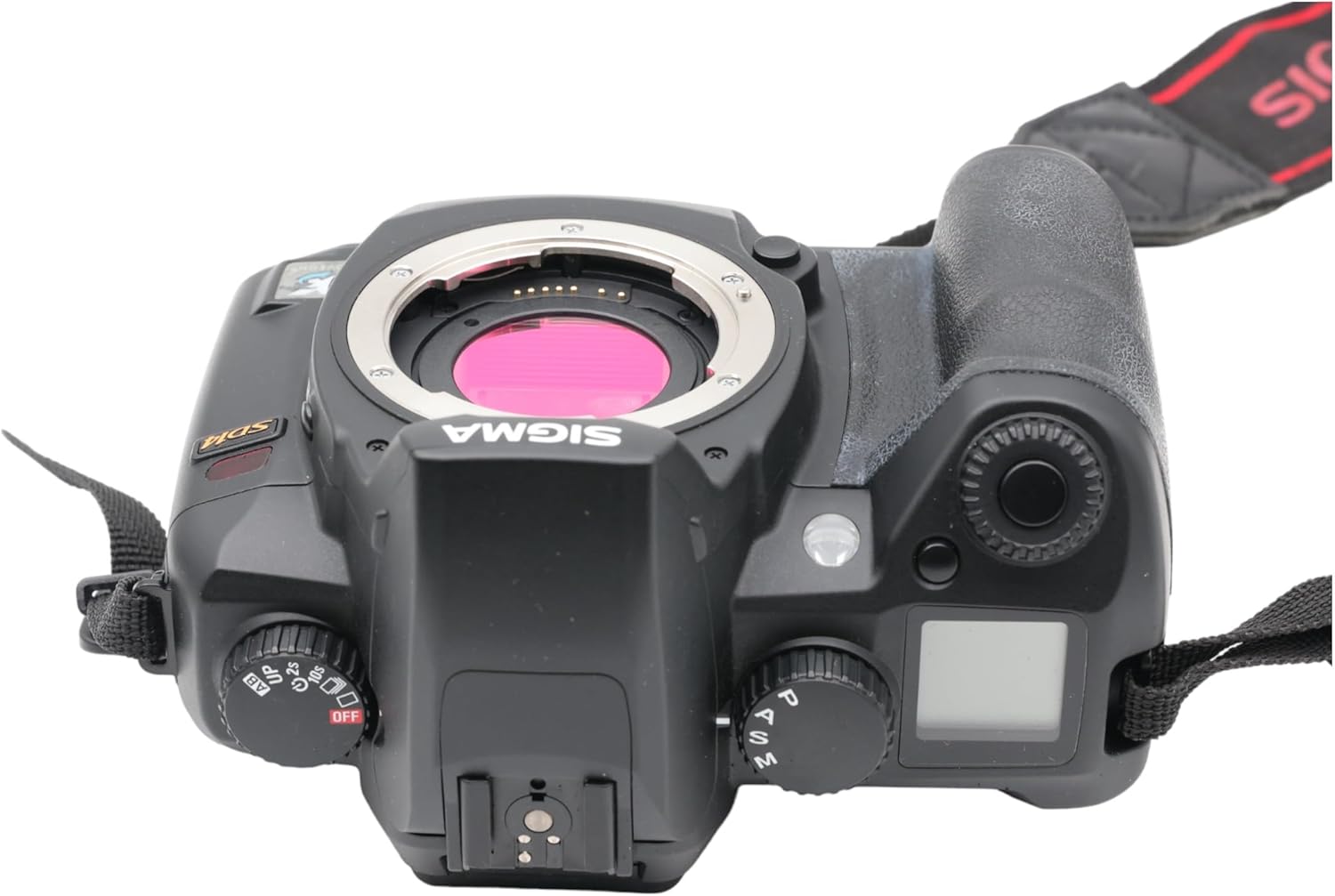
Slika 3.1: Vrh view of the Sigma SD14, illustrating the lens mount and mode dials.
4. Operacija
4.1. Uključivanje/isključivanje
Rotate the power switch to the ON position to turn on the camera. Rotate it to OFF to power down.
4.2. Osnovne kontrole i prikaz
The SD14 features a 2.5-inch LCD monitor for reviewing images and navigating menus, and a pentaprism viewfinder for composing shots. The top LCD panel displays key settings such as resolution, metering mode, battery status, and remaining shots.

Slika 4.1: Stražnji dio view of the Sigma SD14, showing the LCD monitor, viewtražilo i kontrolne tipke.
Key buttons include MENU, ISO, WB (White Balance), and a 4-way controller with an OK button for navigation. The INFO button displays shutter speed, aperture, and other settings on the LCD.
4.3. Fokusiranje
The camera utilizes a 5-point autofocus (AF) system (center, left, right, up, and down). The center AF point features a cross-type sensor for enhanced precision. AF point selection can be automatic or manual.
4.4. Metering Modes
The SD14 offers three metering modes:
- 8-segment Evaluative Metering: Analyzes the entire scene for balanced exposure.
- Center Area Metering: Prioritizes the central area of the frame.
- Center Weighted Average Metering: Measures the entire frame but gives more weight to the central area.
Exposure compensation and auto bracketing functions are available for fine-tuning exposure.
4.5. Snimanje slike
The camera supports both RAW (X3F) and JPEG formats. JPEG recording offers four sizes (Super High, High, Medium, Low) and three quality settings (Fine, Normal, Basic).
- Super High (4608 x 3072 pixels): Suitable for A3 or larger prints.
- High (2640 x 1760 pixels): Suitable for A4 prints.
- Medium (1776 x 1184 pixels): Suitable for regular size prints.
- Low (1296 x 864 pixels): Prikladno za web pages and email.
4.6. Kontinuirano snimanje
The SD14 can shoot continuously at 3 frames per second. The number of frames captured in a burst depends on the resolution setting:
- Visoko: 6 okvira
- Srednje: 12 okvira
- Nisko: 24 okvira
These figures apply to both RAW and JPEG modes.
4.7. Ugrađena bljeskalica
The built-in flash has a guide number of 11 (ISO 100) and covers a 17mm lens angle (28mm equivalent on 35mm format). It supports S-TTL automatic flash metering and can synchronize with shutter speeds up to 1/180 second.
4.8. Mirror Lock-up
Activate the mirror lock-up mechanism to prevent camera shake caused by mirror movement during exposure. This is particularly useful for macro photography, long telephoto shots, or scientific applications. For best results, use with a remote controller or cable release (sold separately).
4.9. Sigma Photo Pro 3.0 Software
The included Sigma Photo Pro 3.0 software is a RAW image developer. It allows for quick conversion of RAW data and offers three adjustment modes: X3F Mode (original settings), Auto Adjustment Mode, and Custom Mode for manual adjustments (exposure, contrast, shadow, highlight, saturation, sharpness, fill-light). The software supports 8-bit TIFF, 16-bit TIFF, and JPEG file formats, and sRGB, Apple RGB, Adobe RGB, and ColorMatch RGB color spaces.
5. Održavanje
5.1. Image Sensor Dust Protector
The SD14 features a dust protector positioned in front of the image sensor. This design prevents dust from adhering directly to the sensor, minimizing its impact on image quality. If dust accumulates on the protector, it will be out of focus and generally not visible in images.
5.2. Čišćenje tijela fotoaparata i objektiva
- Za brisanje kućišta fotoaparata koristite meku krpu koja ne ostavlja dlačice. Za tvrdokornu prljavštinu, laganoamphr krpu s vodom ili blagom otopinom za čišćenje.
- For lenses, use a lens brush to remove loose dust, then a lens cleaning solution and a microfiber cloth. Avoid touching the lens surface with your fingers.
- Nikada ne koristite organska otapala poput razrjeđivača boje ili benzena za čišćenje fotoaparata ili objektiva.
5.3. Briga o bateriji
- Čuvajte baterije na hladnom i suhom mjestu kada ih ne koristite.
- Izbjegavajte često potpuno pražnjenje baterije kako biste produžili njezin vijek trajanja.
- Ako se fotoaparat neće koristiti dulje vrijeme, izvadite bateriju.
6. Rješavanje problema
| Problem | Mogući uzrok | Otopina |
|---|---|---|
| Kamera se ne uključuje. | Baterija je prazna ili nepravilno umetnuta. | Potpuno napunite bateriju i provjerite je li ispravno umetnuta. |
| Slike su mutne. | Nepravilan fokus, podrhtavanje fotoaparata ili prljav objektiv. | Osigurajte pravilno fokusiranje. Koristite veću brzinu zatvarača ili stativ. Očistite objektiv. |
| Images are too dark or too bright. | Incorrect exposure settings or metering mode. | Adjust exposure compensation. Select an appropriate metering mode for the scene. |
| Color blotching in underexposed areas. | Characteristic of the Foveon sensor when severely underexposed. | Aim to slightly overexpose images (e.g., +.7 EV) to retain shadow detail and avoid this effect. |
| Cannot record images. | Memorijska kartica je puna, zaključana ili nije pravilno umetnuta. | Insert an empty card, unlock the card, or reinsert it correctly. Format the card if necessary (this will erase all data). |
| Kamera se zamrzava ili prestaje reagirati. | Privremeni softverski kvar. | Izvadite i ponovno umetnite bateriju za resetiranje fotoaparata. |
For more detailed troubleshooting or error codes, please refer to the comprehensive instruction manual included with your camera or visit the Sigma support webmjesto.
7. Specifikacije
| Značajka | Detalj |
|---|---|
| Naziv modela | SD14 |
| Rezolucija foto senzora | 14 MP (Foveon X3 direct-image sensor) |
| Veličina foto senzora | APS-C |
| Kompatibilni nosači | Sigma SA Bayonet |
| Podržano File Formati | JPEG, RAW (X3F), TIFF |
| Veličina zaslona | 2.5 Inches (150,000 pixels) |
| Viewnalazač | Optical Pentaprism (98% coverage, 0.9x magnification) |
| Točke autofokusa | 5-point (Phase Detection) |
| Brzina kontinuiranog snimanja | 3 sličica u sekundi |
| Maksimalna brzina zatvarača | 1/4000 sekundi |
| Minimalna brzina zatvarača | 30 sekundi |
| Prošireni raspon ISO vrijednosti | 100 - 1600 (prikaz, stručni). |
| Načini mjerenja | 8-segment Evaluative, Center Area, Center Weighted Average |
| Built-in Flash Guide Number | 11 (ISO 100) |
| Mediji za pohranu | Compact Flash (CF) Type I/II |
| Izvor napajanja | Lithium-ion Battery BP-21 |
| Povezivost | USB, Video Out |
| Težina artikla | 1.65 funte (približno 748 g) |
| Broj modela | C23900 |
| UPC | 085126924416 |
7.1. Dodatna oprema (prodaje se zasebno)
- Sigma Lenses (over 40 compatible models)
- Flashguns: EF-500 DG SUPER, EF-500 DG ST, EM-140 DG
- Power Grip PG-21
- Cable Release CR-21
- Remote Controller RS-31
- AC Adapter SAC-21
8. Jamstvo i podrška
8.1. Informacije o jamstvu
For detailed warranty terms and conditions, please refer to the warranty card included with your product or visit the official Sigma webstranica. Jamstvo obično pokriva nedostatke u materijalima i izradi za određeno razdoblje od datuma kupnje.
8.2. Korisnička podrška
If you encounter any issues or have questions not covered in this manual, please contact Sigma customer support. Contact information can usually be found on the official Sigma webweb-mjestu ili u jamstvenoj dokumentaciji.
Mrežni resursi: Visit the official Sigma website for product registration, firmware updates, FAQs, and additional support resources.