
Uvod
Thank you for choosing the Technoline WT 182 Radio-Controlled Alarm Clock. This manual provides detailed instructions for the setup, operation, and maintenance of your new device. Please read this manual thoroughly before use and keep it for future reference. The WT 182 is designed to provide accurate time, indoor temperature, date, and day of the week, along with a reliable alarm function.
Sigurnosne informacije
- Ne izlažite uređaj ekstremnim temperaturama, izravnoj sunčevoj svjetlosti ili visokoj vlažnosti.
- Izbjegavajte ispuštanje ili izlaganje uređaja jakim udarcima.
- Nemojte miješati stare i nove baterije ili različite vrste baterija.
- Odmah uklonite istrošene baterije kako biste spriječili curenje.
- Baterije odložite u skladu s lokalnim propisima.
- Ne pokušavajte sami rastavljati ili popravljati uređaj. Sve servisne radove prepustite kvalificiranom osoblju.
Sadržaj paketa
Molimo provjerite jesu li svi artikli prisutni i u dobrom stanju:
- Technoline WT 182 Radio-Controlled Alarm Clock Unit
- Korisnički priručnik (ovaj dokument)
Bilješka: 2 x AA Mignon LR06 batteries are required and are not included in the package.
Proizvod gotovview
The Technoline WT 182 features a clear digital display showing time, date, day of the week, and indoor temperature. It includes an alarm with a snooze function and a backlight for easy viewrade u uvjetima slabog osvjetljenja.

Slika 1: Prednja strana view of the Technoline WT 182 alarm clock, displaying the current time, date, day of the week, and indoor temperature. The 'RADIO CONTROLLED' text is visible at the top, and 'techno line' branding is at the bottom.

Slika 2: Gornja strana view of the alarm clock, highlighting the 'SNOOZE LIGHT' button located on the top edge of the device. This button is used to activate the backlight and the snooze function.

Slika 3: Stražnji dio view of the alarm clock, showing the battery compartment cover and the product information label. The label includes manufacturer details and the model number WT 182.
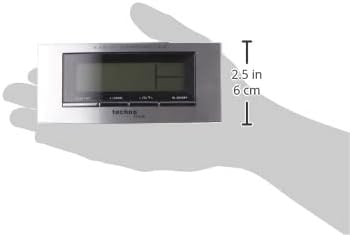
Figure 4: The alarm clock held in a hand, providing a visual reference for its compact dimensions (approximately 14 cm wide and 6 cm high).
Postavljanje
1. Ugradnja baterije
- Otvorite poklopac odjeljka za baterije na stražnjoj strani uređaja (pogledajte sliku 3).
- Insert 2 new AA Mignon LR06 batteries, observing the correct polarity (+ and - markings).
- Čvrsto zatvorite poklopac odjeljka za baterije.
2. Initial Setup and Radio Control
Upon battery insertion, the clock will automatically start searching for the DCF-77 radio signal. This process can take several minutes. During this time, the radio control icon will flash on the display. Once the signal is received, the exact time will be set automatically, and the icon will become steady.
- Za bolji prijem signala, sat postavite blizu prozora.
- Izbjegavajte postavljanje u blizinu elektroničkih uređaja koji mogu uzrokovati smetnje.
3. Manual Time and Date Setting (if radio signal is unavailable)
If the radio signal cannot be received, or if you wish to set the time manually:
- Press and hold the 'MODE' button (usually located on the front or side) for a few seconds until the time display starts flashing.
- Use the '+' or '-' buttons (often labeled 'ADJ' or similar) to adjust the hour, then press 'MODE' to confirm and move to minutes.
- Ponovite za minute, godinu, mjesec i dan.
- Press 'MODE' again to exit the setting mode.
4. Postavka vremenske zone
The clock allows for a time zone adjustment of ± 12 hours. This is useful if you are in a region where the DCF-77 signal is received but the local time zone differs from Central European Time.
- In normal time display mode, press and hold the 'ADJ' or similar button until the time zone offset starts flashing.
- Use the '+' or '-' buttons to adjust the offset.
- Press the 'ADJ' button again to confirm and exit.
Operativni
1. Time Display (12/24 Hour Format)
The clock can display time in either 12-hour (with AM/PM indicator) or 24-hour format.
- To switch between formats, briefly press the 'ADJ' or a dedicated 12/24H button.
2. Prikaz datuma i dana u tjednu
The display shows the current date (Month-Day) and the day of the week. The day of the week can be displayed in 5 different languages.
- To change the day of the week language, press the 'MODE' button repeatedly until the language setting flashes, then use '+' or '-' to select.
3. Prikaz unutarnje temperature
The clock continuously measures and displays the indoor temperature.
- The temperature is typically displayed in Celsius. There might be an option to switch to Fahrenheit by pressing a specific button (e.g., 'C/F' or 'ADJ' in temperature mode).
4. Postavljanje alarma
The WT 182 features a single alarm.
- Press the 'ALARM' button once to display the current alarm time.
- Pritisnite i držite tipku 'ALARM' dok vrijeme alarma ne počne treptati.
- Use the '+' or '-' buttons to set the desired alarm hour, then press 'ALARM' to confirm and move to minutes.
- Use the '+' or '-' buttons to set the desired alarm minutes, then press 'ALARM' to confirm and exit.
- To activate/deactivate the alarm, briefly press the 'ALARM ON/OFF' or 'ALARM' button. An alarm icon will appear/disappear on the display.
5. Funkcija odgode alarma i pozadinsko osvjetljenje
Kada se oglasi alarm:
- Press the 'SNOOZE/LIGHT' button (located on top, refer to Figure 2) to activate the snooze function. The alarm will pause for approximately 5 minutes and then sound again.
- To stop the alarm completely, press any other button (e.g., 'ALARM' or 'MODE'). The alarm will reset for the next day.
- To activate the backlight at any time, briefly press the 'SNOOZE/LIGHT' button. The backlight will illuminate for a few seconds.
Održavanje
Čišćenje
Obrišite uređaj mekom, damp krpu. Nemojte koristiti abrazivna sredstva za čišćenje ili otapala jer mogu oštetiti zaslon iliasing.
Zamjena baterije
When the display becomes dim or the clock functions erratically, it is time to replace the batteries. Follow the battery installation steps in the 'Setup' section.
Rješavanje problema
| Problem | Mogući uzrok | Otopina |
|---|---|---|
| Nema zaslona ili je zaslon taman | Baterije su ispražnjene ili nepravilno umetnute. | Zamijenite baterije novima, pazeći na točan polaritet. |
| Prikazano netočno vrijeme | Poor radio signal reception or manual setting error. | Relocate the clock to an area with better signal. Perform manual time setting if radio signal is consistently poor. Check time zone setting. |
| Alarm se ne oglašava | Alarm nije aktiviran ili je nepravilno postavljen. | Provjerite je li ikona alarma vidljiva na zaslonu. Ponovno provjerite postavke vremena alarma. |
| Pozadinsko osvjetljenje ne radi | Batteries are low or exhausted. | Zamijenite baterije. |
Tehnički podaci
- Broj modela:
- WT 182 (SMADH)
- Dimenzije (D x Š x V):
- 140 x 35 x 63 mm (5.5 x 1.4 x 2.5 inča)
- Težina:
- 150 grama
- Izvor napajanja:
- 2 x AA Mignon LR06 batteries (not included)
- Vrsta zaslona:
- Digitalni
- Format vremena:
- 12/24 sata po izboru
- Prikaz temperature:
- Sobna temperatura
- Posebne karakteristike:
- Radio-controlled time (DCF-77), Date and Day of Week display (5 languages), Alarm with Snooze, Backlight
- Materijal:
- Plastični
- Boja:
- Srebrna/Crna
- Način rada:
- Digitalni
- Vrsta kretanja:
- Kvarcni
- Unutarnja/vanjska upotreba:
- Zatvoreni
- Proizvođač:
- PK
- Zemlja podrijetla:
- Kina
Jamstvo i podrška
Technoline products are manufactured to high-quality standards. For information regarding warranty terms and conditions, please refer to the warranty card included with your purchase or visit the official Technoline website. For technical support or service inquiries, please contact your retailer or the manufacturer directly.
You can find more information and contact details on the official Technoline webstranica: www.technoline.de