
Uvod
Hvala na kupnjiasing the Optimus F-1760 16-inch Wave Oscillating Stand Fan. This manual provides important information regarding the safe operation, assembly, maintenance, and troubleshooting of your fan. Please read these instructions thoroughly before use and retain them for future reference.

Image: The Optimus F-1760 stand fan positioned in a bedroom, showcasing its design and size relative to furniture.
Važne sigurnosne upute
Pri korištenju električnih uređaja uvijek se trebaju pridržavati osnovnih mjera opreza kako bi se smanjio rizik od požara, strujnog udara i ozljeda osoba, uključujući sljedeće:
- Prije uporabe ovog ventilatora pročitajte sve upute.
- Koristite ovaj ventilator samo kako je opisano u ovom priručniku. Druge upotrebe koje nisu preporučene mogu uzrokovati požar, strujni udar ili ozljede osoba.
- To protect against electrical shock, do not place fan in window, immerse unit, plug or cord in water or spray with liquids.
- Neophodan je strogi nadzor kada bilo koji uređaj koriste djeca ili u blizini djece.
- Unplug fan from outlet when not in use, when moving fan from one location to another, and before cleaning.
- Do not operate fan in the presence of explosive and/or flammable fumes.
- Ne stavljajte ventilator ili bilo koje dijelove blizu otvorenog plamena, uređaja za kuhanje ili drugih uređaja za grijanje.
- Do not operate fan with a damaged cord or plug, or after the fan malfunctions or has been dropped or damaged in any manner.
- Izbjegavajte kontakt s pokretnim dijelovima.
- Za odspajanje uhvatite utikač i povucite ga iz zidne utičnice. Nikada ne povlačite kabel.
- Uvijek koristite na suhoj, ravnoj površini.
- Nemojte vješati ili montirati ventilator na zid ili strop.
- Nemojte raditi bez pravilno postavljenih rešetki ventilatora.
- This product employs overload protection (fuse). A blown fuse indicates an overload or short-circuit situation. If the fuse blows, unplug the product from the outlet. Replace the fuse as per the servicing instructions (follow product marking for proper fuse rating) and check the product. If the replacement fuse blows, a short-circuit may be present and the product should be discarded or returned to an authorized service facility for examination and/or repair.
Postavljanje i montaža
The Optimus F-1760 fan requires minimal assembly. Ensure all components are present and undamaged before proceeding.
- Osnovni sklop: Attach the weighted base legs to the main pole. Ensure they are securely fastened to provide stability. The base is designed to be sturdy, with weights at the ends of the feet.
- Podešavanje visine: The fan's height can be adjusted. Loosen the height adjustment knob on the pole, extend or retract the pole to the desired height, and then securely tighten the knob.
- Dodatak za glavu ventilatora: Ensure the fan head is securely attached to the top of the pole. The motor housing and fan blade are plastic, while the grill is metal.
- Plasman: Place the fan on a dry, level surface. Ensure there is adequate space around the fan for proper air circulation and oscillation.
Upute za rad
The Optimus F-1760 fan offers multiple control options and features for customized comfort.
Upravljačka ploča
The fan features a 4-position push-button switch on the pole for basic operation.
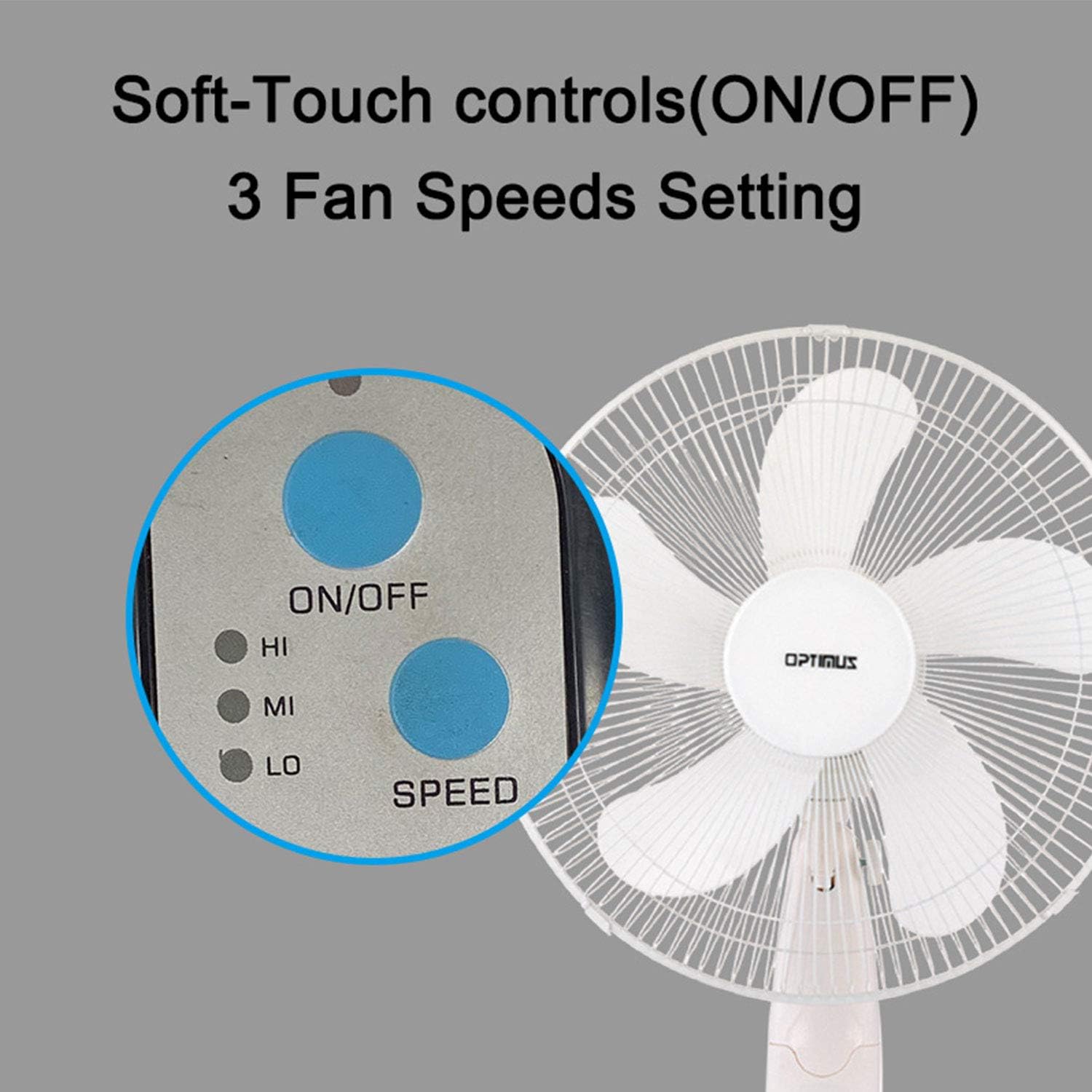
Image: The fan's soft-touch control panel, showing buttons for ON/OFF and SPEED, with indicators for High (HI), Medium (MI), and Low (LO) fan speeds.
- ON/OFF: Pritisnite za uključivanje ili isključivanje ventilatora.
- Postavke brzine: Select from Low, Medium, or High speeds. The 3-speed, energy-saving, whisper-quiet operation motor provides efficient airflow.
Daljinski upravljač
The fan comes with a remote control for convenient operation from a distance. (Batteries not included).

Image: The remote control for the fan, featuring buttons for Mode, Time, Speed, and ON/OFF functions.
- ON/OFF: Uključuje ili isključuje ventilator.
- UBRZATI: Cycles through the three fan speeds (Low, Medium, High).
- NAČIN: Selects between different wind modes.
- VRIJEME: Activates and sets the shut-off timer.
Načini vjetra
The fan offers three distinct wind modes to suit your preference:

Image: The fan's control panel highlighting the MODE button and indicators for Normal, Natural, and Sleep wind modes.
- Normalni način rada: The fan blows at a constant speed based on your selected setting.
- Prirodni način rada: The fan speed fluctuates to mimic a natural breeze.
- Stanje mirovanja: The fan operates at a lower, quieter speed, ideal for sleeping, with gentle speed variations.
Oscilacija
The F-1760 features unique wave oscillation for comprehensive air distribution.

Image: A diagram illustrating the fan's capability for both vertical (up/down) and horizontal (left/right) wave oscillation, providing wider air coverage.
- Up/Down & Left/Right Wave Oscillating: Activates a unique oscillation pattern that moves the fan head both horizontally and vertically, distributing air throughout the room.
- To stop oscillation, press the oscillation button again.
Funkcija mjerača vremena
Postavite ventilator da se automatski isključi nakon određenog vremena.

Image: The fan's control panel showing the TIME button and indicators for 1 hour (1H), 2 hours (2H), and 4 hours (4H) timer settings. The fan can be programmed for up to 7 hours.
- The timer can be set for 1, 2, 4, or up to 7 hours. Press the TIME button repeatedly to cycle through the desired duration.
Održavanje i čišćenje
Redovito čišćenje pomaže u održavanju performansi ventilatora i produžuje njegov vijek trajanja.
- Prije čišćenja: Prije čišćenja uvijek isključite ventilator iz električne utičnice.
- Vanjsko čišćenje: Koristite meku, damp krpom za brisanje vanjskih površina ventilatora. Nemojte koristiti abrazivna sredstva za čišćenje ili otapala.
- Čišćenje roštilja: The metal grill can be cleaned with a soft brush or vacuum cleaner to remove dust. For thorough cleaning, the grill may need to be carefully removed.
- Čišćenje oštrice: If necessary, the fan blades can be cleaned. Ensure the fan is completely off and unplugged. The care instructions specify "Hand Wash" for components.
- Skladištenje: Kada se ventilator ne koristi dulje vrijeme, čuvajte ga na hladnom i suhom mjestu, po mogućnosti u originalnom pakiranju.
Rješavanje problema
| Problem | Mogući uzrok | Otopina |
|---|---|---|
| Ventilator se ne uključuje. | No power supply. Blown fuse. | Ensure the fan is plugged into a working outlet. Check the fuse in the plug and replace if necessary (refer to safety instructions for fuse replacement). |
| Fan operates but air movement is weak. | Low speed setting. Dust accumulation on blades/grill. | Increase the fan speed. Clean the fan blades and grills as per maintenance instructions. |
| Daljinski upravljač ne radi. | Dead batteries. Obstruction between remote and fan. | Replace batteries in the remote control. Ensure a clear line of sight between the remote and the fan's receiver. |
| Fan changes speed automatically or unexpectedly. | Interference from other remote controls (e.g., TV remote). | This fan may respond to frequencies from other remote controls. Try operating the fan manually or repositioning the fan/other devices to minimize interference. |
| Fan makes clicking noises during oscillation. | Normal operation of oscillation gears. | A slight clicking noise from the oscillation gears can occur during normal operation. If the noise is excessive or new, ensure the fan head is securely attached. |
| Fan feels unstable. | Base not properly assembled or tightened. Uneven surface. | Ensure all base components are securely fastened and the fan is placed on a firm, level surface. |
Tehnički podaci
- Naziv modela: F-1760
- Marka: Optimus
- Promjer ventilatora: 16 inča
- Dizajn električnog ventilatora: kat Fan
- Izvor napajanja: Električni na kabel
- Wattage: 60 vata
- Voltage: 6 volti
- Broj noževa: 3
- Postavke brzine: 3 okretaja u minuti (nisko, srednje, visoko)
- Metoda kontrole: Daljinski, tipkalo
- Posebne karakteristike: Up/Down & Left/Right Wave Oscillating, Adjustable Height, Timer Function (up to 7 hours), Wind Modes (Normal, Natural, Sleep)
- Unutarnja/vanjska upotreba: Zatvoreni
- Težina artikla: 9.9 funti
- Uključene komponente: Proizvod, Priručnik
Informacije o jamstvu
This Optimus F-1760 fan comes with a 1-godišnje ograničeno jamstvo from the date of purchase. This warranty covers defects in materials and workmanship under normal use. It does not cover damage resulting from misuse, accident, alteration, or unauthorized repair. Please retain your proof of purchase for warranty claims.
Korisnička podrška
For technical assistance, warranty claims, or questions regarding your Optimus F-1760 fan, please contact Optimus customer service. Refer to the product packaging or the official Optimus webstranicu za najnovije kontaktne podatke.