
Uvod
The ADATA S102PRO is a high-performance USB 3.0 flash drive designed for fast and reliable data storage and transfer. Its durable design and high-speed interface make it ideal for everyday use, allowing you to carry important files, documents, photos, and videos with ease.
Postavljanje
Follow these steps to begin using your ADATA S102PRO USB Flash Drive:
- Identificirajte USB priključak: Locate an available USB port on your computer. For optimal performance, use a USB 3.0 port (often colored blue internally). The ADATA S102PRO is backward compatible with USB 2.0 ports, but data transfer speeds will be limited to USB 2.0 rates.
- Uklonite čep: Carefully remove the protective cap from the USB flash drive to expose the USB connector.
- Umetnite pogon: Insert the USB connector firmly into the USB port on your computer. Ensure it is inserted correctly; do not force it.
- Prepoznavanje sustava: Your operating system (Windows, macOS, Linux) should automatically detect and install the necessary drivers. A notification may appear indicating that the device is ready for use. The drive will typically appear as a removable disk or volume in your file istraživač.
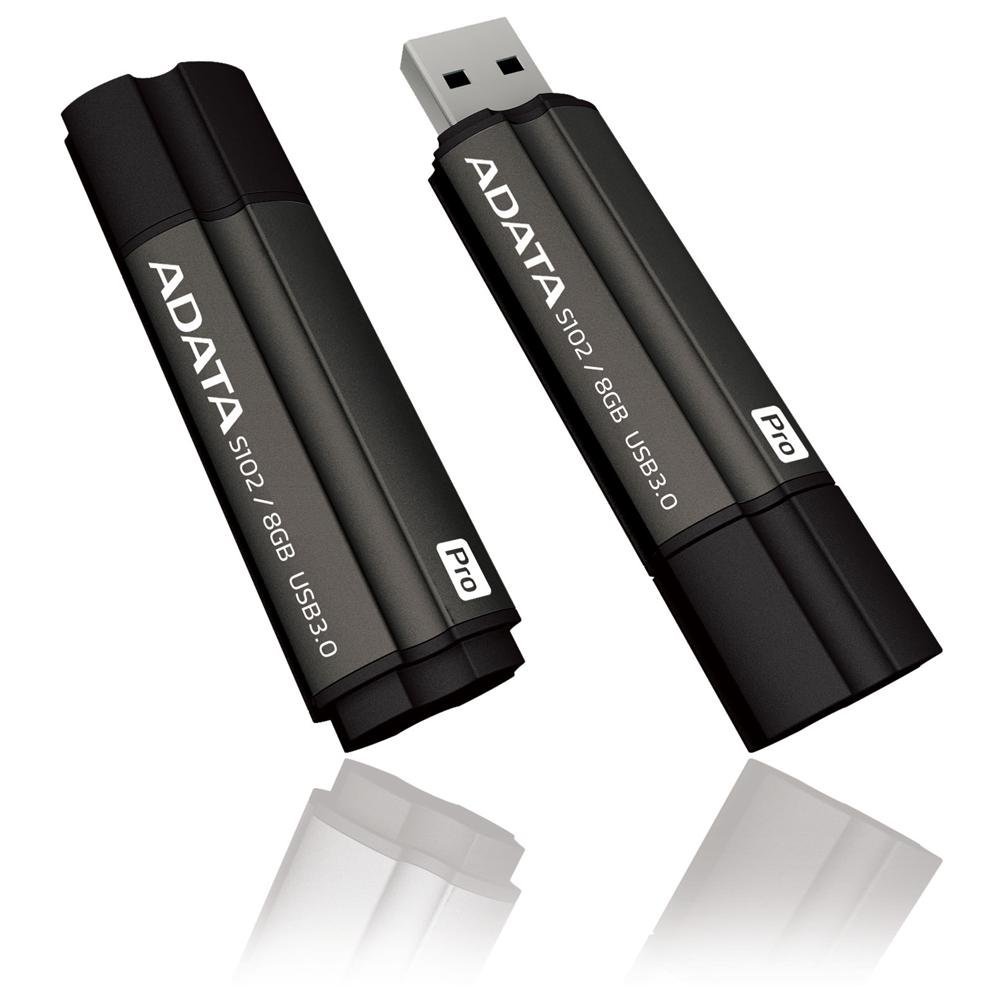
Image: The ADATA S102PRO USB Flash Drive shown with its protective cap on and with the cap removed, revealing the USB 3.0 connector. This illustrates the physical appearance and how to prepare the drive for insertion.
Operativni
Once the ADATA S102PRO is recognized by your computer, you can begin transferring files:
- Pristup pogonu:
- Windows: Open "This PC" or "My Computer" and locate the drive listed under "Devices and drives" (e.g., "Removable Disk" or a drive letter like E:).
- MacOS: The drive icon will appear on your desktop or in the Finder sidebar under "Locations."
- Prijenos Files:
- Kopirati files do the flash drive, drag and drop them from your computer's folders into the flash drive's window.
- Kopirati files iz the flash drive, drag and drop them from the flash drive's window to a folder on your computer.
- You can also use the standard copy (Ctrl+C / Command+C) and paste (Ctrl+V / Command+V) functions.
- Sigurno uklanjanje pogona: Ključno je sigurno izbaciti USB pogon prije fizičkog uklanjanja kako biste spriječili oštećenje podataka.
- Windows: Click the "Safely Remove Hardware and Eject Media" icon in the system tray (bottom-right corner), then select your flash drive and click "Eject." Wait for the "Safe to Remove Hardware" message.
- MacOS: Drag the drive icon from the desktop to the Trash, or click the Eject button next to the drive name in the Finder sidebar. Wait for the icon to disappear before removing the drive.
Održavanje
Proper care will help ensure the longevity and reliability of your ADATA S102PRO USB Flash Drive:
- Zaštitite konektor: Always keep the protective cap on the USB connector when the drive is not in use to prevent dust, dirt, and physical damage.
- Izbjegavajte ekstremne uvjete: Do not expose the drive to extreme temperatures, direct sunlight, high humidity, or strong magnetic fields.
- Rukovati pažljivo: Izbjegavajte ispuštanje pogona ili izlaganje jakim udarcima.
- Do Not Remove During Transfer: Never unplug the drive while data is being read from or written to it. Always follow the safe removal procedure.
- Redovite sigurnosne kopije: While flash drives are reliable, it is always recommended to back up critical data to another storage device or cloud service.
Rješavanje problema
If you encounter issues with your ADATA S102PRO, try the following solutions:
- Pogon nije prepoznat:
- Provjerite je li pogon potpuno umetnut u USB priključak.
- Pokušajte s drugim USB priključkom na računalu.
- Testirajte pogon na drugom računalu kako biste isključili problem specifičan za računalo.
- Check your computer's Device Manager (Windows) or System Information (macOS) to see if the drive is listed, even if it doesn't appear in File Istraživač/Tražilica.
- Male brzine prijenosa:
- Ensure you are connected to a USB 3.0 port for optimal performance. USB 2.0 ports will limit speeds.
- Prijenos mnogih malih filemože biti sporije od prijenosa nekoliko velikih files.
- Close other applications that might be using system resources or performing disk operations.
- Ne mogu pisati Files za pogon:
- Provjerite je li pogon pun. Izbrišite nepotrebne stvari. fileili ih premjestiti na drugu lokaciju.
- Osigurajte file system (e.g., FAT32, NTFS, exFAT) is compatible with your operating system and allows writing. If formatted as NTFS on macOS, you may only have read access without third-party software.
- Check for any software-based write protection or permissions issues on your computer.
Tehnički podaci
| Marka | ADATA |
| Naziv modela | S102PRO |
| Broj modela | AT806-4G-CPK |
| Kapacitet pohrane memorije | 4 GB |
| Hardversko sučelje | USB 3.0 (unatrag kompatibilan s USB 2.0) |
| Proizvođač | A-DATA TECHNOLOGY (USA) CO. L |
| UPC | 842243005080 |
| ASIN | B004AVOGW8 |
Jamstvo i podrška
For detailed warranty information, product registration, and technical support, please visit the official ADATA webweb-mjesto. Tamo obično možete pronaći resurse za podršku, često postavljana pitanja i kontaktne podatke za korisničku službu.
ADATA Official Webstranica: www.adata.com