
1. Uvod
This manual provides essential instructions for the safe and efficient operation of your Sharp CD-DH950P 240W Mini-Component System. This system features a 5-disc CD changer, a cassette deck, an iPod/iPhone docking station, a USB host for digital audio playback, and an AM/FM tuner. Please read this manual thoroughly before using the system and retain it for future reference.
2. Sigurnosne informacije
- Izvor napajanja: Uređaj priključite samo na AC utičnicu navedenog volumenatage.
- Ventilacija: Osigurajte odgovarajuću ventilaciju. Ne blokirajte ventilacijske otvore.
- Voda i vlaga: Ne izlažite uređaj kiši, vlazi ili kapanju/prskanju tekućina.
- toplina: Držite uređaj dalje od izvora topline kao što su radijatori, grijalice, peći ili drugi uređaji koji proizvode toplinu.
- Čišćenje: Prije čišćenja isključite uređaj iz zidne utičnice. Koristite meku, suhu krpu.
- Servisiranje: Ne pokušavajte sami servisirati ovaj proizvod. Sve servise prepustite kvalificiranom servisnom osoblju.
3. Sadržaj paketa
Provjerite sadrži li vaš paket sljedeće stavke:
- Main Unit (CD-DH950P)
- Lijevi zvučnik
- Desni zvučnik
- Daljinski upravljač s baterijama
- AM okvirna antena
- FM žičana antena
- Kabel za napajanje
4. Postavljanje
4.1 Spajanje zvučnika
Connect the speaker wires from the main unit to the corresponding terminals on the back of each speaker. Ensure correct polarity (red to red, black to black) for optimal sound quality. The left speaker connects to the left speaker output, and the right speaker to the right speaker output.
4.2 Connecting the Antennas
- FM antena: Connect the supplied FM wire antenna to the FM antenna terminal on the rear of the main unit. Extend the wire for better reception.
- AM antena: Connect the supplied AM loop antenna to the AM antenna terminals on the rear of the main unit. Position the antenna for best reception.
4.3 Priključak za napajanje
Plug the power cord into the AC IN jack on the rear of the main unit, then plug the other end into a standard AC wall outlet.
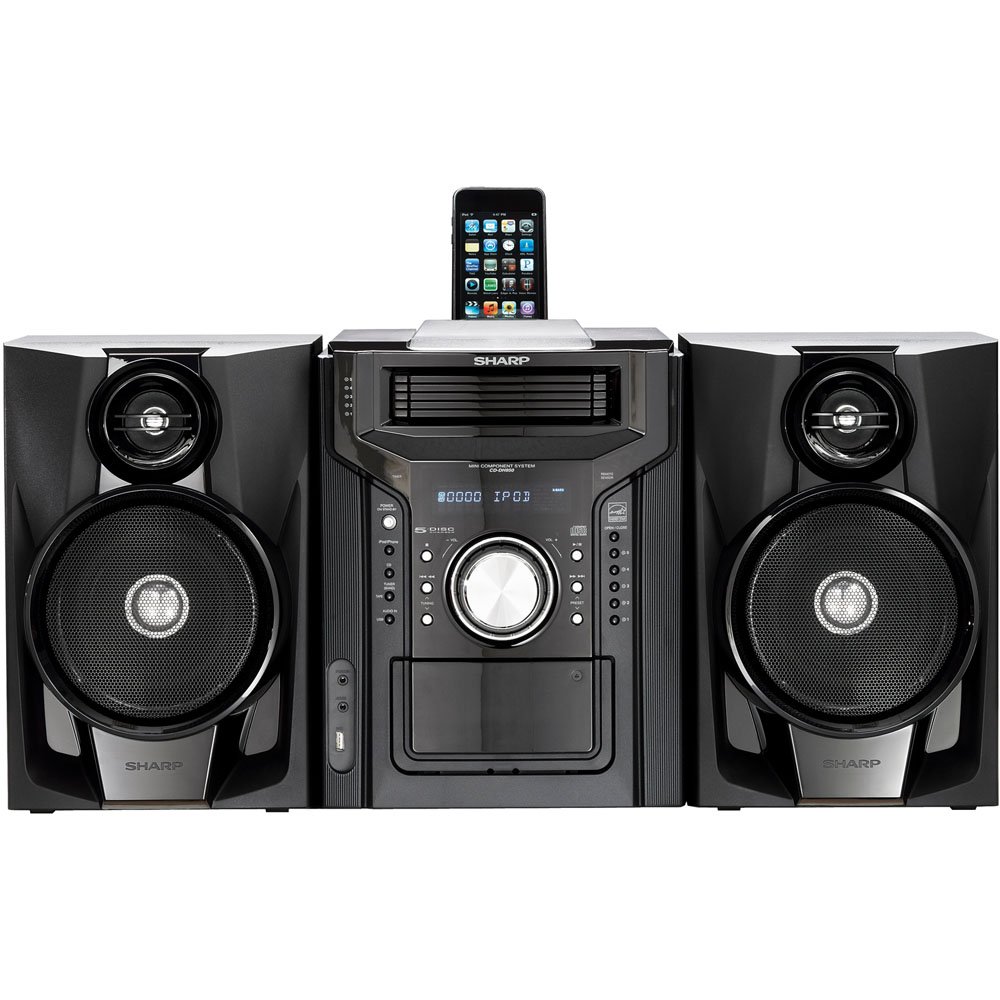
Slika 4.3.1: Sveukupno view of the Sharp CD-DH950P Mini-Component System, showing the main unit flanked by two speakers, with an iPhone docked on top of the main unit.
5. Upute za rad
5.1 Uključivanje/isključivanje i kontrola glasnoće
- Pritisnite tipku VLAST gumb na prednjoj ploči ili daljinskom upravljaču za uključivanje ili isključivanje uređaja.
- Zakrenite VOLUMEN gumb na prednjoj ploči ili upotrijebite GLASNOĆA +/- tipke na daljinskom upravljaču za podešavanje razine zvuka.
5.2 Reprodukcija CD-a
This system features a 5-disc CD changer.
- Pritisnite tipku OTVORI/ZATVORI gumb za otvaranje CD ladice.
- Place up to five CDs on the disc trays, label side up.
- Pritisnite OTVORI/ZATVORI ponovno da zatvorite pladanj.
- Pritisnite tipku CD gumb za odabir funkcije CD-a.
- Pritisnite tipku REPRODUCIRAJ/PAUZIRAJ gumb za početak reprodukcije.
- Koristite PRESKOČITI buttons to navigate between tracks or discs.
5.3 Rad kasetofona
- Pritisnite tipku TAPE OPEN/CLOSE button to open the cassette deck.
- Umetnite kasetu.
- Pritisnite tipku TRAKA button to select the cassette function.
- Pritisnite IGRATI za početak reprodukcije.
- To record, ensure the source is selected (e.g., CD, Tuner) and press the SNIMITI button on the cassette deck.
5.4 Priključna stanica za iPod/iPhone
The system includes a top-mounted docking slot for compatible iPod and iPhone devices (30-pin connector).
- Carefully place your iPod or iPhone into the docking slot.
- The system will automatically switch to iPod/iPhone mode or you may need to press the iPod/iPhone dugme.
- Use the system's controls or your device's controls to play music. The device will also charge while docked.
5.5 USB Host Playback
Connect a USB storage device containing MP3 or WMA audio files to the USB port on the front panel.
- Umetnite USB uređaj u USB priključak.
- Pritisnite tipku USB button to select the USB function.
- Koristite kontrole reprodukcije za navigaciju i reprodukciju files.
5.6 AM/FM tuner
- Pritisnite tipku TUNER gumb za odabir AM ili FM radija.
- Koristite UGLAŠAVANJE +/- tipke za ručno podešavanje stanice.
- To auto-scan, press and hold the UGLAŠAVANJE +/- gumbi.
- To store a preset, tune to the desired station, then press MEMORIJA followed by a preset number.
5.7 audio ulaz
Connect an external audio device (e.g., MP3 player, smartphone) to the AUDIO IN jack on the front panel using a 3.5mm stereo cable.
- Connect your device to the AUDIO IN jack.
- Pritisnite tipku AUDIO ULAZ gumb za odabir ovog izvora.
- Upravljajte reprodukcijom s povezanog uređaja.
6. Održavanje
6.1 Čišćenje jedinice
Wipe the exterior of the unit with a soft, dry cloth. Do not use abrasive cleaners, waxes, or solvents. Ensure the unit is unplugged before cleaning.
6.2 CD and Cassette Care
- Handle CDs by their edges to avoid fingerprints and scratches. Clean discs with a soft, lint-free cloth from the center outwards.
- Store cassette tapes away from strong magnetic fields and direct sunlight.
7. Rješavanje problema
| Problem | Mogući uzrok | Otopina |
|---|---|---|
| Nema struje | Kabel za napajanje nije spojen; utičnica je neispravna | Provjerite je li kabel za napajanje sigurno priključen; pokušajte s drugom utičnicom |
| Nema zvuka | Volume too low; Speakers not connected; Incorrect source selected | Povećajte glasnoću; Provjerite spojeve zvučnika; Odaberite ispravan ulazni izvor |
| CD se ne reproducira | Disc inserted incorrectly; Disc is dirty or scratched | Insert disc correctly (label side up); Clean or replace disc |
| Loš radio prijem | Antena nije pravilno postavljena; Slab signal | Adjust position of AM/FM antennas; Try auto-tuning or manual fine-tuning |
| iPod/iPhone not charging/playing | Device not properly docked; Device not compatible (e.g., newer connector) | Re-dock the device; Note that this system uses a 30-pin connector, newer devices may require an adapter (not included) |
8. Specifikacije
- Marka: Oštar
- Model: CD-DH950P
- Ukupna izlazna snaga: 240 Watts RMS (85W/ch FTC)
- Konfiguracija zvučnika: 2.1 kanal
- Podržani audio formati: CD, MP3, WMA
- Odnos signal / šum: 100 dB
- Kompatibilni uređaji: MP3 Player, Smartphone (via 30-pin dock or USB/Audio In)
- Dimenzije (D x Š x V): 27.6 x 13.6 x 13.5 inča
- Težina artikla: 24.4 funti
- UPC: 074000369863, 074000369290
9. Informacije o jamstvu
This product is covered by a 1-year limited warranty from the date of purchase. Please refer to the warranty card included with your product for full terms and conditions, or contact Sharp customer service for details.
10. Podrška
For further assistance, technical support, or service inquiries, please contact Sharp customer service. Contact information can typically be found on the Sharp official webweb-mjestu ili u dokumentaciji koja je priložena uz vaš proizvod.