
1. Uvod
This manual provides essential information for the safe and efficient operation of your InFocus IN112 Portable DLP Projector. Please read these instructions thoroughly before using the projector and retain them for future reference.
The InFocus IN112 is designed for versatile use, offering high brightness and a strong contrast ratio. It incorporates BrilliantColor technology for clear image reproduction and is 3D-ready. Its compact and lightweight design facilitates easy portability and installation.
2. Što je u kutiji
Provjerite jesu li sve dolje navedene stavke uključene u pakiranje vašeg proizvoda:
- InFocus IN112 projektor
- Kabel za napajanje
- RGB cable (VGA cable)
- A/V cable (Composite Video cable)
- Sigurnosne upute
- Korisnički priručnik (ovaj dokument)
- Daljinski upravljač
3. Projektor iznadview

Slika 1: Vrh View - Displays the control panel with buttons for power, source selection, menu navigation, and keystone adjustment, along with the focus ring for the lens.

Slika 2: Bočna strana View - Shows the ventilation grilles essential for heat dissipation during operation. Ensure these are not obstructed.
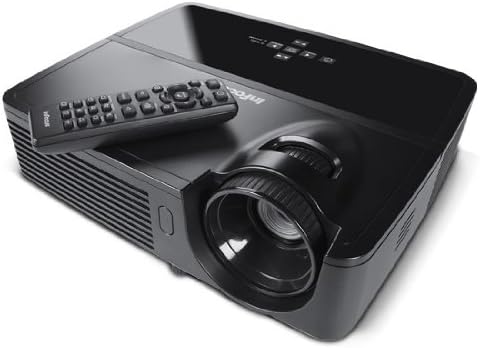
Slika 3: Kutno View s daljinskim upravljačem - Illustrates the projector from an angle, highlighting the lens and the included remote control for convenient operation.

Slika 4: Stražnji dio View - Details the various input and output ports, including power, audio in/out, video, computer (VGA), RS232, and Mini USB.
4. Postavljanje
4.1 Postavljanje
Position the projector on a stable, flat surface or mount it securely. Ensure adequate ventilation around the projector to prevent overheating. The distance from the screen will determine the image size. Adjust the projector's position to achieve the desired image size and clarity.
4.2 Priključak za napajanje
- Spojite priloženi kabel za napajanje na utičnicu za napajanje projektora.
- Uključite drugi kraj kabela za napajanje u uzemljenu električnu utičnicu.
4.3 Spajanje ulaznih izvora
The IN112 projector offers multiple input options:
- VGA (Computer In 1 & 2): Use the RGB cable to connect to a computer's VGA output.
- Kompozitni video: Use the A/V cable to connect to devices with composite video output.
- S-video: Connect to devices with S-Video output.
- Audio ulaz: Connect external audio sources using a 3.5mm stereo cable.
- RS232C: For control and automation systems.
- USB B Mini: For control and firmware updates.
Ensure all cables are securely connected before powering on the projector.
5. Upute za rad
5.1 Uključivanje/isključivanje
- Za uključivanje pritisnite Vlast button on the control panel or remote control. The power indicator light will illuminate.
- Za isključivanje, pritisnite Vlast ponovno pritisnite gumb. Potvrdite isključivanje ako se to zatraži. Pustite da se projektor ohladi prije isključivanja iz struje.
5.2 Podešavanje slike
- Fokus: Okrećite prsten za fokusiranje na objektivu projektora dok slika ne postane oštra i jasna.
- Ključni kamen: Koristite Keystone buttons on the control panel or remote to correct trapezoidal image distortion if the projector is not perfectly perpendicular to the screen.
5.3 Odabir izvora
Pritisnite tipku Izvor button on the control panel or remote control to cycle through available input sources (VGA1, VGA2, Video, S-Video).
5.4 Navigacija izbornikom
Pritisnite tipku Izbornik/Izlaz za pristup izborniku s prikazom na zaslonu (OSD). Za navigaciju koristite tipke sa strelicama i Odaberite or Uđi za potvrdu odabira. Pritisnite Izbornik/Izlaz ponovno za zatvaranje izbornika.
5.5 Eko način rada
Activate Eco Mode to extend lamp life and reduce power consumption. This mode is suitable for environments with lower ambient light. The lamp life is approximately 6,000 hours in Eco Mode compared to 5,000 hours in normal mode.
5.6 3D Content Projection
The IN112 is 3D-ready. To project 3D content, you will need compatible 3D source material, a 3D-capable player, and active 3D glasses (sold separately). Refer to your 3D source device's manual for specific setup instructions.
6. Održavanje
6.1 Lamp Zamjena
Projektor lamp ima ograničen vijek trajanja. Kada lamp indikator (Temp/Lamp) illuminates or the image brightness significantly decreases, the lamp may need replacement. The lamp door is conveniently located on the top of the projector for easy access, even when installed.
Oprez: Ensure the projector is powered off and completely cooled before attempting lamp replacement. Refer to the detailed lamp replacement instructions in the full service manual for safety and proper procedure.
6.2 Čišćenje
The IN112 projector is designed without filters, eliminating the need for filter cleaning or replacement. Periodically wipe the exterior casing with a soft, dry cloth. For the lens, use a specialized lens cleaning cloth and solution to avoid scratches.
7. Rješavanje problema
| Problem | Mogući uzrok | Otopina |
|---|---|---|
| Nema prikazane slike | Power cable disconnected, incorrect input source selected, source device not powered on. | Check power connections. Press the Izvor button to select the correct input. Ensure the source device is on. |
| Slika je mutna | Objektiv nije u fokusu. | Podesite prsten za fokusiranje na leći projektora. |
| Slika je trapezoidna | Projektor nije okomit na platno. | Koristite Keystone buttons to correct the image shape. |
| Colors appear incorrect or dull | Color settings require adjustment. | Access the OSD menu and navigate to image settings to adjust color, brightness, and contrast. |
| Projektor se pregrijava i gasi | Ventilation obstructed, high ambient temperature. | Ensure clear airflow around the projector. Operate in a well-ventilated area. |
8. Specifikacije
| Značajka | Detalj |
|---|---|
| Broj modela | IN112 |
| Tehnologija zaslona | DLP with BrilliantColor |
| Izvorna razlučivost | SVGA (800 x 600) |
| Svjetlina (ANSI lumeni) | 2700 (2200 in Eco Mode) |
| Omjer kontrasta | 3000:1 |
| Lamp Life (Average) | 5,000 hours (Normal), 6,000 hours (Eco Mode) |
| 3D spreman | Da |
| Povezivost | 2x VGA In, Composite Video, S-Video, 3.5mm Stereo In, RS232C, USB B Mini |
| Dimenzije proizvoda | 13 x 5.5 x 12.5 inča |
| Težina artikla | 4.78 funti (2.17 kg) |
| Operativni jezik | engleski |
9. Jamstvo i podrška
9.1 Jamstvo za proizvod
The InFocus IN112 projector is backed by a comprehensive warranty:
- 5-godišnje ograničeno jamstvo na projektoru.
- 2 godina punog jamstva covering parts and labor.
- Jamstvo 6 mjeseci na lamp.
Please retain your proof of purchase for warranty claims. For detailed terms and conditions, refer to the official InFocus warranty documentation or visit the InFocus webmjesto.
9.2 Tehnička podrška
For technical assistance, troubleshooting, or service inquiries, please contact InFocus customer support. Contact information can typically be found on the InFocus official webweb-mjestu ili u priloženoj dokumentaciji.
10. Related Product Information (IN130 Series)
Sljedeći video pruža pregledview of features found in the InFocus IN130 Series projectors. While specific models may vary, many core functionalities and design principles are shared across InFocus projector lines, offering general insight into InFocus projector capabilities.
Video: InFocus IN130 Series Overview - This video highlights features such as HDMI + Power for streaming sticks, high brightness, vivid colors, long lamp life, 3D readiness, and various connectivity options. Note: This video is for the IN130 series, but demonstrates general InFocus projector features.