
Uvod
Hvala na kupnjiasing the GPX Weatherx WR282B Weather and Alert Radio. This portable radio is designed to provide you with AM/FM radio reception and access to all 7 NOAA weatherband channels, ensuring you stay informed during various conditions. It offers flexible power options, operating on either AC power or D-size batteries, making it suitable for both indoor and outdoor use.
Please read this manual thoroughly before operating the device to ensure proper use and to maximize its performance and longevity.
Važne sigurnosne informacije
- Pročitajte upute: Prije uporabe proizvoda potrebno je pročitati sve sigurnosne i upute za uporabu.
- Sačuvajte upute: Sigurnosne upute i upute za rad treba sačuvati za buduću upotrebu.
- Obratite pažnju na upozorenja: Treba se pridržavati svih upozorenja na proizvodu iu uputama za uporabu.
- Slijedite upute: Treba se pridržavati svih uputa za rad i uporabu.
- Voda i vlaga: Ne koristite ovaj proizvod u blizini vode (npr. blizu kade, umivaonika, sudopera, kade za pranje rublja, u vlažnom podrumu ili blizu bazena).
- Čišćenje: Čistite samo suhom krpom.
- Ventilacija: Ne blokirajte ventilacijske otvore. Instalirajte u skladu s uputama proizvođača.
- toplina: Ne instalirajte u blizini izvora topline kao što su radijatori, grijači, peći ili drugi uređaji (uključujući amplifiers) koji proizvode toplinu.
- Zaštita kabela za napajanje: Zaštitite kabel za napajanje od gaženja ili prignječenja, osobito na utikačima, utičnicama i na mjestu gdje izlaze iz uređaja.
- Munja: Isključite ovaj uređaj iz struje tijekom grmljavinske oluje ili ako ga nećete koristiti dulje vrijeme.
- Servisiranje: Sve servise prepustite kvalificiranom servisnom osoblju. Servisiranje je potrebno kada je uređaj oštećen na bilo koji način, kao što je oštećen kabel za napajanje ili utikač, prolivena je tekućina ili su neki predmeti upali u uređaj, uređaj je bio izložen kiši ili vlazi, ne radi normalno , ili je odbačeno.
Značajke
- AM/FM radio prijemnik
- Weatherband - All 7 NOAA Channels
- Swivel Telescopic Antenna
- Kontrola glasnoće
- Audio Line Input (Auxiliary Input)
- Integrirana ručka za nošenje
- Dual Power Options: AC/DC Adapter or 3 x 'D' Batteries
Sadržaj paketa
- GPX Weatherx WR282B Weather and Alert Radio
- AC/DC strujni adapter
- Korisnički priručnik (ovaj dokument)
Kontrole i indikatori
Familiarize yourself with the various controls and indicators on your WR282B radio.
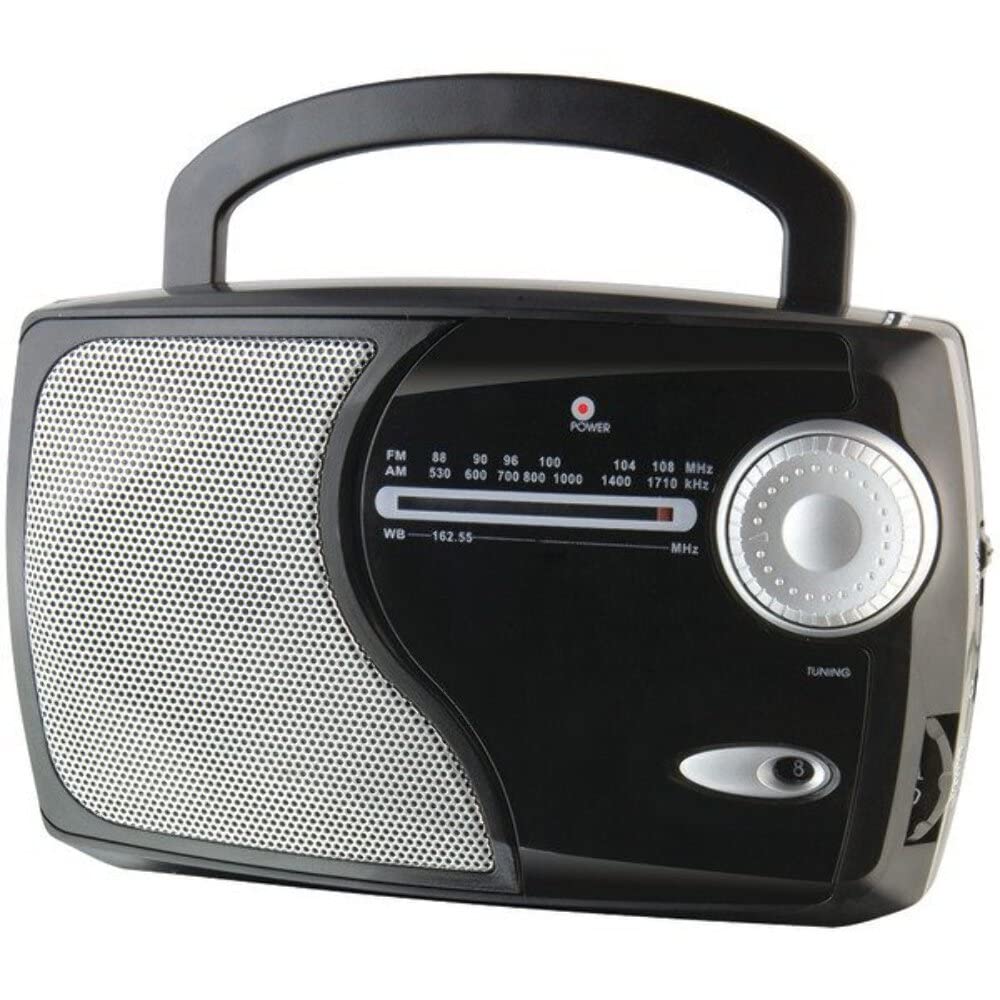
Slika: prednja strana view of the GPX Weatherx WR282B radio, showing the speaker, tuning dial, and control knobs.
- Gumb za napajanje/glasnoću: Turns the radio on/off and adjusts the audio output level.
- Prekidač za odabir opsega: Selects between AM, FM, and Weatherband (WB) modes.
- Gumb za podešavanje: Adjusts the frequency to tune into desired radio stations or weather channels.
- Pokazatelj podešavanja: Illuminates when a strong signal is received.
- Biranje frekvencije: Prikazuje trenutnu radio frekvenciju.
- Teleskopska antena: Extendable antenna for improved FM and Weatherband reception.
- Pomoćni ulaz (AUX IN): 3.5 mm priključak za spajanje vanjskih audio uređaja.
- Ulaz izmjeničnog napajanja: Jack for connecting the included AC/DC power adapter.
- Odjeljak za baterije: Located on the back, holds 3 'D' size batteries.
- Ručka za nošenje: Za laku prenosivost.
Postavljanje
Napajanje radija
The WR282B radio can be powered using either the included AC/DC power adapter or three 'D' size batteries.
1. AC Power Operation
- Ensure the radio is turned off by rotating the Power/Volume knob counter-clockwise until it clicks.
- Insert the small plug of the AC/DC power adapter into the AC Power Input jack on the radio.
- Plug the other end of the AC/DC power adapter into a standard wall outlet (AC 120V~60Hz).
- Radio je sada spreman za korištenje s izmjeničnom strujom.
Bilješka: When the AC adapter is connected, battery power is automatically disconnected.
2. Battery Power Operation
- Uvjerite se da je radio isključen.
- Pronađite odjeljak za baterije na stražnjoj strani radija.
- Otvorite poklopac odjeljka za baterije.
- Insert three (3) 'D' size batteries (not included) into the compartment, observing the correct polarity (+/-) as indicated inside the compartment.
- Čvrsto zatvorite poklopac odjeljka za baterije.
- The radio is now ready for use with battery power.
Važno: Remove batteries if the radio will not be used for an extended period to prevent leakage and damage.
Upute za rad
1. Turning On and Adjusting Volume
- Zakrenite Gumb za napajanje/glasnoću clockwise to turn on the radio. Continue rotating to increase the volume to a comfortable listening level.
- Da biste isključili radio, zakrenite Gumb za napajanje/glasnoću suprotno od kazaljke na satu dok ne klikne.
2. Selecting a Radio Band (AM/FM/Weatherband)
- Koristite Prekidač za odabir opsega to choose your desired listening mode:
- AM: Za Amplitude Modulation radio stations.
- FM: For Frequency Modulation radio stations.
- WB: For NOAA Weatherband channels.
3. Tuning to a Station or Channel
- Proširite Teleskopska antena fully for optimal FM and Weatherband reception. For AM reception, the radio has a built-in antenna, and adjusting the radio's position may improve reception.
- Zakrenite Gumb za podešavanje to scan through frequencies on the Birač frekvencije.
- When a strong signal is received, the Pokazatelj ugađanja svjetlo će zasvijetliti.
- For Weatherband (WB) mode, tune to one of the 7 NOAA weather channels (162.400 MHz to 162.550 MHz).
4. Using the Auxiliary Input (AUX IN)
- Connect a 3.5mm audio cable (not included) from your external audio device (e.g., MP3 player, smartphone) to the Pomoćni ulaz (AUX IN) jack on the radio.
- Ensure the radio is turned on and the volume is adjusted.
- The audio from your external device will now play through the radio's speaker. Control playback and track selection from your external device.
Održavanje
- Čišćenje: Wipe the exterior of the radio with a soft, dry cloth. Do not use abrasive cleaners, waxes, or solvents.
- Zamjena baterije: Replace all three 'D' batteries when the radio's performance diminishes or if the unit will not be used for an extended period. Always replace with new batteries of the same type.
- Skladištenje: When storing the radio for a long time, remove the batteries to prevent leakage. Store in a cool, dry place away from direct sunlight and extreme temperatures.
- Održavanje antene: Pažljivo rukujte teleskopskom antenom kako biste izbjegli savijanje ili lomljenje.
Rješavanje problema
| Problem | Mogući uzrok | Otopina |
|---|---|---|
| Nema struje |
|
|
| Loš radio prijem |
|
|
| Nema zvuka iz AUX IN-a |
|
|
Tehnički podaci
- Model: WR282B
- Radio pojasevi: AM, FM, Weatherband (7 NOAA channels)
- Izvor napajanja: AC 120V~60Hz (via included adapter) or 3 x 'D' Batteries (not included)
- Povezivost: 3.5 mm pomoćni ulaz
- Antena: Telescopic (FM/WB), Built-in Ferrite Bar (AM)
- Dimenzije proizvoda: 8.86" L x 2.76" W x 5.51" H (approximately)
- Težina artikla: 1.06 funte (bez baterija)
Jamstvo i podrška
For detailed warranty information and customer support, please refer to the warranty card included with your product or visit the official GPX webstranicu. Sačuvajte račun kao dokaz o kupnji za bilo kakve reklamacije u jamstvenom roku.
If you experience issues not covered in the troubleshooting section, please contact GPX customer service for assistance.