
1. Uvod
This manual provides essential information for the safe and efficient operation of your Alto Professional TMX160 DFX 16-Channel Powered Mixer. The TMX160 DFX is a versatile audio mixing console featuring 16 input channels, a built-in Alesis digital effects processor, and an integrated power amplifier capable of delivering 750W stereo output at 4Ω or 1500W mono output at 8Ω. It includes 12 XLR microphone inputs with phantom power, 16 line inputs, and stereo RCA inputs, along with a 3-band equalizer on each mono and stereo channel.
Please read this manual thoroughly before using the product to ensure proper setup and operation. Keep this manual for future reference.
2. Sigurnosne informacije
Uvijek slijedite osnovne sigurnosne mjere pri korištenju ovog proizvoda kako biste smanjili rizik od požara, strujnog udara i ozljeda osoba.
- Izvor napajanja: Uređaj priključite samo na AC utičnicu navedenog naponatage.
- Uzemljenje: Ensure the unit is properly grounded. Do not defeat the safety purpose of the polarized or grounding-type plug.
- Voda i vlaga: Do not expose this equipment to rain or moisture. Do not use near water.
- Ventilacija: Osigurajte odgovarajuću ventilaciju. Ne blokirajte ventilacijske otvore.
- toplina: Ne instalirajte u blizini izvora topline kao što su radijatori, grijači, peći ili drugi uređaji (uključujući amplifiers) koji proizvode toplinu.
- Kabeli: Zaštitite kabele za napajanje od gaženja ili priklještenja.
- Servisiranje: Za sve servisne radove obratite se kvalificiranom servisnom osoblju. Ne pokušavajte sami servisirati ovaj proizvod.
3. Postavljanje
3.1 Raspakiranje i pregled
Carefully unpack the TMX160 DFX mixer and inspect it for any signs of damage that may have occurred during transit. If any damage is found, contact your dealer immediately.
3.2 Povezivanje struje
Connect the supplied AC power cord to the mixer's power input and then to a suitable grounded AC power outlet. Ensure the mixer's power switch is in the OFF position before connecting to power.
3.3 Spajanje ulaza
The TMX160 DFX offers a variety of input options:
- Microphone Inputs (MIC 1-12): Use XLR cables to connect microphones to the 12 XLR inputs. Phantom power (+48V) can be activated for condenser microphones.
- Linijski ulazi (kanali 1-16): Use 1/4-inch TRS or TS cables for line-level instruments or devices. Channels 13/14 and 15/16 are stereo line inputs, also accepting RCA for 2-Track In.
- 2-Track In: Spojite vanjske audio izvore poput CD playera ili media playera pomoću RCA kabela.
3.4 Spajanje izlaza
Connect your speakers or monitoring system to the appropriate outputs:
- Izlazi za zvučnike: Connect passive speakers to the power amplifier outputs. Ensure the impedance of your speakers matches the mixer's output capabilities (e.g., 4Ω for 750W stereo, 8Ω for 1500W mono).
- Monitor/Aux Outputs: Use these outputs to send signals to stage monitors or external effects processors.
- Stereo Out/Mono Out: These outputs provide the main mix signal for recording or connecting to additional sound systems.
3.5 Početno uključivanje
After all connections are made, ensure all channel faders and the main mix fader are at their lowest settings. Turn on any connected devices (e.g., microphones, instruments) first, then power on the TMX160 DFX mixer. Finally, turn on your power amplifiers ili aktivni govornici.
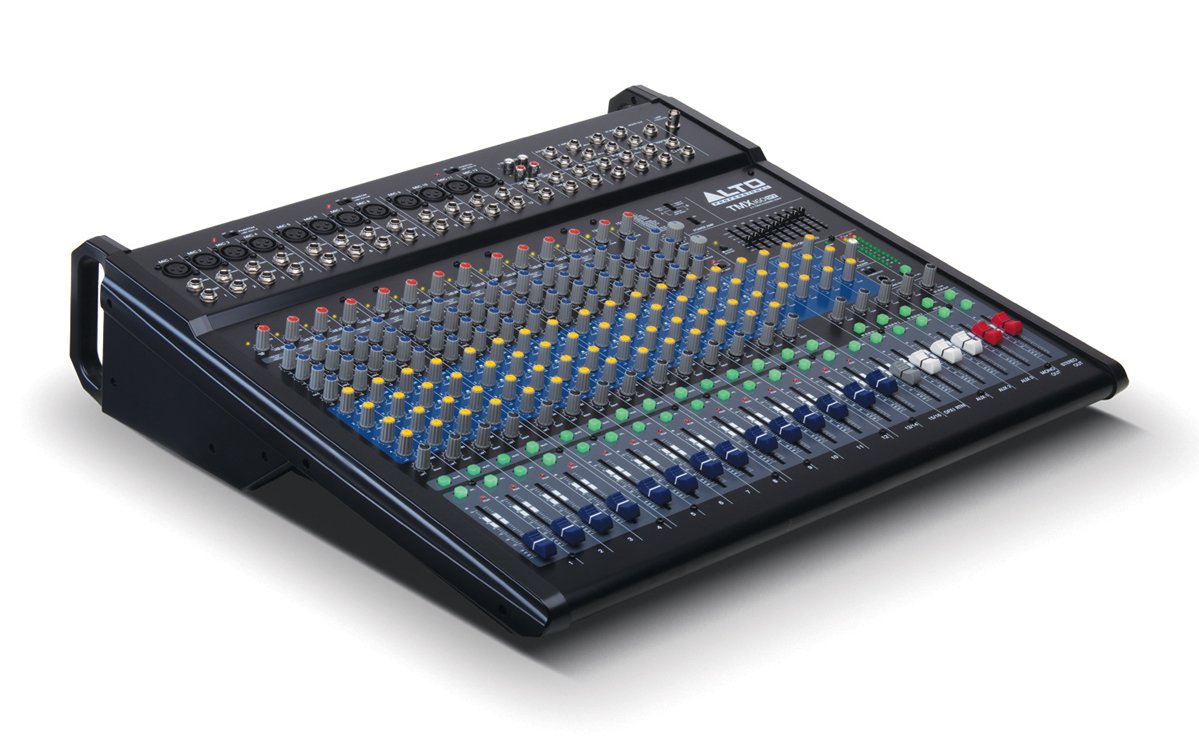
Slika 1: Prednja ploča iznadview of the Alto Professional TMX160 DFX mixer. This image shows the comprehensive layout including microphone and line inputs at the top, channel controls in the middle, and faders at the bottom.
4. Operacija
4.1 Kontrole kanala
Each input channel (1-16) features a set of controls to shape its sound:
- DOBITAK: Adjusts the input sensitivity for the connected microphone or line-level device. Set this to achieve a strong signal without clipping (distortion).
- EQ (visoki, srednji, niski): A 3-band equalizer allows you to boost or cut frequencies (treble, midrange, bass) for each channel.
- AUX šalje: Controls the amount of signal sent from the channel to the auxiliary outputs (e.g., for monitors or external effects).
- KRUH: Postavlja signal kanala unutar stereo polja (s lijeva na desno).
- Fader LEVEL: Controls the overall volume of the channel in the main mix.
4.2 Glavni dio
The master section controls the overall output of the mixer:
- Glavni miks faderi: Control the overall volume of the stereo output.
- DFX (Digital Effects) Controls: Select and adjust parameters for the built-in Alesis digital effects.
- Stereo Graphic EQ: A 7-band graphic equalizer allows for fine-tuning the overall frequency response of the main mix.
- Vlast Amp Kontrole: Adjust the output level and mode (Stereo/Mono) for the integrated power ampsredstvo za podsticanje.
4.3 Built-in Alesis Digital Effects
The TMX160 DFX features a high-quality Alesis digital effects processor. Use the DFX controls in the master section to browse and select from various effects such as reverb, delay, chorus, and more. Adjust the effect send levels on individual channels and the overall effect return level in the master section to blend the effects into your mix.
Slika 2: Detaljno view of the input channels, showing individual GAIN, EQ, AUX, PAN, and LEVEL controls for precise audio shaping.
5. Održavanje
Proper maintenance ensures the longevity and optimal performance of your TMX160 DFX mixer.
- Čišćenje: Za čišćenje vanjske strane miksera koristite meku, suhu krpu. Izbjegavajte korištenje abrazivnih sredstava za čišćenje, otapala ili voskova.
- Prah: Regularly remove dust from the ventilation openings to prevent overheating.
- Skladištenje: Kada se mikser ne koristi dulje vrijeme, čuvajte ga na hladnom i suhom mjestu, dalje od izravne sunčeve svjetlosti i ekstremnih temperatura.
- Faderi i gumbi: Avoid applying excessive force to faders and knobs. Keep them free from dust and debris.
6. Rješavanje problema
If you encounter issues with your TMX160 DFX, refer to the following common problems and solutions:
- Bez napajanja:
- Check if the power cord is securely connected to both the mixer and the AC outlet.
- Verify the AC outlet is functional.
- Provjerite je li prekidač za napajanje na mikseru u položaju UKLJUČENO.
- Nema izlaza zvuka:
- Provjerite sve spojeve ulaznih i izlaznih kabela.
- Ensure channel GAIN and LEVEL faders are appropriately set.
- Verify the Main Mix faders are raised.
- Check if connected speakers or power amplifiers are turned on and functioning.
- Osigurajte snagu Amp controls are set correctly for your speaker configuration.
- Izobličen zvuk:
- Reduce the GAIN setting for the input channel.
- Lower the channel LEVEL fader or Main Mix faders.
- Provjerite ima li oštećenih kablova.
- Efekti se ne čuju:
- Ensure the DFX send controls on the channels are turned up.
- Verify the DFX return level in the master section is raised.
- Check the selected effect program.
If the problem persists after trying these steps, contact Alto Professional customer support.
7. Specifikacije
| Značajka | Specifikacija |
|---|---|
| Marka | Alto Professional |
| Model | TMX160 DFX |
| Broj kanala | 16 |
| Težina artikla | 12.5 kilogram |
| Tehnologija povezivanja | Pomoćni |
| Audio ulaz | XLR, RCA, Line, AUX, 2-Track |
| Proizvođač | uMuzici |
| ASIN | B007T1VZ52 |
| Power Output (Stereo) | 750 W pri 4 Ω |
| Power Output (Mono) | 1500 W pri 8 Ω |
| Ekvilajzer | 3-band EQ per channel, Stereo Graphic EQ |
| Učinci | Built-in Alesis Digital Effector (24-bit A/D and D/A converters) |
| Dimenzije (Š x D x V) | Cca. 21.9 x 22.2 x 5.7 inča (555 x 565 x 145 mm) |
8. Jamstvo i podrška
For warranty information and technical support, please refer to the documentation included with your product or visit the official Alto Professional webstranicu. Sačuvajte račun kao dokaz o kupnji za slučaj reklamacije.
For further assistance, you may contact Alto Professional customer service directly.