1. Uvod
The D-Link DGS-1500-28 SmartPro 24-Port Gigabit Switch is a high-performance Layer 3 managed switch designed for small to medium-sized businesses. It offers 24 Gigabit Ethernet ports and 4 SFP+ expansion slots, providing flexible connectivity and advanced management features. This manual provides essential information for the proper installation, configuration, operation, and maintenance of your DGS-1500-28 switch.
2. Sadržaj paketa
Verify the following items are present in your DGS-1500-28 package. If any item is missing or damaged, please contact your local D-Link reseller for assistance.
- DGS-1500-28 SmartPro 24-Port Gigabit Switch
- Kabel za napajanje
- Rack Mount Kit (two brackets and screws)
- Gumene noge (za ugradnju na radnu površinu)
- Console Cable (RJ-45 to RS-232)
- Vodič za brzu instalaciju
- CD-ROM (containing product documentation)
3. Fizički opis
3.1 Prednja ploča
The front panel of the DGS-1500-28 switch features the Gigabit Ethernet ports, SFP+ slots, and LED indicators for monitoring the switch's status and activity.
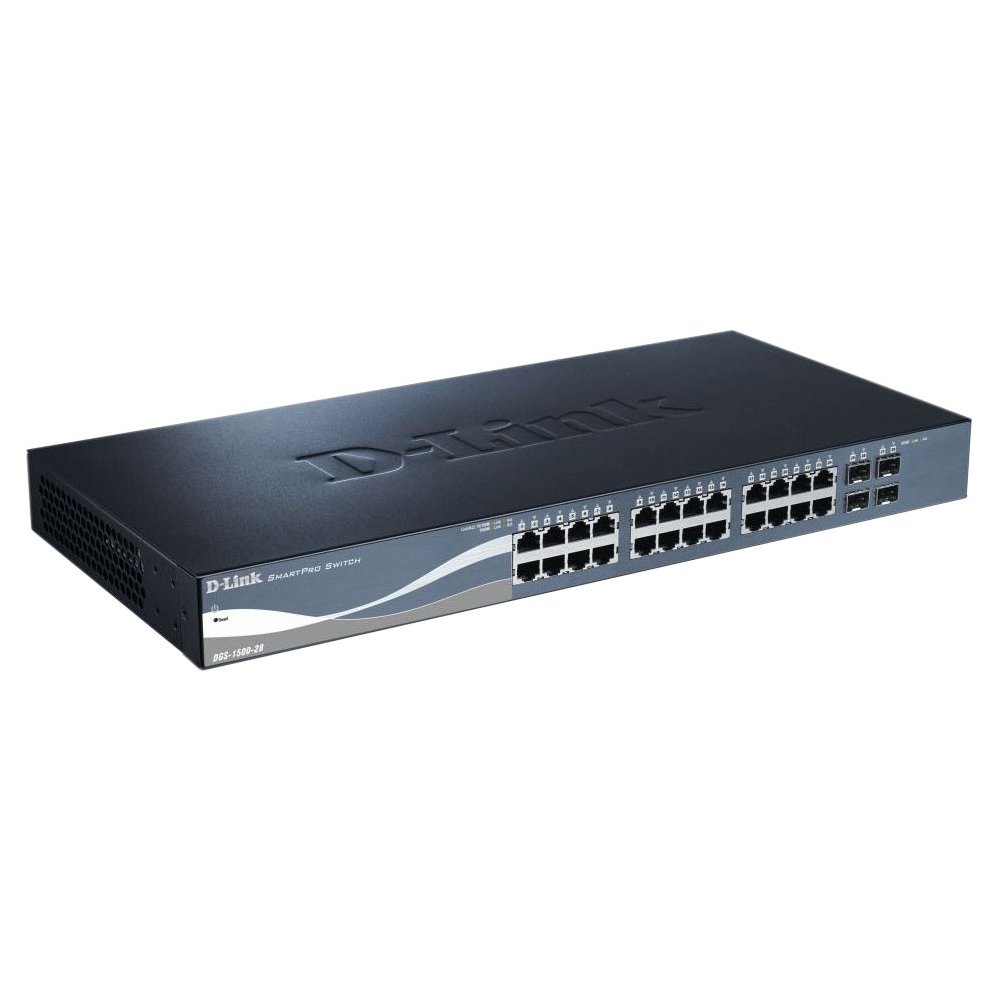
This image displays the front panel of the D-Link DGS-1500-28 switch, featuring 24 RJ-45 Gigabit Ethernet ports and LED indicators for status and activity.
- RJ-45 Ports (1-24): 10/100/1000 Mbps Gigabit Ethernet ports for connecting network devices.
- SFP+ utori (25-28): 10 Gigabit Ethernet SFP+ ports for fiber optic connections or stacking.
- LED indikatori:
- LED za napajanje: Označava status napajanja.
- Link/Act LED (per port): Indicates network link and data activity.
- Speed LED (per port): Indicates connection speed (e.g., green for Gigabit, amber for 10/100 Mbps).
3.2 Stražnja ploča
The rear panel typically includes the power connector, grounding screw, and a console port for out-of-band management.
- Utičnica za izmjeničnu struju: Connects to the provided AC power cord.
- Vijak za uzemljenje: Provides an optional connection for grounding the switch.
- Konzolni priključak: RJ-45 port for connecting a console cable to a computer for command-line interface (CLI) management.
4. Instalacija
4.1 Instalacija na stolno računalo
- Attach the four rubber feet to the recessed areas on the bottom of the switch.
- Place the switch on a sturdy, level surface that can support its weight.
- Ensure adequate ventilation around the switch.
4.2 Instalacija u stalak
- Attach the two rack-mounting brackets to the sides of the switch using the provided screws.
- Pričvrstite prekidač u standardni 19-inčni stalak za opremu pomoću odgovarajućih vijaka za stalak (nisu uključeni).
- Ensure proper airflow and avoid placing the switch near heat sources.
4.3 Uključivanje prekidača
- Connect the AC power cord to the power receptacle on the rear panel of the switch.
- Uključite drugi kraj kabela za napajanje u odgovarajuću utičnicu.
- LED lampica napajanja na prednjoj ploči će svijetliti, što označava da prekidač prima napajanje.
5. Početna konfiguracija
The DGS-1500-28 switch can be managed via a webgrafičko korisničko sučelje (GUI) ili sučelje naredbenog retka (CLI) putem konzolnog porta.
5.1 Pristup Web-sučelje za upravljanje
- Connect a computer to any of the switch's RJ-45 ports using an Ethernet cable.
- Configure your computer's IP address to be in the same subnet as the switch's default IP address (e.g., if the switch is 10.90.90.90, set your computer to 10.90.90.100).
- Otvori a web browser and enter the switch's default IP address (e.g., http://10.90.90.90) u adresnoj traci.
- Enter the default username and password (refer to the Quick Installation Guide for default credentials).
- Upon successful login, you will access the switch's web sučelje za upravljanje.
Bilješka: It is highly recommended to change the default password immediately after initial login for security purposes.
6. Upravljanje prekidačem
Once configured, the DGS-1500-28 operates as a network switch, forwarding data between connected devices. The LED indicators provide visual feedback on the operational status of the switch and its ports.
6.1 Port Functionality
- RJ-45 priključci: Automatically detect the speed and duplex mode of connected devices (10/100/1000 Mbps).
- SFP+ Slots: Support 10 Gigabit Ethernet transceivers for high-speed uplinks or stacking. Ensure compatible SFP+ modules are used.
6.2 Napredne značajke
The DGS-1500-28 series integrates advanced features to enhance network performance and management:
- Virtual Stacking: Allows up to 32 DGS-1500 series devices to be managed as a single unit with one IP address, simplifying network administration and scalability.
- Layer 3 Static Routing: Enables the switch to forward IP packets between different IP subnets based on static routes configured by the administrator. This feature is crucial for inter-VLAN routing and basic network segmentation.
7. Održavanje
Regular maintenance ensures optimal performance and longevity of your DGS-1500-28 switch.
- Ažuriranja firmvera: Periodically check the D-Link support webstranica za najnovije verzije firmvera. Ažuriranje firmvera može pružiti nove značajke, poboljšanja performansi i sigurnosne zakrpe.
- Uvjeti okoliša: Ensure the switch operates within recommended temperature and humidity ranges. Keep ventilation openings clear of obstructions.
- Čišćenje: Za čišćenje vanjske strane prekidača koristite meku, suhu krpu. Nemojte koristiti tekuća ili aerosolna sredstva za čišćenje.
- Sigurnosna kopija konfiguracije: Regularly back up your switch configuration to an external device. This allows for quick restoration in case of a factory reset or device replacement.
8. Rješavanje problema
This section provides solutions to common issues you might encounter with your DGS-1500-28 switch.
8.1 LED lampica napajanja je isključena
- Provjerite je li kabel za napajanje sigurno spojen i na prekidač i na ispravnu utičnicu.
- Provjerite je li utičnica funkcionalna tako da priključite drugi uređaj.
8.2 Nema veze/aktivnosti na portu
- Provjerite spoj Ethernet kabela na oba kraja. Pokušajte s drugim kabelom.
- Provjerite je li povezani uređaj uključen i ispravno radi.
- Verify the port status in the switch's web sučelje za upravljanje.
- Za SFP+ portove, provjerite je li SFP+ modul ispravno umetnut i kompatibilan.
8.3 Nemoguć pristup Web Upravljačko sučelje
- Confirm your computer's IP address is in the same subnet as the switch's IP address.
- Verify the switch's IP address. If unknown, you may need to reset the switch to factory defaults (refer to the Quick Installation Guide for reset procedures).
- Provjerite da nema sukoba IP adresa na mreži.
- Pokušajte pristupiti sučelju s drugog web browser or computer.
9. Specifikacije
| Značajka | Opis |
|---|---|
| Marka | D-Link |
| Broj modela | DGS150028 |
| luke | 24 x 10/100/1000 Mbps RJ-45 Gigabit Ports, 4 x 10 Gigabit SFP+ Expansion Slots |
| Vrsta sučelja | RJ45, SFP+ |
| Preklopni kapacitet | Up to 128 Gbps (non-blocking) |
| Podrška za slojeve | Layer 3 (Static Routing) |
| Upravljanje | Web-based GUI, CLI, SNMP |
| Kompatibilni uređaji | Desktop, Rack-mount devices |
| Težina artikla | 0.01 Ounces (Note: This value may be a placeholder or incorrect. Refer to product packaging for accurate weight.) |
| UPC | 790069362927 |
| ASIN | B007TL1DHM |
10. Jamstvo i podrška
D-Link products are backed by a limited warranty. The specific terms and conditions of the warranty may vary by region and product. Please refer to the warranty information included with your product or visit the official D-Link website for detailed warranty statements.
For technical support, product documentation, firmware updates, and FAQs, please visit the D-Link support webstranica: www.dlink.com/support
You may also contact D-Link technical support directly through the contact information provided on their webstranicu za vašu specifičnu regiju.