
1. Važne sigurnosne informacije
Always observe basic safety precautions when installing, operating, and maintaining electrical equipment. Failure to do so may result in electric shock, fire, or serious injury.
- Prije bilo kakvih radova na instalaciji ili održavanju provjerite je li napajanje isključeno.
- This device operates on 230 V AC 50/60 Hz. Verify your electrical system's compatibility.
- Nemojte izlagati lamp vodi ili prekomjernoj vlazi.
- Ne pokušavajte otvoriti ili modificirati lamp or its components. Refer all servicing to qualified personnel.
- Čuvati izvan dohvata djece.
2. Proizvod je gotovview i komponente
The Gewiss GW30501 is a removable anti-blackout lamp designed to provide emergency lighting during power outages. It features a white LED lamp and an internal Ni-Mh battery for autonomous operation.
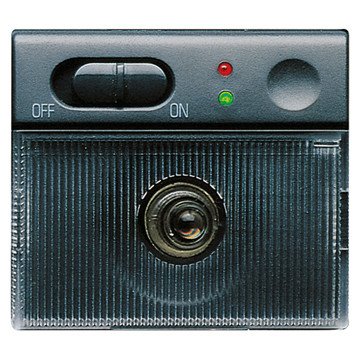
An image showing the compact design of the Gewiss GW30501 removable anti-blackout lamp, suitable for wall mounting.
Sadržaj paketa:
- 1 x Gewiss GW30501 Removable Anti-Blackout Lamp
- Integrated Ni-Mh Power Batteries
3. Postavljanje i instalacija
The GW30501 lamp is designed for wall mounting and integrates into a 2-module Playbus system.
Koraci instalacije:
- Odspojite napajanje: Before beginning installation, ensure the main power supply to the installation area is completely disconnected at the circuit breaker.
- Pripremite mjesto montaže: Identify a suitable wall location within your electrical system's 2-module Playbus slot.
- Spojite ožičenje: Pažljivo spojite lamp's electrical wiring to the 230 V AC, 50/60 Hz power supply terminals within the Playbus module. Ensure correct polarity and secure connections.
- Postavite Lamp: Securely insert the lamp into the 2-module Playbus slot on the wall. Ensure it is firmly seated.
- Početna naplata: Once installed, restore power. The lamp's internal Ni-Mh battery will begin charging. Allow at least 12-24 hours for the initial full charge to ensure optimal autonomy.
4. Upute za rad
The Gewiss GW30501 lamp offers both automatic emergency lighting and a removable portable light function.
Automatic Anti-Blackout Function:
- When installed and connected to the main power supply, the lamp's battery remains charged.
- In the event of a power failure (blackout), the lamp will automatically illuminate using its internal battery, providing emergency lighting for up to 2 hours.
- Once main power is restored, the lamp will turn off (if not manually activated) and begin recharging its battery.
Uklonjivi Lamp Funkcija:
- Lamp can be easily removed from its wall-mounted base.
- Za aktiviranje lamp when removed, gently touch the designated activation area (Touch-activated style). The white LED will illuminate.
- Za isključivanje lamp, touch the activation area again.
- Kada je lamp is reinserted into its wall base, it will resume its automatic anti-blackout function and recharge its battery.
5. Održavanje
Regular maintenance ensures the longevity and optimal performance of your anti-blackout lamp.
Njega baterije:
- The integrated Ni-Mh battery is designed for long life. To maintain its capacity, ensure the lamp is regularly connected to power to allow for charging cycles.
- Ako je lamp is stored for an extended period, fully charge it before storage and recharge every 3-6 months to prevent deep discharge.
Čišćenje:
- Očistite lamp's exterior with a soft, dry cloth.
- Ne koristite abrazivna sredstva za čišćenje, otapala ili jake kemikalije, jer mogu oštetiti završnu obradu.
Provjera funkcionalnosti:
- Periodically test the anti-blackout function by temporarily cutting power to the circuit the lamp is connected to. The lamp treba osvijetliti.
- Test the removable lamp function by removing it from the base and activating it via touch.
6. Rješavanje problema
If you encounter issues with your Gewiss GW30501 lamp, pogledajte sljedeće uobičajene probleme i rješenja:
| Problem | Mogući uzrok | Otopina |
|---|---|---|
| Lamp does not light up during a power outage. | Battery not charged or faulty. No power to the base. | Osigurajte lamp has been connected to power for at least 24 hours. Check the circuit breaker for the lamp's power supply. If issues persist, contact support. |
| Uklonjivo lamp does not turn on when touched. | Battery low or discharged. Faulty touch sensor. | Vratite lamp to its base for charging. Ensure the touch area is clean and dry. |
| Short autonomy (less than 2 hours). | Baterija nije potpuno napunjena ili je baterija stara. | Allow for a full 24-hour charge. If the lamp is old, battery capacity may naturally decrease over time. |
| Lamp treperi ili se prigušuje. | Low battery. Loose connection. | Osigurajte lamp is fully charged. Check the electrical connections at the wall base (with power disconnected). |
If these solutions do not resolve the issue, please contact Gewiss customer support or a qualified electrician.
7. Tehničke specifikacije
Detailed specifications for the Gewiss GW30501 Removable Anti-Blackout Lamp:
| Značajka | Specifikacija |
|---|---|
| Broj modela | GW30501 |
| Marka | Gewiss |
| Napajanje Voltage | 230 V izmjenična struja, 50/60 Hz |
| Autonomija | 2 sata |
| Lamp Tip | Bijeli LED |
| Vrsta baterije | Ni-Mh (included) |
| Number of Modules (Playbus) | 2 |
| Dimenzije (D x Š x V) | 6.5 x 5 x 5 cm |
| Težina | 9.07 grama |
| Materijal | Metal |
| Boja | Sivo |
| Vrsta instalacije | Montaža na zid |
| Prebaci stil | Aktivira se dodirom |
| Specifične namjene | For use during power outages or emergencies |
8. Jamstvo i podrška
For warranty information, technical support, or service inquiries, please refer to the documentation provided with your purchase or contact your retailer or the manufacturer directly.
Proizvođač: Gewiss
Please have your model number (GW30501) and purchase details available when contacting support.