
Uvod
This manual provides essential instructions for the safe and effective use of your Fujifilm FinePix HS50EXR digital camera. Please read this manual thoroughly before using the camera and keep it in a safe place for future reference.

Slika 1: Prednja strana view of the Fujifilm FinePix HS50EXR Digital Camera, showcasindizajn njegovog objektiva i tijela.
Postavljanje
1. Raspakiranje i prvi pregled
Pažljivo izvadite sve predmete iz pakiranja. Provjerite jesu li prisutni sljedeći dijelovi:
- Fujifilm FinePix HS50EXR Digital Camera body
- Punjiva li-ion baterija
- Punjač baterija
- Naramenica
- USB kabel
- Poklopac leće
- CD-ROM (sadrži softver i potpuni priručnik)
2. Punjenje baterije
Before first use, fully charge the supplied rechargeable Li-ion battery. Insert the battery into the charger and connect the charger to a power outlet. The charging indicator will show the charging status and turn off when charging is complete.
3. Umetanje baterije i memorijske kartice
- Otvorite poklopac pretinca za bateriju/memorijsku karticu na dnu fotoaparata.
- Umetnite napunjenu bateriju s ispravnom orijentacijom dok ne klikne na mjesto.
- Insert a compatible SD or microSD memory card (sold separately) into the card slot until it clicks. Ensure the card is facing the correct direction.
- Čvrsto zatvorite poklopac pretinca.
4. Pričvršćivanje remena za rame
Thread the shoulder strap through the strap lugs on the camera body as illustrated in the full manual on the CD-ROM. Ensure it is securely fastened to prevent accidental drops.
Rukovanje kamerom
1. Uključivanje/isključivanje
To power on the camera, slide the power switch located on the top of the camera. To power off, slide the switch again.
2. Osnovni načini snimanja
Kotačić za odabir načina rada na vrhu fotoaparata omogućuje vam odabir različitih načina snimanja:
- AUTOMOBIL: Za potpuno automatsko snimanje, gdje fotoaparat odabire optimalne postavke.
- P (Program AE): The camera sets aperture and shutter speed for optimal exposure, while you can adjust other settings.
- A (AE s prioritetom otvora blende): You set the aperture, and the camera automatically adjusts the shutter speed.
- S (Prioritet zatvarača AE): You set the shutter speed, and the camera automatically adjusts the aperture.
- M (Ručno): Kontrolirate i otvor blende i brzinu zatvarača za potpunu kreativnu kontrolu.
- EXR: Utilizes the EXR CMOS II sensor's capabilities for enhanced image quality in various conditions.
- SCENA: Select from various scene presets (e.g., Portrait, Landscape, Sport) for specific shooting situations.
3. Rad zumiranja
The FinePix HS50EXR features a manual Fujinon 42x optical zoom lens (24-1000mm equivalent). Rotate the zoom barrel on the lens directly to adjust the focal length. This manual control provides precise and intuitive zooming.
4. Fokusiranje
The camera employs an Intelligent Hybrid AF system, combining high-speed phase detection AF and contrast AF for rapid and accurate focusing. You can also switch to manual focus by rotating the focus ring on the lens.
- Jednostruki AF (AF-S): Fokusira kada se okidač pritisne do pola.
- Kontinuirani AF (AF-C): Kontinuirano prilagođava fokus za pokretne objekte.
- Ručno fokusiranje (MF): Rotate the focus ring on the lens to adjust focus manually.
5. Stabilizacija slike
The camera features lens shift optical image stabilization to reduce blur caused by camera shake, especially when shooting at longer focal lengths or in low light conditions.
6. LCD and Viewnalazač
The camera is equipped with a 3.0-inch Vari-angle LCD screen (920K-dot) that can be rotated and tilted for flexible shooting angles. It also has a high-resolution electronic viewfinder (EVF) with an eye sensor, which automatically switches between the LCD and EVF when you bring your eye to the viewtražilo.
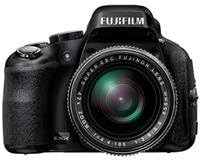
Slika 2: Bočna strana view of the Fujifilm FinePix HS50EXR Digital Camera, showing the vari-angle LCD screen extended for flexible viewing.
7. Video snimanje
To record movies, set the mode dial to the movie icon. The camera supports Full HD (1080p) video recording at 60 frames per second (60fps) with continuous phase detection autofocus.
8. Kontinuirano snimanje
The FinePix HS50EXR can capture images at up to 11 frames per second (fps) in full resolution, allowing you to capture fast-moving action.
9. Korištenje bljeskalice
The camera has a built-in flash. Press the flash button to pop it up. Various flash modes (e.g., Auto, Fill-in, Slow Sync) can be selected via the menu.
10. Povezivost
The camera supports HDMI and USB connectivity for transferring images and videos to a computer or displaying them on a TV. It also features Wi-Fi for wireless image transfer and remote control via a compatible smartphone app.
Održavanje
1. Čišćenje fotoaparata
- Objektiv: Use a soft, lint-free cloth or a lens brush to gently remove dust. For stubborn smudges, use a lens cleaning solution applied to a cloth, not directly to the lens.
- Tijelo: Wipe the camera body with a soft, dry cloth. For heavy dirt, use a cloth lightly dampened with water, then wipe dry. Avoid using organic solvents.
- LCD zaslon: Koristite meku, suhu krpu. Izbjegavajte snažan pritisak na zaslon.
2. Briga o bateriji
- Always use the genuine Fujifilm battery and charger.
- Čuvajte baterije na hladnom i suhom mjestu kada ih ne koristite.
- Ne izlažite baterije ekstremnim temperaturama ili izravnoj sunčevoj svjetlosti.
3. Skladištenje
When storing the camera for extended periods, remove the battery and memory card. Store the camera in a dry, well-ventilated area, away from dust and direct sunlight. Use a desiccant if storing in a humid environment.
Rješavanje problema
Ako naiđete na probleme s fotoaparatom, pogledajte sljedeće uobičajene probleme i rješenja:
| Problem | Mogući uzrok/rješenje |
|---|---|
| Kamera se ne uključuje. | Baterija je prazna ili nepravilno umetnuta. Provjerite je li baterija napunjena i ispravno umetnuta. |
| Slike su mutne. | Camera shake: Use image stabilization, a faster shutter speed, or a tripod. Incorrect focus: Ensure the camera is properly focused on the subject. |
| Bljeskalica se ne aktivira. | Flash is closed or disabled. Pop up the flash and check flash settings in the menu. |
| Greška memorijske kartice. | Card is full, damaged, or incorrectly inserted. Try reinserting the card, using a different card, or formatting the card (this will erase all data). |
| Baterija se brzo prazni. | Frequent use of LCD, flash, or video recording. Reduce usage or carry a spare charged battery. |
For more detailed troubleshooting, refer to the full instruction manual on the supplied CD-ROM.
Tehnički podaci
| Značajka | Detalj |
|---|---|
| Vrsta senzora | 1/2-inch 16 MP BSI-CMOS |
| Objektiv | Fujinon 42x Optical Zoom (24-1000mm equivalent), f/2.8-f/11 aperture |
| Stabilizacija slike | Optički |
| LCD zaslon | 3.0-inch Vari-angle, 920K-dot |
| Viewnalazač | Electronic (EVF), 920K-dot, with eye sensor |
| Video rezolucija | Full HD 1080p pri 60fps |
| File Formati | JPEG (Exif Ver 2.3), RAW (RAF format), RAW+JPEG |
| Brzina zatvarača | 30 sekundi do 1/4000 sekunde |
| Kontrola izloženosti | Program AE, Shutter Priority AE, Aperture Priority AE, Manual |
| Fokus sustav | Intelligent Hybrid AF (Phase Detection, Contrast AF), Manual Focus |
| Povezivost | HDMI, USB, Wi-Fi |
| Mediji za pohranu | SD, microSD (UHS-I compatible) |
| Težina | Otprilike 2.3 funte (1.04 kg) |
Informacije o jamstvu
Your Fujifilm FinePix HS50EXR Digital Camera comes with a manufacturer's warranty. Please refer to the warranty card included in your product packaging or visit the official Fujifilm webstranicu za detaljne uvjete i odredbe u vezi s jamstvom i servisom.
podrška
For further assistance, technical support, or to download the full instruction manual and software updates, please visit the official Fujifilm support webstranica:
You may also contact Fujifilm customer service directly through the contact information provided on their webmjesto.


