
1. Uvod
Hvala na kupnjiasing the Lexon LR98R1 Onoff LCD Alarm Clock. This manual provides detailed instructions for the proper setup, operation, and maintenance of your device. Please read this manual thoroughly before use and retain it for future reference.
The Lexon Onoff alarm clock features a unique design where flipping the clock activates or deactivates the alarm. It includes an LCD display with a blue electroluminescent backlight for clear visibility.
2. Sigurnosne informacije
- Ne izlažite uređaj ekstremnim temperaturama, izravnoj sunčevoj svjetlosti ili visokoj vlažnosti.
- Izbjegavajte ispuštanje uređaja ili njegovo izlaganje jakim udarcima.
- Do not attempt to disassemble or modify the alarm clock. This will void the warranty.
- Držite uređaj dalje od vode i drugih tekućina.
- Iskorištene baterije odložite odgovorno u skladu s lokalnim propisima.
- Koristite samo navedenu vrstu baterija (2 x AAA).
3. Sadržaj paketa
Provjerite jesu li svi artikli prisutni u paketu:
- Lexon LR98R1 Onoff LCD Alarm Clock
- Korisnički priručnik (ovaj dokument)
Napomena: AAA baterije nisu uključene i moraju se kupiti zasebno.
4. Proizvod je gotovview
Familiarize yourself with the components of your Lexon Onoff alarm clock.
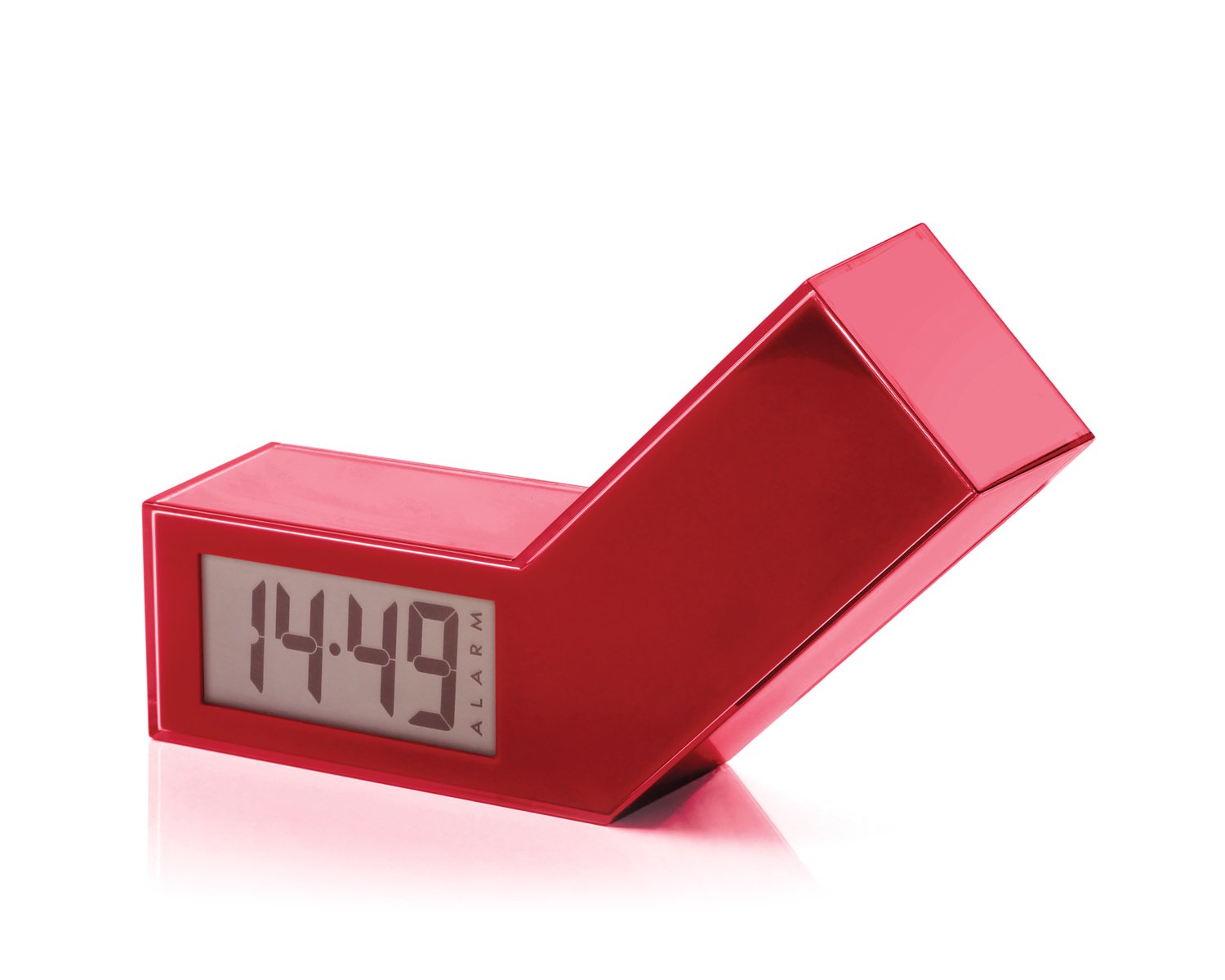
Slika 1: Prednja strana view of the Lexon LR98R1 Onoff LCD Alarm Clock. The image displays the alarm clock in its red casing, with the LCD screen visible. The side labeled 'ON' is facing upwards, indicating the alarm is active. The clock has a minimalist rectangular design.
While specific button labels are not visible in the provided image, typical alarm clock controls are usually located on the back or sides. These generally include:
- Gumb za postavljanje vremena: To adjust the current time.
- Gumb za postavljanje alarma: To adjust the alarm time.
- Hour/Minute Adjustment Buttons: To change hour and minute values.
- Gumb za odgodu/svjetlo: To temporarily silence the alarm or activate the backlight.
- Odjeljak za baterije: Located on the back or bottom.
5. Postavljanje
5.1 Ugradnja baterije
- Locate the battery compartment cover on the back or bottom of the alarm clock.
- Pomaknite ili podignite poklopac da biste otvorili pretinac.
- Umetnite dvije (2) AAA baterije, pazeći na ispravan polaritet (+ i -) kako je naznačeno unutar odjeljka.
- Čvrsto namjestite poklopac odjeljka za baterije.
Note: Batteries are not included. Please use new AAA alkaline batteries for optimal performance.
5.2 Početno uključivanje
Once batteries are installed, the LCD display should illuminate, and the clock will typically start at a default time (e.g., 12:00 AM). You will then need to set the current time and alarm.
6. Upute za rad
6.1 Postavljanje trenutnog vremena
- Pritisnite i držite POSTAVLJENO VRIJEME button (or similar, refer to device markings) until the hour digits begin to flash.
- Koristite SAT i MINUTA adjustment buttons to set the correct hour and minute.
- Pritisnite POSTAVLJENO VRIJEME ponovno za potvrdu i izlaz iz načina podešavanja vremena.
6.2 Postavljanje vremena alarma
- Pritisnite i držite SET ALARMA button (or similar) until the alarm hour digits begin to flash.
- Koristite SAT i MINUTA adjustment buttons to set your desired alarm time.
- Pritisnite SET ALARMA again to confirm and exit alarm setting mode.
6.3 Activating/Deactivating the Alarm (Onoff Feature)
The Lexon Onoff alarm clock features a unique flip mechanism:
- Do AKTIVIRATI the alarm, place the clock with the side labeled "ON" facing upwards. An alarm icon should appear on the LCD display.
- Do DEAKTIVIRATI the alarm, flip the clock so the side labeled "ISKLJUČENO" is facing upwards. The alarm icon should disappear from the display.
6.4 Silencing the Alarm / Snooze Function
- Kad se oglasi alarm, pritisnite SNOOZE / SVJETLO button (usually a large button on top) to temporarily silence the alarm. The alarm will sound again after a few minutes (typically 5-10 minutes).
- To completely turn off the alarm for the day, flip the clock to the "ISKLJUČENO"pozicija".
6.5 Pozadinsko osvjetljenje zaslona
Pritisnite tipku SNOOZE / SVJETLO button to activate the blue electroluminescent backlight for a few seconds, allowing you to view vrijeme u uvjetima slabog osvjetljenja.
7. Održavanje
7.1 Čišćenje
Wipe the surface of the alarm clock with a soft, dry cloth. Do not use abrasive cleaners, solvents, or chemical sprays, as these may damage the finish or electronic components.
7.2 Zamjena baterije
When the display dims or the alarm function becomes unreliable, it is time to replace the batteries. Follow the battery installation steps in Section 5.1. Always replace both AAA batteries at the same time.
8. Rješavanje problema
| Problem | Mogući uzrok | Otopina |
|---|---|---|
| Zaslon je prazan ili taman. | Baterije su prazne ili nepravilno postavljene. | Zamijenite baterije novim AAA baterijama, pazeći na ispravan polaritet. |
| Alarm se ne oglašava. | Alarm is not activated (clock is in "OFF" position) or alarm time is not set. | Flip the clock to the "ON" position. Verify the alarm time is set correctly (Section 6.2). Ensure batteries are not low. |
| Vrijeme je netočno. | Time was not set correctly or batteries were removed/replaced. | Reset the current time (Section 6.1). |
| Pozadinsko osvjetljenje ne radi. | Slabe baterije. | Zamijenite baterije. |
9. Specifikacije
| Broj modela | LR98R1 |
| Marka | Lexon |
| Vrsta zaslona | LCD with Blue Electroluminescent Backlight |
| Izvor napajanja | 2 x AAA baterije (nisu uključene) |
| Materijal | ABS / Injected Polycarbonate |
| Dimenzije (D x Š x V) | 13.5 x 3.5 x 8 cm (otprilike 5.3 x 1.4 x 3.1 inča) |
| Vrsta kretanja | Kvarcni |
| Posebne značajke | Onoff flip alarm activation/deactivation, Snooze function |
10. Jamstvo i podrška
The Lexon LR98R1 Onoff LCD Alarm Clock comes with a 2-godišnje jamstvo proizvođača od datuma kupnje. Ovo jamstvo pokriva nedostatke u materijalu i izradi pri normalnoj uporabi.
Jamstvo ne pokriva:
- Šteta uzrokovana nesrećom, zlouporabom, pogrešnom uporabom, poplavom, požarom, potresom ili drugim vanjskim uzrocima.
- Damage caused by operating the product outside the permitted or intended uses described in this manual.
- Damage caused by service performed by anyone who is not an authorized representative of Lexon.
- Products or parts that have been modified to alter functionality or capability without the written permission of Lexon.
For warranty claims or technical support, please contact Lexon customer service through their official website or your retailer. Please have your proof of purchase and model number (LR98R1) ready.