
Uvod
This manual provides essential information for setting up, operating, and maintaining your Microsoft Xbox 360 E 250GB Console. Please read this guide thoroughly before using your console to ensure proper function and longevity.
Sadržaj paketa
Provjerite sadrži li vaš paket sljedeće stavke:
- Xbox 360 E 250GB Console
- Xbox 360 Wireless Controller (Black)
- Napajanje i strujni kabel
- HDMI kabel
- AA Batteries for Wireless Controller
Konzola gotovaview
Familiarize yourself with the various ports and buttons on your Xbox 360 E console.

Image: Microsoft Xbox 360 E 250GB Console. This image displays the front and side view of the Xbox 360 E console, showing its compact design and disc drive slot.
Prednja ploča
- Gumb za napajanje: Turns the console on or off.
- Disc Drive: Insert game discs or DVDs.
- USB priključci: Connect accessories like USB drives or wired controllers.
- Controller Connect Button: Used to wirelessly sync controllers.
Stražnja ploča
- Priključak za napajanje: Spojite napajanje.
- HDMI priključak: Connect to a TV or monitor for high-definition video and audio.
- AV priključak: For older composite or component cables (not included with all models).
- Ethernet priključak: Spojite se na žičanu mrežu.
- USB priključci: Additional ports for accessories.
Wireless Controller Overview
The Xbox 360 Wireless Controller allows for intuitive gameplay. Familiarize yourself with its buttons and functions.
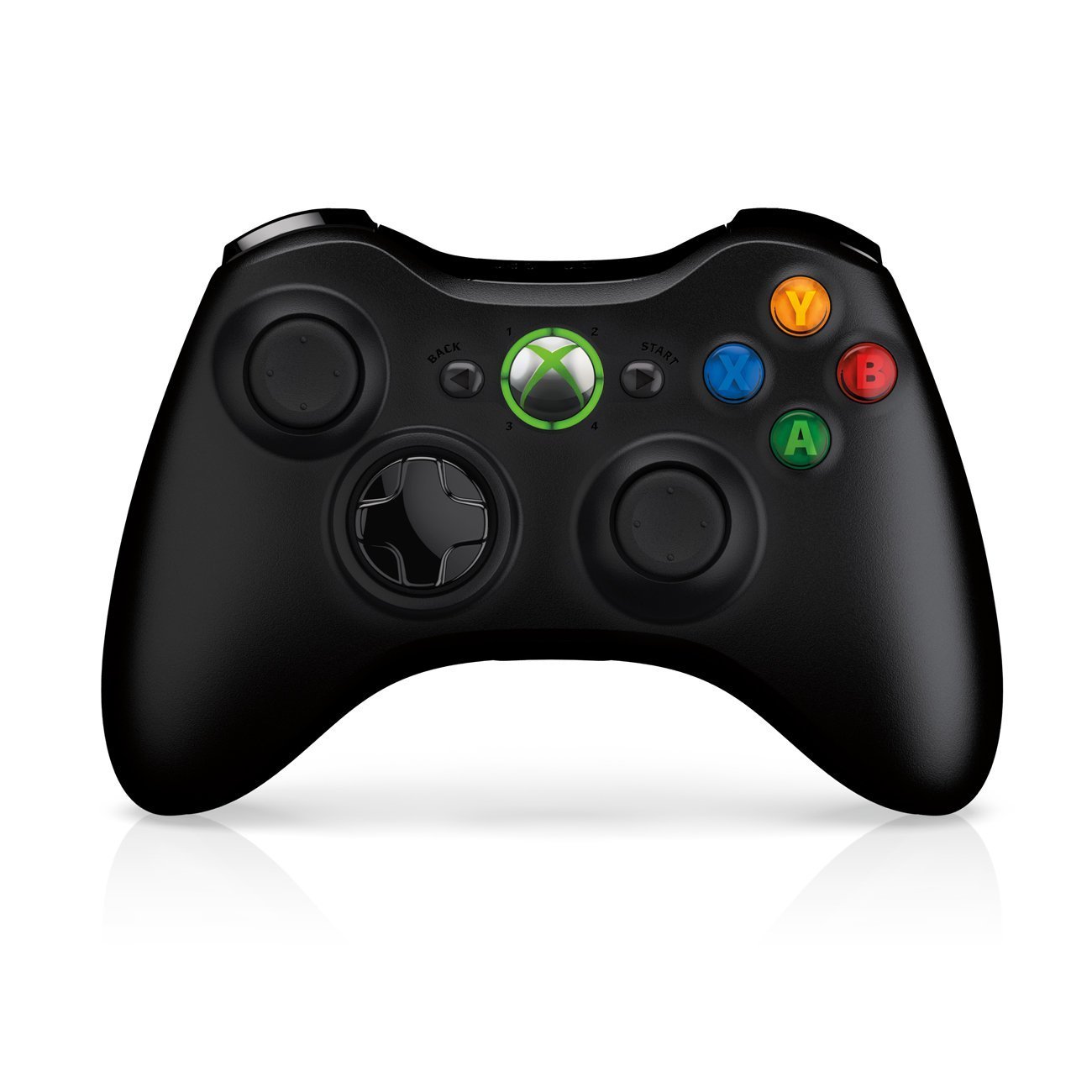
Image: Xbox 360 Wireless Controller. This image displays the front view of the black wireless controller, highlighting the D-pad, analog sticks, face buttons (A, B, X, Y), Guide button, Start button, and Back button.
Gumbi i funkcije kontrolera
- Lijeva/desna analogna palica: Za kretanje i kontrolu kamere.
- D-Pad (smjerna pločica): For menu navigation and specific game controls.
- Gumbi A, B, X, Y: Primary action buttons, color-coded (Green A, Red B, Blue X, Yellow Y).
- Gumb za pokretanje: Pauses games or opens in-game menus.
- Gumb Natrag: Returns to previous screens or opens specific game functions.
- Guide Button (Xbox Logo): Powers on the console, accesses the Xbox Guide, or turns off the controller.
- Lijevi/Desni branici (LB, RB): Gumbi na ramenu za razne radnje u igri.
- Lijevi/Desni okidači (LT, RT): Analog triggers for precise control, often used for acceleration/braking or firing weapons.
Ugradnja baterije
The wireless controller requires two AA batteries. To install:
- Press the tab on the top of the battery pack and pull down to remove it.
- Umetnite dvije AA baterije, pazeći na ispravan polaritet (+/-).
- Slide the battery pack back into the controller until it clicks into place.
Vodič za postavljanje
1. Spajanje konzole
- Priključak za napajanje: Connect the power cord to the power supply, then connect the power supply to the console's power port. Plug the power cord into a wall outlet.
- Video/audio priključak: Connect one end of the HDMI cable to the HDMI port on the back of your Xbox 360 E console. Connect the other end to an available HDMI input on your TV or monitor.
- Internetska veza (nije obavezno): For wired internet, connect an Ethernet cable from your router/modem to the Ethernet port on the console. For wireless, the console has built-in Wi-Fi.
2. Spajanje bežičnog kontrolera
- Ensure batteries are installed in the controller.
- Turn on the console by pressing the Power button on the console or the Guide button on the controller.
- Press and release the Connect button on the console (small button near the USB ports on the front).
- Within 20 seconds, press and release the Connect button on the controller (small button on the top edge, between the bumpers).
- The lights around the Guide button on the controller and the console will flash and then glow steadily, indicating a successful connection.
3. Početno uključivanje i postavke sustava
After connecting, turn on your console. Follow the on-screen prompts to:
- Odaberite svoj jezik i regiju.
- Adjust display settings (resolution, aspect ratio).
- Set up your internet connection (wired or wireless).
- Create or sign in to an Xbox Live profile.
Operating Your Console
Igranje igara i medija
- Turn on your console and TV.
- Open the disc tray by pressing the eject button on the console.
- Place a game disc or DVD/Blu-ray disc into the tray, label side up.
- Close the disc tray. The console should automatically start the game or media. If not, select it from the dashboard.
- Digital games can be launched directly from the Xbox Dashboard.
Connecting to Xbox Live
Xbox Live allows you to play online, download games and content, and access streaming services. Ensure your console is connected to the internet.
- From the Xbox Dashboard, navigate to the "Social" or "Settings" tab.
- Select "Join Xbox Live" or "Network Settings" to configure your connection and create/manage your profile.
- A 1-month Xbox LIVE Gold trial may be included with your console.
Postavke sustava
Access system settings to customize your console experience:
- Zaslon i zvuk: Adjust resolution, audio output, and screen format.
- Skladištenje: Manage your 250GB hard drive, view free space, and delete content.
- Mrežne postavke: Configure wired or wireless internet connections.
- Family Settings: Set parental controls for content and online access.
Održavanje
Čišćenje konzole
- Always power off and unplug the console before cleaning.
- Use a soft, dry, lint-free cloth to wipe down the exterior of the console and controller.
- Ne koristite tekuća sredstva za čišćenje, aerosole ili abrazivne materijale.
- Keep ventilation openings clear of dust and obstructions to ensure proper airflow.
Skladištenje i postavljanje
- Place the console on a stable, flat surface.
- Ensure adequate ventilation around the console. Do not place it in an enclosed cabinet or on soft surfaces that can block vents.
- Avoid exposing the console to direct sunlight, excessive heat, or extreme cold.
Rješavanje problema
If you encounter issues with your Xbox 360 E console, refer to the following common solutions:
No Power / Console Not Turning On
- Ensure the power cord is securely connected to the console, power supply, and wall outlet.
- Check the power supply unit (PSU) indicator light. If it's off or red, try a different outlet or contact support.
- Pokušajte s drugom utičnicom.
Nema video ili audio izlaza
- Verify the HDMI cable is securely connected to both the console and your TV/monitor.
- Ensure your TV/monitor is set to the correct HDMI input source.
- Pokušajte s drugim HDMI kabelom ili drugim HDMI priključkom na televizoru.
- Check your TV's volume and mute settings.
Pogreške čitanja diska
- Provjerite je li disk čist i bez ogrebotina ili mrlja. Nježno obrišite mekom krpom od središta prema van.
- Try a different game or movie disc to determine if the issue is with the disc or the console.
- Ensure the console is placed on a stable, flat surface and not being moved during disc operation.
Wireless Controller Not Connecting
- Ensure the controller has fresh batteries.
- Resync the controller by pressing the Connect buttons on both the console and controller as described in the "Setup Guide".
- Provjerite da u blizini nema jakih bežičnih smetnji.
For further assistance, please refer to the official Microsoft Xbox support webmjesto.
Tehnički podaci
| Značajka | Detalj |
|---|---|
| Broj modela | M9V-00001 |
| Skladištenje | 250 GB tvrdi disk |
| Bežično povezivanje | Ugrađeni Wi-Fi |
| Kontrolor | 1 Black Wireless Controller |
| Regijski kod | NTSC |
| Dimenzije proizvoda | 12 x 6 x 24 inča |
| Težina artikla | 10.32 funti |
| Potrebne baterije | 2 AA batteries for controller |
| Datum izlaska | 1. lipnja 2013 |
Informacije o jamstvu
For detailed warranty information regarding your Microsoft Xbox 360 E 250GB Console, please refer to the warranty card included with your product or visit the official Microsoft Xbox support webstranica. Uvjeti jamstva mogu se razlikovati ovisno o regiji i datumu kupnje.
podrška
If you require technical assistance, have questions about your console, or need to report an issue, please contact Microsoft Xbox Support:
- Mrežna podrška: Posjetite službenu osobu Podrška za Xbox webmjesto za često postavljana pitanja, vodiče za rješavanje problema i mogućnosti kontakta.
- Telefonska podrška: Refer to your product packaging or the Xbox Support webstranica za regionalne telefonske brojeve.