
1. Uvod
Thank you for choosing the SCHWAIGER DCR600HD Full HD Cable TV Receiver. This manual provides essential information for the safe and efficient use of your device. Please read these instructions carefully before installation and operation, and keep them for future reference.
2. Sigurnosne upute
- Napajanje: Only use the power adapter supplied with the device. Ensure the voltage odgovara vašoj lokalnoj opskrbi strujom.
- Ventilacija: Do not block ventilation openings. Ensure adequate space around the receiver for proper airflow to prevent overheating.
- Vlaga: Keep the device away from water, moisture, and high humidity. Do not expose it to rain or splashes.
- Čišćenje: Isključite napajanje prije čišćenja. Koristite meku, suhu krpu. Nemojte koristiti tekuća ili aerosolna sredstva za čišćenje.
- Mjesto: Place the receiver on a stable, flat surface. Avoid direct sunlight, heat sources, and strong magnetic fields.
- Servisiranje: Ne pokušavajte sami otvarati ili popravljati uređaj. Za sve servisne radove obratite se kvalificiranom osoblju.
3. Sadržaj paketa
Molimo provjerite paket za sljedeće stavke:
- SCHWAIGER DCR600HD Cable TV Receiver
- Daljinski upravljač
- Power Cable (integrated or separate adapter)
- Korisnički priručnik (ovaj dokument)
4. Proizvod je gotovview
4.1 Prednja ploča
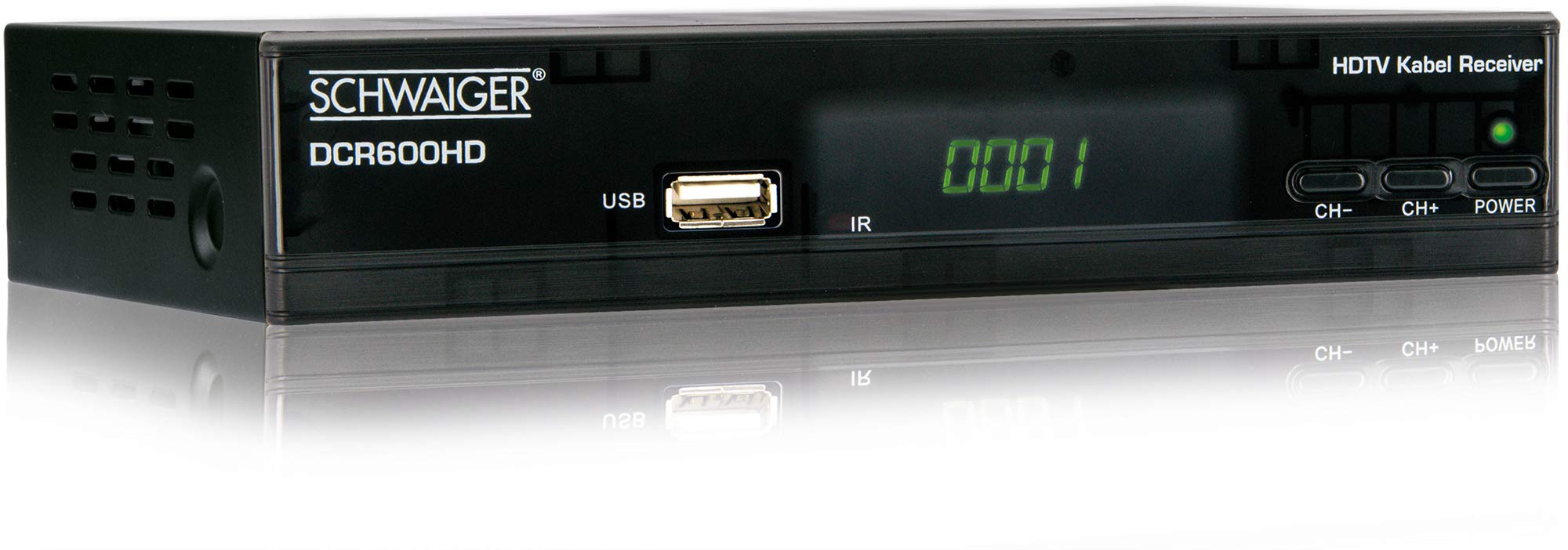
Slika: Ispred view of the SCHWAIGER DCR600HD receiver, showing the display, USB port, IR receiver, and control buttons.
- Prikaz: Prikazuje broj kanala ili vrijeme.
- USB priključak: Za spajanje USB uređaja za pohranu podataka za reprodukciju medija.
- IR: Infracrveni prijemnik za daljinski upravljač.
- CH- / CH+: Buttons for changing channels.
- VLAST: Button to turn the receiver on or off (standby).
4.2 Stražnja ploča

Slika: Stražnji view of the SCHWAIGER DCR600HD receiver, displaying various input and output ports.
- RF IN: Input for connecting to your cable TV network.
- ETHERNET / LAN: For network connection (if supported for updates or specific services).
- HDMI: High-Definition Multimedia Interface output for connecting to an HD TV.
- TV SCART (CVBS): SCART output for connecting to older TVs or other devices.
- ~220-240V 50/60Hz: Ulazno napajanje za prijemnik.
4.3 Daljinski upravljač

Slika: Layout of the SCHWAIGER DCR600HD remote control, showing various function buttons.
The remote control allows you to operate all functions of your receiver. Familiarize yourself with the button layout for easy navigation.
5. Postavljanje
5.1 Spajanje prijemnika
- Connect to Cable Network: Connect your cable TV antenna cable to the RF ULAZ priključak na stražnjoj ploči prijemnika.
- Spoji se na TV:
- For High Definition (HD) picture quality, connect an HDMI cable from the HDMI priključak na prijemniku na HDMI ulaz na vašem televizoru.
- For standard definition (SD) or older TVs, connect a SCART cable from the TV SCART (CVBS) port on the receiver to the SCART input on your TV.
- Priključite napajanje: Plug the power cable into the receiver's power input and then into a wall outlet.
- Uključite TV: Switch on your television and select the correct input source (HDMI or SCART) corresponding to your connection.
5.2 Prva instalacija
Upon first power-on, the receiver will typically guide you through an initial setup process:
- Odabir jezika: Use the remote control to select your preferred language for the on-screen menus.
- Odabir zemlje: Select your country. This helps configure regional settings and channel frequencies.
- Skeniranje kanala: The receiver will prompt you to perform an automatic channel scan. Confirm to start scanning for available cable TV channels. This process may take several minutes.
- Spremi postavke: Once the scan is complete, save the found channels. Your receiver is now ready for use.
6. Upute za rad
6.1 Osnovni rad
- Uključivanje/isključivanje: Pritisnite tipku VLAST button on the remote control or front panel to switch the receiver on or to standby mode.
- Odabir kanala: Koristite CH+ / CH- buttons on the remote or front panel to change channels sequentially. Alternatively, use the number buttons to directly enter a channel number.
- Podešavanje glasnoće: Koristite GLASNOST+ / VOL- buttons on the remote control to adjust the audio volume.
- Isključi zvuk: Pritisnite tipku MUČI button to temporarily turn off the sound. Press again to restore.
6.2 Elektronički programski vodič (EPG)
The EPG provides a schedule of current and upcoming TV programs.
- Pritisnite tipku EPG button on the remote control to access the Electronic Program Guide.
- Navigate through channels and program times using the arrow buttons.
- Pritisnite OK do view detaljne informacije o odabranom programu.
6.3 Reprodukcija medija putem USB-a
You can play multimedia files (AVI, MKV, MP3) from a USB storage device.
- Umetnite USB flash pogon ili vanjski tvrdi disk u USB priključak na prednjoj ploči.
- The receiver should detect the USB device and prompt you to open the media player, or you can access it via the main menu.
- Krećite se kroz svoje files and folders using the arrow buttons and press OK to select and play a file.
- Use the media control buttons (Play, Pause, Stop, Fast Forward, Rewind) on the remote control for playback.
6.4 Teletekst
Access teletext services provided by broadcasters.
- Pritisnite tipku TTX button on the remote control to activate teletext.
- Use the number buttons to enter page numbers or the arrow buttons to navigate.
- Pritisnite TTX again to exit teletext.
7. Održavanje
- Čišćenje: Regularly wipe the receiver with a soft, dry, lint-free cloth. Do not use abrasive cleaners, waxes, or solvents.
- Ventilacija: Ensure that the ventilation slots are not obstructed by dust or other objects.
- Ažuriranja softvera: Povremeno provjerite proizvođačeve website for any available software updates for your model. Follow the instructions provided with the update carefully.
8. Rješavanje problema
If you encounter problems with your receiver, refer to the following common issues and solutions:
| Problem | Mogući uzrok/rješenje |
|---|---|
| Nema slike ni zvuka |
|
| Daljinski upravljač ne radi |
|
| No channels found during scan |
|
| USB medij se ne reproducira |
|
9. Specifikacije
| Značajka | Opis |
|---|---|
| Naziv modela | DCR600HD |
| Vrsta proizvoda | Digital DVB TV Tuner / Digital Player |
| Boja | Crna |
| Dimenzije (Š x D x V) | 17 cm x 4.5 cm x 10 cm |
| Težina | 380 g |
| Tehnologija povezivanja | HDMI, USB, SCART, RF |
| Kompatibilni uređaji | televizija |
| Video kodiranje | H.264 |
| Podržane rezolucije | 576i, 576p, 720p, 1080i, 1080p |
| Omjeri stranica | 4:3, 16:9 |
| Način audio izlaza | Stereo |
| Podržani audio formati | MP3 |
| Podržane vrste medija | AVI, MKV, MP3 |
| Ukupno USB priključaka | 1 (USB 4-pin Type A) |
| Ukupno HDMI priključaka | 1 |
| Potrošnja energije | 3.8 W |
| Voltage | 240 volti |
| Posebne značajke | Electronic Program Guide (EPG), Teletext, Built-in Bluetooth (Note: Bluetooth functionality may vary by region/firmware) |
| Daljinski upravljač | Uključeno |
10. Jamstvo i podrška
For warranty information and technical support, please refer to the documentation included with your product packaging or visit the official SCHWAIGER webstranicu. Sačuvajte račun kao dokaz o kupnji za slučaj reklamacije.