
1. Uvod
This manual provides essential instructions for the proper setup, operation, and maintenance of your AmazonBasics 10-Port USB 3.0 Hub. Please read this manual thoroughly before using the product to ensure optimal performance and safety. Keep this manual for future reference.
2. Sigurnosne upute
- Ne izlažite uređaj vlazi, ekstremnim temperaturama ili izravnoj sunčevoj svjetlosti.
- Ne pokušavajte rastavljati ili modificirati uređaj. To može poništiti jamstvo i predstavljati sigurnosni rizik.
- Use only the provided power adapter. Using an incompatible power adapter may damage the device or connected peripherals.
- Držite uređaj podalje od djece.
- Ensure proper ventilation around the hub during operation.
3. Sadržaj paketa
Provjerite jesu li sve dolje navedene stavke prisutne u vašem paketu:
- AmazonBasics 10-Port USB 3.0 Hub
- Adapter za napajanje (DC 15V)
- USB 3.0 podatkovni kabel
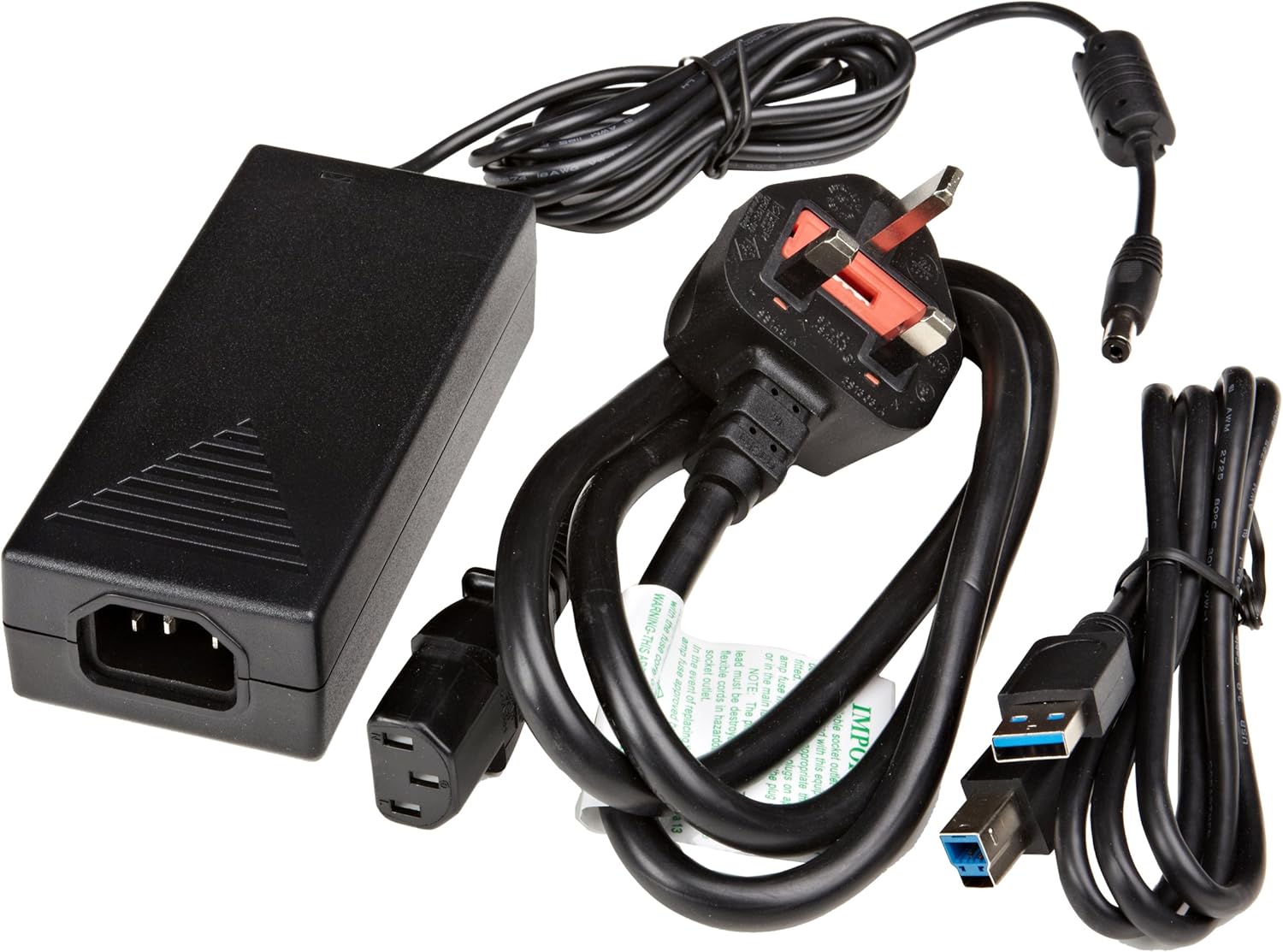
Slika 3.1: The image displays the AmazonBasics 10-Port USB 3.0 Hub, its power adapter, and a USB 3.0 data cable, which are the typical contents found in the product packaging.
4. Proizvod je gotovview
The AmazonBasics 10-Port USB 3.0 Hub expands your computer's connectivity, offering ten USB 3.0 ports for various peripherals. It supports high-speed data transfer and is backward compatible with USB 2.0 devices.
4.1 Prednja i bočna strana View

Slika 4.1: This image shows the front and left side of the USB hub. On the front, three USB 3.0 ports are visible, two of which are labeled 'Fast'. The left side features the upstream USB 3.0 port for connecting to a computer and the DC 15V power input.
4.2 Gornji i stražnji dio View

Slika 4.2: Ova slika pruža pogled odozgo prema dolje view of the USB hub, highlighting five additional USB 3.0 ports located on the rear panel. An 'ON/OFF' switch is also visible on the side, allowing users to power the hub on or off.
4.3 Dno View

Slika 4.3: Dno view of the hub shows four rubber feet for stability and a product label containing regulatory information and the model number.
5. Vodič za postavljanje
Follow these steps to set up your USB 3.0 hub:
- Spojite strujni adapter: Plug the provided power adapter into the DC 15V input port on the side of the USB hub. Then, plug the power adapter into a standard electrical outlet.
- Povežite se s računalom: Use the supplied USB 3.0 data cable to connect the upstream USB 3.0 port on the hub (located on the side) to an available USB 3.0 port on your computer.
- Uključivanje: If the hub has an ON/OFF switch (refer to Figure 4.2), ensure it is in the 'ON' position.
- Povežite periferne uređaje: You can now connect your USB devices (e.g., external hard drives, keyboards, mice, flash drives) to any of the ten available USB 3.0 ports on the hub.
The hub supports automatic switching between self-power and bus-power mode. For optimal performance with multiple high-power devices, ensure the power adapter is connected.
6. Operacija
Once connected, the AmazonBasics 10-Port USB 3.0 Hub operates automatically. Your computer should recognize connected devices without requiring additional drivers for most operating systems.
- Brzina USB 3.0: The hub supports SuperSpeed (5 Gbps), High Speed (480 Mbps), Full Speed (12 Mbps), and Low Speed (1.5 Mbps) data transfer rates, depending on the connected device and your computer's USB port capabilities.
- Kompatibilnost uređaja: The hub is compatible with both USB 3.0 and USB 2.0 specifications, allowing you to connect a wide range of USB devices.
- Upravljanje napajanjem: The hub intelligently manages power distribution to connected devices. For devices requiring more power, ensure the external power adapter is connected.
7. Rješavanje problema
If you encounter issues with your USB hub, refer to the following common problems and solutions:
| Problem | Moguće rješenje |
|---|---|
| Devices are not recognized. |
|
| Spore brzine prijenosa podataka. |
|
| Hub is not powering on. |
|
| Intermittent device connection. |
|
8. Specifikacije
- Broj modela: HU37A0V1-UK
- Priključci: 10 x USB 3.0
- Brzina prijenosa podataka: Up to 5 Gbps (USB 3.0 SuperSpeed)
- Kompatibilnost s prethodnim verzijama: USB 2.0, USB 1.1
- Ulazna snaga: DC 15V (putem priloženog adaptera za napajanje)
- Dimenzije (DxŠxV): Približno 5.71 x 2.96 x 1.06 inča (14.5 x 7.5 x 2.7 cm)
- Težina: Otprilike 1.29 funti (0.58 kg)
- Kompatibilnost operativnog sustava: Windows, macOS, Linux (driver-free for most systems)
9. Njega i održavanje
- Clean the hub with a soft, dry cloth. Do not use liquid cleaners or aerosols.
- Izbjegavajte blokiranje ventilacijskih otvora.
- Čuvajte čvorište na hladnom i suhom mjestu kada nije u upotrebi.
10. Informacije o recikliranju
Dispose of this product according to local regulations. Do not dispose of it with general household waste. For more information on recycling electronic waste, contact your local authorities or the retailer where you purchased the product.
11. Jamstvo i podrška
For warranty information or technical support, please refer to the AmazonBasics support page or contact Amazon customer service directly. Details can typically be found on the Amazon webweb-mjesto u odjeljcima 'Pomoć' ili 'Korisnička služba'.