
1. Uvod
This user manual provides comprehensive instructions for the Yamaha PSRE443 61-Key Portable Keyboard. It covers essential information for setting up, operating, maintaining, and troubleshooting your instrument. The PSRE443 is designed for musicians of all levels, offering a wide range of voices, accompaniment styles, and interactive learning features.
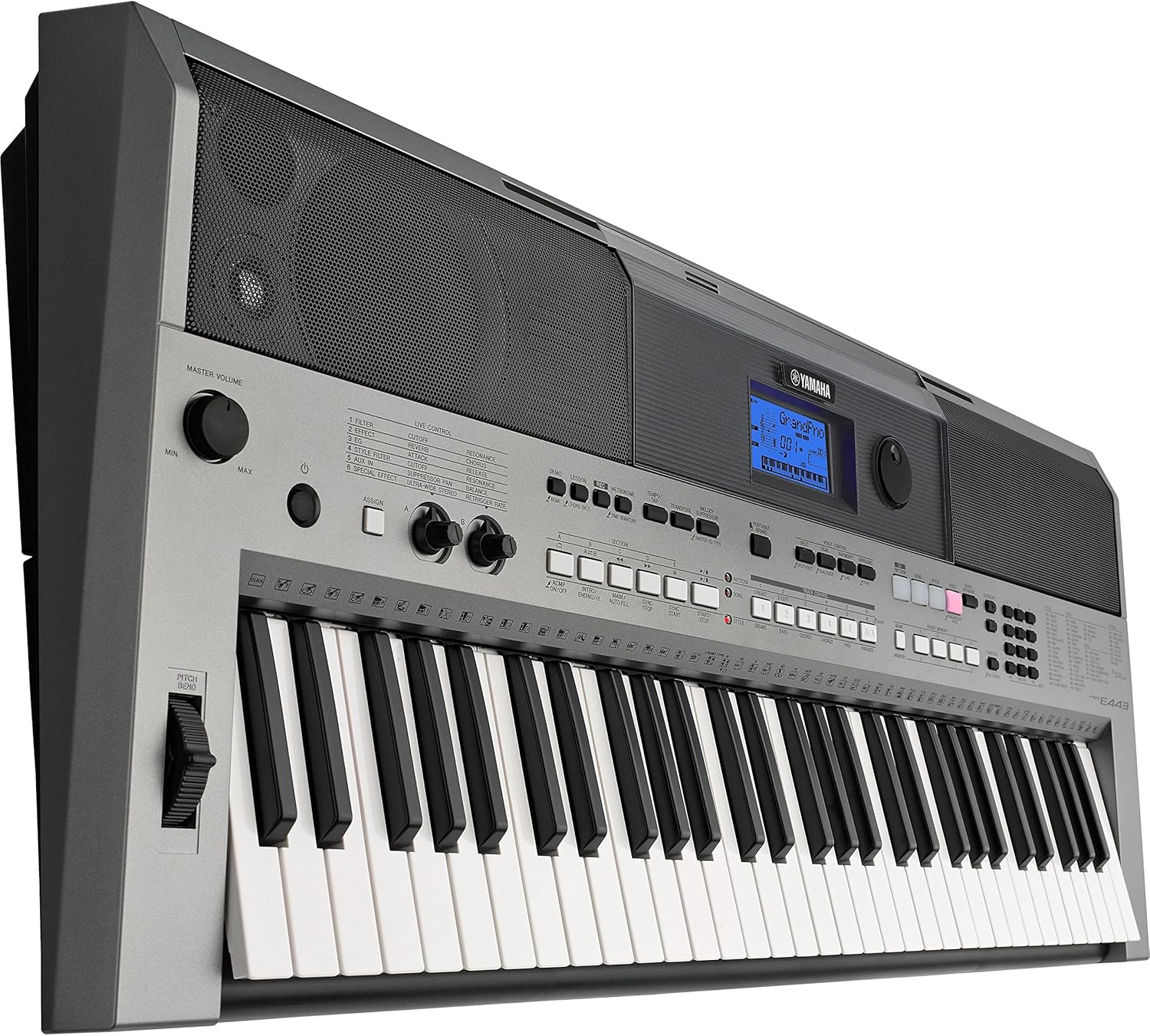
Slika 1.1: Prednja strana view of the Yamaha PSRE443 Portable Keyboard, showcasing the 61 keys, control panel, and integrated speakers.
2. Sigurnosne informacije
Please read these safety precautions carefully before using your PSRE443 keyboard to ensure safe and optimal performance.
- Napajanje: Use only the specified power adapter (not included) or 6 AA batteries. Ensure the voltage matches the requirements of the instrument.
- Mjesto: Izbjegavajte postavljanje instrumenta na izravnu sunčevu svjetlost, u blizinu izvora topline ili u pretjerano prašnjava, vlažna ili vibrirajuća okruženja.
- Voda i vlaga: Ne izlažite instrument kiši ili vlazi. Ne stavljajte posude s tekućinama na instrument.
- Rukovanje: Ne primjenjujte pretjeranu silu na tipke, gumbe ili priključke. Izbjegavajte ispuštanje instrumenta.
- Čišćenje: Clean the instrument with a soft, dry cloth. Do not use paint thinners, solvents, or cleaning fluids.
3. Postavljanje
3.1 Raspakiranje
Carefully remove the keyboard from its packaging. Retain the packaging materials for future transport or storage.
3.2 Priključak za napajanje
The PSRE443 can be powered using an AC adapter (sold separately) or batteries.
- Using an AC Adapter: Connect the appropriate Yamaha AC power adapter (e.g., PA-150, sold separately) to the 12V DC IN jack on the rear panel of the keyboard. Plug the adapter into a standard AC outlet.
- Korištenje baterija: Open the battery compartment on the underside of the keyboard. Insert six new "AA" size alkaline (LR6) or rechargeable Ni-MH batteries, ensuring correct polarity.
3.3 Connecting Headphones or External Audio System
To listen privately or connect to an external amplifier/speaker system, use the PHONES/OUTPUT jack.
- Connect stereo headphones to the PHONES/OUTPUT jack. The internal speakers will be muted.
- Za vanjske amplification, connect an audio cable from the PHONES/OUTPUT jack to the input of your amplifier ili pojačani zvučnici.

Figure 3.1: Rear panel connections, including DC IN, USB TO HOST, USB TO DEVICE, SUSTAIN, AUX IN, and PHONES/OUTPUT jacks.
4. Osnovni rad
4.1 Uključivanje/isključivanje
Pritisnite tipku [VLAST] gumb za uključivanje instrumenta. Pritisnite i držite [VLAST] gumb nekoliko sekundi da biste ga isključili.
4.2 Kontrola glasnoće
Podesite [MASTER VOLUME] knob to set the overall output level of the instrument.
4.3 Odabir glasova
The PSRE443 features 755 high-quality voices, including realistic Sweet! and Cool! Voices.
- Pritisnite tipku [GLAS] dugme.
- Use the numeric keypad or the [CATEGORY] buttons to browse and select a voice. The selected voice name and number will appear on the LCD display.
4.4 Selecting Styles
The keyboard includes 200 diverse accompaniment styles.
- Pritisnite tipku [STIL] dugme.
- Koristite numeričku tipkovnicu ili [CATEGORY] buttons to select a style.
- Pritisnite tipku [ACMP UKLJUČEN/ISKLJUČEN] button to start/stop the accompaniment.
5. Napredne značajke
5.1 Real-time Control Knobs
The two assignable real-time control knobs allow for dynamic manipulation of sound parameters such as filter cutoff, effects, and sound envelope during performance.
- Okrenite [ASSIGN] button to select the parameter you wish to control (e.g., Filter, Effect, EQ).
- Zakrenite [CONTROL KNOB A] or [CONTROL KNOB B] to adjust the selected parameter in real-time.

Figure 5.1: Real-time control knobs (A and B) and the ASSIGN button for dynamic sound manipulation.
5.2 Kotač za promjenu visine tona
Use the pitch bend wheel located on the left side of the keyboard to smoothly raise or lower the pitch of notes while playing.
5.3 PATTERN Function
The PATTERN function allows you to create and play dynamic grooves, similar to a DJ. Press the [DJ PATTERN] button to activate this mode and use the various pads and controls to build your patterns.
5.4 Arpeggio Function
The Arpeggio function automatically generates arpeggiated phrases based on the chords you play. Press the [ARPEGGIO] button to activate and deactivate this feature.
5.5 6-Track Sequencer
Record your performances using the built-in 6-track sequencer. This allows you to layer multiple instrument parts to create complete songs.
- Pritisnite tipku [SNIMANJE] gumb za ulazak u stanje pripravnosti za snimanje.
- Pritisnite [START / STOP] za početak snimanja.
- Pritisnite [START / STOP] ponovno za zaustavljanje snimanja.
5.6 Music Database
The Music Database provides 305 song titles with pre-configured keyboard settings (voice, style, tempo) for quick and easy setup. Press the [MUSIC DATABASE] button and use the numeric keypad to select a song.
5.7 Yamaha Education Suite (Y.E.S.)
Y.E.S. offers a suite of lesson functions to help beginners learn to play. These include listening, timing, and waiting modes to practice songs at your own pace.
6. Povezivost
6.1 AUX IN Terminal
Connect an external audio player (e.g., smartphone, MP3 player) to the AUX IN terminal using a stereo mini cable. This allows you to play along with your favorite songs through the keyboard's speakers.

Figure 6.1: Connecting an external audio device to the AUX IN terminal.
6.2 USB TO HOST Terminal
Connect the keyboard to a computer (PC or Mac) using a standard USB cable. This enables MIDI communication, allowing you to use the keyboard as a MIDI controller or transfer MIDI data to and from your computer.
6.3 USB TO DEVICE Terminal
Insert a USB flash drive into the USB TO DEVICE terminal to save and load user data, such as recorded songs or registration memories.

Slika 6.2: Krupni plan view of the USB TO HOST and USB TO DEVICE ports for computer and storage connectivity.
6.4 iOS Device Connectivity
The PSRE443 supports connectivity with iOS devices (iPhone/iPod touch/iPad) for use with various Yamaha apps, enhancing your playing, performing, and practicing experience.
7. Održavanje
7.1 Čišćenje
Obrišite instrument mekom, suhom krpom. Za tvrdokornu prljavštinu upotrijebite laganoamp krpom, a zatim obrišite suhom krpom. Izbjegavajte abrazivna sredstva za čišćenje ili otapala.
7.2 Skladištenje
When not in use for extended periods, disconnect the AC adapter or remove the batteries. Store the instrument in a cool, dry place away from extreme temperatures and humidity.
8. Rješavanje problema
| Problem | Mogući uzrok | Otopina |
|---|---|---|
| Nema struje | AC adapter not connected, batteries depleted/incorrectly inserted | Check AC adapter connection; replace batteries or ensure correct polarity. |
| Nema zvuka | Volume too low, headphones connected, local control off | Increase MASTER VOLUME; disconnect headphones; check Local Control setting (refer to full manual). |
| Tipke ne reagiraju | MIDI settings, specific mode activated | Check MIDI settings if connected to computer; ensure not in a mode that disables keyboard input. |
For more detailed troubleshooting, please refer to the complete owner's manual available on the Yamaha webmjesto.
9. Specifikacije
| Značajka | Opis |
|---|---|
| Naziv modela | PSRE443 |
| Broj modela | PSR-E433 |
| Broj tipki | 61 |
| Glasovi | 755 High Quality Voices (including Sweet! and Cool! Voices) |
| Stilovi | 200 Varieties of Styles |
| Sekvencer | Snimka od 6 pjesama |
| Gumbi za upravljanje | 2 Real-time Control Knobs |
| Povezivost | USB TO HOST, USB TO DEVICE, AUX IN (3.5mm Jack), PHONES/OUTPUT (3.5mm Jack), SUSTAIN |
| Izvor napajanja | AC Adapter (12V, sold separately) or 6 "AA" Batteries |
| Težina artikla | 22 funti (otprilike 9.98 kg) |
| Dimenzije predmeta (D x Š x V) | 41.34 x 19.69 x 8.54 inča (otprilike 105 x 50 x 21.7 cm) |
10. Službeni video proizvoda
Video 10.1: Overview of the Yamaha PSRE443 61-Key Portable Keyboard, highlighting its versatile features, extensive voice library, and real-time controls.
11. Jamstvo i podrška
11.1 Informacije o jamstvu
The Yamaha PSRE443 Portable Keyboard comes with a limited 1-year warranty covering parts and labor. Please retain your proof of purchase for warranty claims.
11.2 Korisnička podrška
For further assistance, technical support, or to download the full owner's manual, please visit the official Yamaha webweb-mjesto ili se obratite korisničkoj službi Yamahe.