
1. Uvod
This manual provides essential information for the proper setup, operation, and maintenance of your Sony SLV-FT5 VHS Video Cassette Recorder (VCR). Please read these instructions thoroughly before using the unit to ensure optimal performance and safety.
2. Sigurnosne informacije
Uvijek slijedite osnovne sigurnosne mjere prilikom korištenja ovog proizvoda kako biste smanjili rizik od požara, strujnog udara i ozljeda.
- Ne izlažite uređaj kiši ili vlazi.
- Ne otvarajte ormarić. Servisiranje prepustite samo kvalificiranom osoblju.
- Osigurajte pravilnu ventilaciju; ne blokirajte ventilacijske otvore.
- Koristite samo napajanje specificirano za ovaj uređaj.
- Držite jedinicu dalje od izvora topline i izravnog sunčevog svjetla.
3. Postavljanje
3.1 Raspakiranje
Carefully remove the VCR and all accessories from the packaging. Verify that all components are present: the SLV-FT5 VCR unit, remote control, and necessary connection cables (e.g., RCA audio/video cables).
3.2 Spajanje na televizor
To connect the VCR to your television, use the provided RCA audio/video cables. Match the colored plugs to the corresponding colored jacks on both the VCR and your TV (Yellow for Video, White for Left Audio, Red for Right Audio).

Slika 1: Rear panel of the Sony SLV-FT5 VCR. This image displays the various input and output ports, including RCA jacks for audio and video, and the power input. The product label with model number SLV-FT5 and power specifications (100V 18W 50/60Hz) is also visible.
3.3 Priključak za napajanje
Plug the VCR's power cord into a standard electrical outlet (AC 100V, 50/60Hz). Ensure the power outlet is easily accessible.
3.4 Postavljanje daljinskog upravljača
Open the battery compartment on the back of the remote control and insert two AA batteries, observing the correct polarity (+/-). Close the compartment securely.

Slika 2: The Sony RMT-V219 remote control, designed for the SLV-FT5 VCR. This image also shows the included RCA audio/video cables, which are typically used for connecting the VCR to a television.
4. Upravljanje videorekorderom
4.1 Uključivanje/isključivanje
Pritisnite tipku VLAST button on the VCR's front panel or the remote control to turn the unit on or off.
4.2 Loading and Unloading a VHS Tape
- Učitavanje: Insert a VHS cassette into the tape slot on the front of the VCR with the tape window facing forward. The VCR will automatically pull the tape in.
- istovar: Pritisnite tipku IZBACITI button on the VCR or remote control. The tape will be ejected.
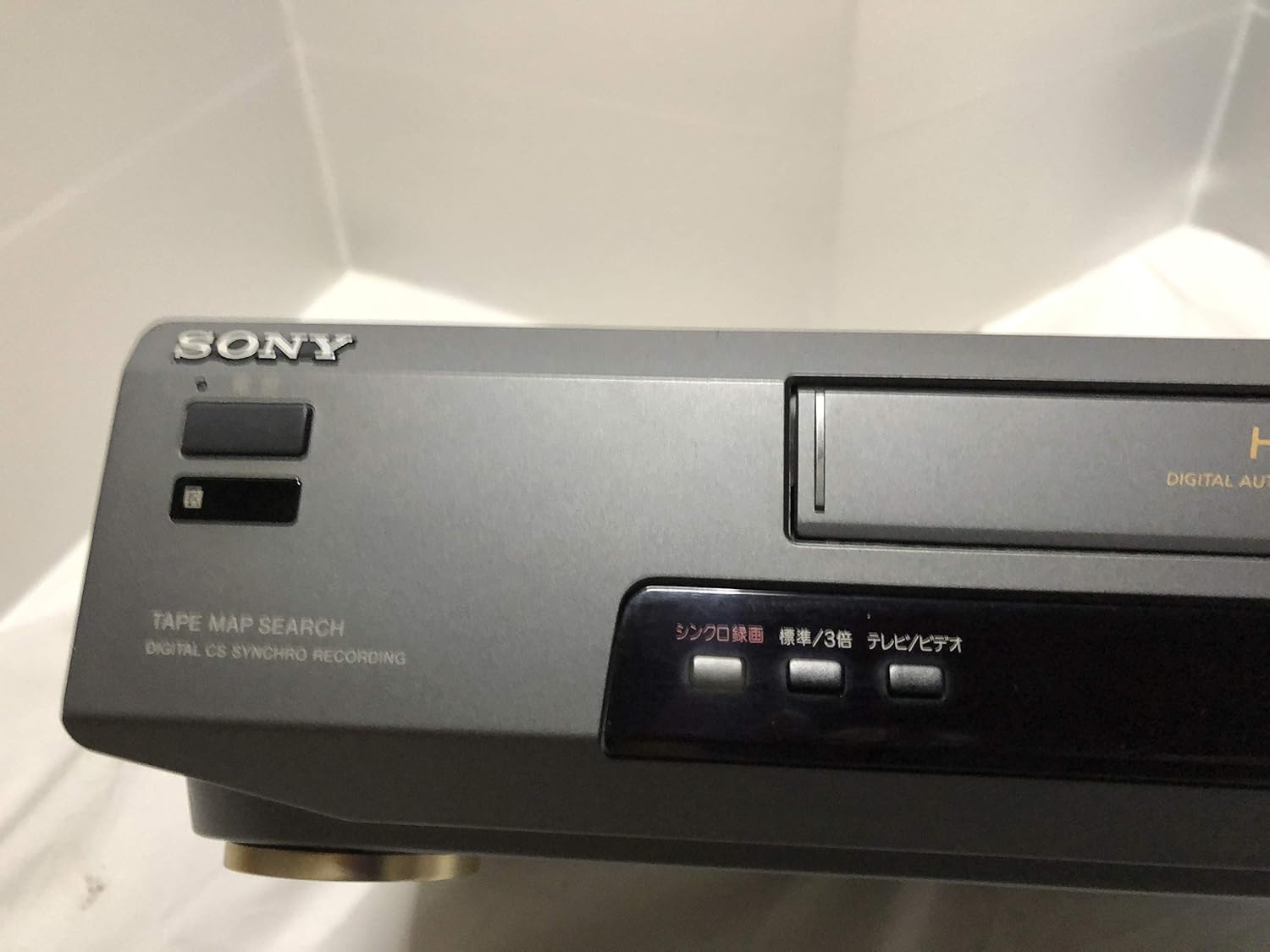
Slika 3: Front left section of the Sony SLV-FT5 VCR. This view highlights the tape loading slot and the 'TAPE MAP SEARCH' feature, which assists in navigating recorded content on a tape.
4.3 Reprodukcija
After loading a tape, press the IGRATI button (►) on the VCR or remote control to begin playback. Use the PAUZA (∥), STOP (■), PREMOTATI (◀◀), and BRZO PREMOĆI (►►) buttons to control playback.

Slika 4: Front right section of the Sony SLV-FT5 VCR. This image displays the main playback controls (Play, Stop, Rewind, Fast Forward, Pause) and additional buttons for 'Quick Timer' and 'Tracking' adjustments.
4.4 Snimanje
To record, ensure a blank or recordable tape is inserted. Select the desired input source (e.g., TV channel). Press the REC (●) button on the VCR or remote control. Press STOP (■) za završetak snimanja.
4.5 Tracking Adjustment
If the picture quality during playback is poor (e.g., horizontal lines or noise), use the PRAĆENJE buttons on the front panel or remote control to fine-tune the tape's alignment with the VCR's heads.
5. Održavanje
5.1 Čišćenje jedinice
Wipe the exterior of the VCR with a soft, dry cloth. For stubborn stains, use a cloth lightly dampOperite blagom otopinom deterdženta, a zatim obrišite suhom krpom. Nemojte koristiti abrazivna sredstva za čišćenje ili otapala.
5.2 Čišćenje glave
Over time, VCR heads can accumulate dirt, leading to poor picture and sound quality. Use a commercially available dry-type VHS head cleaning cassette according to its instructions. Avoid wet-type cleaners as they can damage the heads.
5.3 Skladištenje
When not in use for extended periods, disconnect the VCR from the power outlet. Store the unit in a cool, dry place, away from dust and direct sunlight.
6. Rješavanje problema
If you encounter issues with your VCR, refer to the following common problems and solutions before seeking professional service.
| Problem | Mogući uzrok | Otopina |
|---|---|---|
| Nema struje | Kabel za napajanje isključen; problem s utičnicom | Provjerite priključak kabela za napajanje; pokušajte s drugom utičnicom. |
| Nema slike/zvuka | Incorrect TV input; loose A/V cables | Select correct TV input (e.g., Video 1, AV); ensure A/V cables are securely connected. |
| Poor picture quality (snowy, lines) | Dirty VCR heads; tracking issue; old/damaged tape | Clean VCR heads; adjust tracking; try a different tape. |
| Traka se ne izbacuje | Power issue; mechanical malfunction | Ensure power is on; try pressing EJECT multiple times. If issue persists, seek service. |
| Daljinski upravljač ne radi | Dead batteries; obstructed sensor | Replace batteries; ensure no obstacles between remote and VCR sensor. |
7. Specifikacije
| Značajka | Specifikacija |
|---|---|
| Marka | Sony |
| Broj modela | SLV-FT5 |
| Vrsta medija | VHS |
| Rezolucija | 720 x 480 piksela |
| Težina proizvoda | 4160 grama |
| Način audio izlaza | Stereo |
| Podržani audio formati | Monaural, Stereo |
| Video kodiranje | Analog |
| Kompatibilni uređaji | televizija |
| Kompatibilnost ulaznog videa | NTSC |
| Zahtjevi za napajanje | 100V, 18W, 50/60Hz |
8. Jamstvo i podrška
For warranty information and customer support, please refer to the documentation included with your purchase or visit the official Sony webstranicu. Sačuvajte dokaz o kupnji za slučaj reklamacije.