
Uvod
This manual provides instructions for the Goldmaster RCU 881 Universal Remote Control. This device is designed to control various television sets using infrared technology, offering a convenient replacement or alternative to multiple original remote controls.
Sigurnosne informacije
- Držite baterije izvan dohvata djece.
- Nemojte miješati stare i nove baterije ili različite vrste baterija.
- Do not expose the remote control to extreme temperatures, direct sunlight, or moisture.
- Iskorištene baterije odložite u skladu s lokalnim propisima o zaštiti okoliša.
- Avoid disassembling the remote control; this may void any warranty.
Sadržaj paketa
- 1 x Goldmaster RCU 881 Universal Remote Control
- Note: Batteries are not included and must be purchased separately (2x AAA batteries required).
Proizvod gotovview
The Goldmaster RCU 881 is a universal infrared remote control featuring a sleek silver design and a comprehensive button layout for intuitive control of compatible devices, primarily televisions.
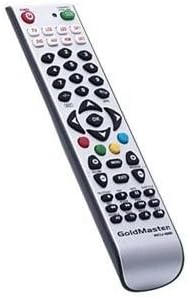
Slika: prednja strana view of the Goldmaster RCU 881 Universal Remote Control, showing its silver finish and button layout.

Image: The official Goldmaster brand logo.
Postavljanje
1. Ugradnja baterije
- Pronađite poklopac pretinca za baterije na stražnjoj strani daljinskog upravljača.
- Slide the cover off in the direction indicated by an arrow (if present).
- Insert two AAA batteries, ensuring correct polarity (+ and - symbols match the markings inside the compartment).
- Vratite poklopac odjeljka za baterije dok ne klikne sigurno na svoje mjesto.
2. Programiranje daljinskog upravljača
The Goldmaster RCU 881 is a universal remote. Programming typically involves entering a code specific to your TV brand or using an automatic search function. Refer to the included code list (if available with your purchase) or follow these general steps:
- Turn on the device you wish to control (e.g., your television).
- Pritisnite i držite SET button (or a similar button, if present) on the remote until the indicator light turns on and remains lit.
- Enter the 3 or 4-digit code for your TV brand using the number buttons. If the indicator light turns off, the code has been accepted.
- Testirajte daljinski upravljač pritiskom na VLAST button or other function buttons. If the device responds, the programming is successful.
- If the code does not work, or if the indicator light flashes and turns off without controlling the device, repeat steps 2-4, trying other codes listed for your brand.
- If no code works, or if a code list is not provided, use the automatic search function:
- Pritisnite i držite SET gumb dok se ne upali indikatorska lampica.
- Pritisnite tipku VLAST button once. The indicator light will begin to flash slowly.
- Point the remote at your TV and repeatedly press the VLAST gumb (ili CH+ button) slowly, allowing a few seconds between presses, until the TV turns off.
- Once the TV turns off, immediately press the SET gumb za spremanje koda. Indikatorska lampica će se ugasiti.
- Test the remote. If it controls your TV, programming is complete. If not, repeat the automatic search process.
Note: Specific programming steps and available codes may vary. Consult the original packaging or manufacturer's website for a comprehensive code list or detailed instructions for your specific device model.
Upute za rad
Once programmed, the Goldmaster RCU 881 functions like your original remote control for the assigned device. Below are common button functions:
- Gumb za napajanje: Uključuje ili isključuje uređaj.
- Gumbi kanala (CH+/CH-): Mijenja kanale gore ili dolje.
- Tipke za glasnoću (VOL+/VOL-): Podešava glasnoću zvuka.
- Gumb za isključivanje zvuka: Isključuje ili uključuje zvuk.
- Brojčani gumbi (0-9): Koristi se za izravni ulaz kanala.
- Menu/Settings Buttons: Accesses device menus and settings.
- Navigacijske tipke (gore/dolje/lijevo/desno/u redu): Navigacija kroz izbornike i potvrđivanje odabira.
- Gumb za ulaz/izvor: Changes the input source (e.g., HDMI 1, AV, Component).
Button layout and specific functionality may vary based on the programmed device and the universal code used.
Održavanje
- Clean the remote control with a soft, dry cloth. Do not use liquid cleaners, abrasive materials, or chemical solvents.
- If the remote control will not be used for an extended period (e.g., one month or more), remove the batteries to prevent potential leakage and damage.
- Avoid dropping the remote control or exposing it to strong impacts, which can damage internal components.
- Store the remote in a cool, dry place away from direct sunlight.
Rješavanje problema
Daljinski upravljač ne radi nakon programiranja:
- Ensure batteries are inserted correctly with the correct polarity and are not depleted. Replace if necessary.
- Re-attempt the programming process, trying different codes for your device brand.
- Provjerite da nema prepreka između daljinskog upravljača i infracrvenog prijemnika uređaja.
- The remote control may not be compatible with all functions of your specific device model.
Neki gumbi ne rade:
- This can occur if the programmed code does not fully support all functions of your device. Try a different code.
- Ensure the buttons are clean and free from debris.
Indikatorska lampica se ne pali:
- Check battery installation and ensure batteries have sufficient charge. Replace batteries if needed.
Tehnički podaci
| Značajka | Detalj |
|---|---|
| Marka | GoldMaster |
| Model | RCU-881 |
| Tehnologija povezivanja | Infracrveni |
| Kompatibilni uređaji | televizija |
| Boja | Srebro |
| Metoda unosa | Gumb |
| Baterije uključene | Ne |
| Model godine | 2014 |
| ASIN | B00PUIXRRA |
Jamstvo i podrška
Specific warranty information for the Goldmaster RCU 881 Universal Remote Control is not provided in the product details. For warranty claims, technical support, or further assistance, please contact GoldMaster customer service directly or refer to the documentation included with your original purchase.
You can often find up-to-date support information and contact details on the official GoldMaster webmjesto.