
1. Uvod
The Argox AS8520 is a high-performance cordless imager designed for efficient barcode scanning. It features advanced wireless communication technology, allowing for a data transmission range of up to 100 meters. Equipped with a long-lasting Li-ion battery and an IP42 sealing level, the AS8520 is built for durability and mobility across various environments, including offices, supermarkets, warehouses, and manufacturing facilities.
2. Proizvod je gotovview
The AS8520 barcode scanner is designed for comfortable handling and robust performance. Key components include the scanning window, trigger button, and ergonomic grip.
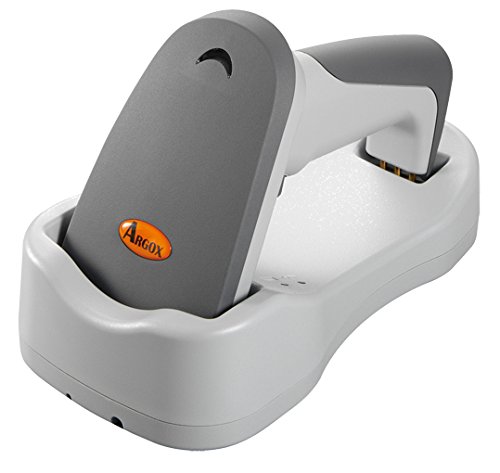
Slika 2.1: Strana view of the Argox AS8520 Barcode Scanner, showing the ergonomic handle and trigger button.
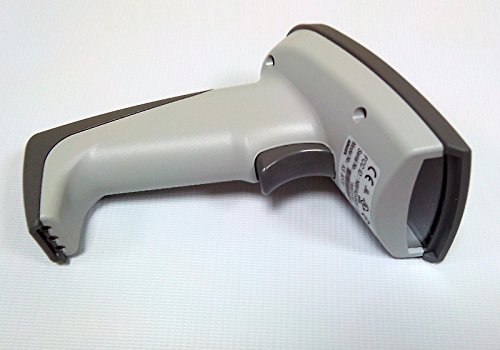
Slika 2.2: Ispred view of the Argox AS8520 Barcode Scanner, highlighting the scanning window and product labels.
3. Vodič za postavljanje
3.1. Ugradnja i punjenje baterije
- Ensure the scanner is powered off before installing or removing the battery.
- Locate the battery compartment on the scanner handle.
- Insert the Li-ion battery pack, ensuring correct polarity.
- Čvrsto zatvorite odjeljak za baterije.
- Connect the scanner to its charging base or power adapter using the provided cable. Allow the battery to fully charge before first use.
3.2. Connecting to a Host Device
The Argox AS8520 can connect wirelessly to various host devices, including desktops, laptops, and smartphones. Refer to the separate quick start guide for specific pairing instructions for your operating system or device type.
4. Upute za rad
4.1. Osnovno skeniranje
- Provjerite je li skener uključen i uspješno uparen s vašim glavnim uređajem.
- Point the scanning window towards the barcode you wish to scan.
- Press and hold the trigger button. A red LED light source (630nm Visible Red LED) will illuminate the barcode.
- Position the scanner at an appropriate distance (the AS8520 offers superior depth of field up to 40 inches on 40-mil codes) until the barcode is successfully read. A successful scan is typically indicated by an audible beep and/or a visual indicator.
- Otpustite okidač.
4.2. Napredne značajke skeniranja
- Rapid Scan Rate: The AS8520 provides a rapid scan rate of 450 scans/sec for efficient data capture.
- Barcode Symbology Support: Supports GS1 Databar (RSS) and CS (Composite Symbology) barcodes.
- Sunlight Readability: Designed to be readable under direct sunlight conditions.
5. Održavanje
5.1. Čišćenje skenera
- Prije čišćenja provjerite je li skener isključen iz napajanja.
- Lagano koristite meku krpu koja ne ostavlja dlačice dampvodom ili blagom otopinom za čišćenje obrišite vanjštinu skenera.
- For the scanning window, use a lens cleaning cloth to avoid scratches.
- Do not use abrasive cleaners, solvents, or immerse the scanner in liquid. The IP42 sealing level protects against dust and light water splashes, but not full immersion.
5.2. Briga o bateriji
- To maximize battery life, avoid fully discharging the Li-ion battery frequently.
- Skener čuvajte na hladnom i suhom mjestu kada ga ne koristite dulje vrijeme.
- If the battery performance degrades significantly, consider replacing it with an authorized Argox replacement battery.
6. Rješavanje problema
| Problem | Mogući uzrok | Otopina |
|---|---|---|
| Skener se ne uključuje. | Baterija je prazna ili nije pravilno instalirana. | Charge the battery. Ensure the battery is correctly seated in its compartment. |
| Skener ne čita barkodove. | Barcode is damaged, scanner is too far/close, or incorrect symbology settings. | Ensure the barcode is clear. Adjust scanning distance. Check scanner programming for supported barcode types. |
| Nema prijenosa podataka na glavni uređaj. | Scanner not paired or out of range. | Re-pair the scanner with the host device. Ensure the scanner is within the 100-meter transmission range. |
| Scanner is unresponsive. | Privremeni softverski kvar. | Perform a soft reset by powering off and then on the scanner. If issues persist, consult the manufacturer's support. |
7. Tehničke specifikacije
| Značajka | Specifikacija |
|---|---|
| Model | AS8520 |
| Brzina skeniranja | 450 skeniranja/sek |
| Izvor svjetlosti | 630nm Visible Red LED |
| Izvedba skeniranja | Starting at 0.1mm (4 mil) |
| Dubina polja | Up to 40 inches on 40-mil codes |
| Domet prijenosa podataka | 100 meters (wireless) |
| Kompatibilni uređaji | Stolno računalo, prijenosno računalo, pametni telefon |
| Izvor napajanja | Battery Powered (Li-ion battery pack) |
| Radna temperatura | 0°C do 50°C (32°F do 122°F) |
| Temperatura skladištenja | -20°C do 70°C (-4°F do 158°F) |
| Vlažnost | 10% do 90% relativne vlažnosti, bez kondenzacije |
| Razina svjetla | Do 70,000 luksa |
| Current - Operating | 225 mA pri 4.2 VDC |
| Current - Standby | 32 mA pri 4.2 VDC |
| Power - Operating | 900 mW |
| Power - Standby | 150 mW |
| Reliability (Trigger) | 1,000,000 puta |
| Reliability (Cable) | 320,000 times (90° bend) |
| Specifikacija pada | 1.5 metara |
| Sealing Level | IP42 |
| Težina artikla | 1.3 kg |
| GTIN/UPC | 702563636336 |
8. Jamstvo i podrška
For detailed warranty information, please refer to the warranty card included with your product or visit the official Argox website. For technical support, service, or replacement parts, please contact your authorized Argox reseller or Argox customer service directly.