
Uvod
Hvala na kupnjiasing the STOGA Ubox STV040 Dual Lens Car DVR Camera. This manual provides detailed instructions for the proper installation, operation, and maintenance of your device. Please read this manual thoroughly before using the product to ensure optimal performance and safety.
Sadržaj paketa
Molimo provjerite sadržaj pakiranja nakon otvaranja. Ako bilo koji predmet nedostaje ili je oštećen, obratite se prodavaču.
- 1 x STOGA Ubox STV040 Car DVR Camera
- 1 x auto punjač
- 1 x Car Mount
- 1 x External GPS Module
- 1 x korisnički priručnik
Proizvod gotovview
Familiarize yourself with the components and features of your STOGA Ubox STV040 Car DVR Camera.

Slika 1: Ispred view of the DVR camera with the display screen active.

Slika 2: Ispred view detailing the dual wide-angle lenses and surrounding controls.
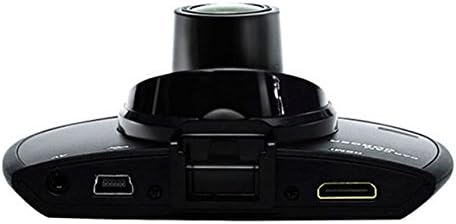
Slika 3: Vrh view illustrating the connectivity ports (HDMI, USB, AV).
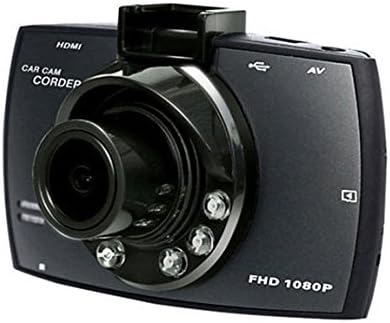
Slika 4: Angled perspective of the DVR camera, showing its compact design.
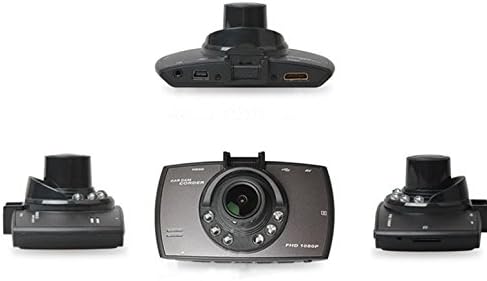
Slika 5: Sveobuhvatno view of the DVR camera from various angles.
Postavljanje
1. Installing the Micro SD Card
Insert a Micro SD card (Class 6 or higher, 4GB-32GB) into the designated slot on the DVR camera. Ensure the card is inserted correctly until it clicks into place. The device supports continuous loop recording and emergency event recording.
2. Montaža kamere
- Attach the car mount to the windshield in a position that does not obstruct your view.
- Securely attach the DVR camera to the car mount.
- Adjust the camera angle to ensure both lenses capture the desired view (front and interior/side). The dual lenses are 180-degree rotatable.
3. Priključak za napajanje
Connect the car charger to the DVR camera's power input and plug the other end into your vehicle's 12V power outlet (cigarette lighter socket). The camera will typically power on automatically when the vehicle starts and power off when the vehicle is turned off.
4. GPS Module Connection (Optional)
Connect the external GPS module to the designated GPS port on the DVR camera. This enables GPS logging, recording location data along with video footage.
Upute za rad
Uključivanje/isključivanje
- Automatski: The camera powers on and starts recording automatically when the car engine starts. It powers off automatically when the engine is turned off.
- Priručnik: Press and hold the power button to manually turn the device on or off.
Načini snimanja
- Snimanje petlje: The camera continuously records video in segments. When the memory card is full, it automatically overwrites the oldest unlocked footage.
- Snimanje u hitnim slučajevima (G-senzor): The built-in G-Sensor detects sudden impacts or collisions. In such an event, the current video segment is automatically locked and protected from being overwritten.
Navigacija izbornikom
Use the control buttons located on the device to navigate through the menu options on the 2.0" TFT LCD screen. Adjust settings such as video resolution, date/time stamp, language (English, Chinese, Japanese, Russian), and G-Sensor sensitivity.
Reprodukcija
- Stop recording if currently active.
- Enter playback mode via the menu.
- Odaberite željeni video file for playback on the device screen.
- Alternatively, remove the Micro SD card and insert it into a computer to view files.
Zaštita lozinkom
The device supports password protection to prevent unauthorized access to recordings. Refer to the on-screen menu for setting up and managing this feature.
Održavanje
- Čišćenje: Use a soft, dry cloth to clean the camera lenses and screen. Avoid abrasive cleaners or solvents.
- Micro SD kartica: Format the Micro SD card regularly (e.g., once a month) to ensure optimal performance and prevent data corruption. Back up important files prije formatiranja.
- Temperatura: Izbjegavajte izlaganje uređaja ekstremnim temperaturama, izravnoj sunčevoj svjetlosti dulje vrijeme ili visokoj vlažnosti.
- Ažuriranja firmvera: Provjerite proizvođača webpovremeno provjeravajte dostupna ažuriranja firmvera kako biste poboljšali performanse i dodali nove značajke.
Rješavanje problema
| Problem | Mogući uzrok/rješenje |
|---|---|
| Kamera se ne uključuje. |
|
| Snimanje se neočekivano zaustavlja. |
|
| Loša kvaliteta videa. |
|
| GPS ne radi. |
|
| Battery does not hold charge. |
|
Tehnički podaci
| Značajka | Detalj |
|---|---|
| Broj modela | Ubox STV040 |
| Prikaz | 2.0" TFT LCD (960 x 240 pixels) |
| Leće | Dual 140-degree A+ wide-angle, 180-degree rotatable |
| Senzor | CMOS |
| Video rezolucija | 1280 x 480 @ 30 fps, 640 x 480 @ 30 fps |
| Video format | AVI |
| Format slike | M-JPG |
| Noćni vid | Infracrvena noćna funkcija |
| Skladištenje | Micro TF (SD HC) card, 4GB-32GB, Class 6 and above |
| GPS | Supports external GPS module |
| G-senzor | Integrated, supports emergency event recording lock |
| Mikrofon/Zvučnik | Integriran |
| Izlaz | CVBS (Video Output) |
| Baterija | 3.7V 700mA Lithium-Polymer battery |
| Kompatibilnost operativnog sustava | Windows 2000/XP/Vista/Windows 7 |
| Podržani jezici | English, Chinese, Japanese, Russian |
Jamstvo i podrška
For warranty information and technical support, please refer to the documentation provided with your purchase or contact your retailer. Keep your purchase receipt as proof of purchase for warranty claims.
For further assistance, you may also visit the official STOGA webweb-mjesto (ako je dostupno) ili se obratite njihovoj službi za korisnike.