
1. Uvod
The Yamaha TF3 is a 24-channel digital mixing console designed for a wide range of audio applications. It combines ample input capacity with intuitive hands-on control, making it suitable for both experienced sound engineers and those new to digital mixing. This manual provides essential information for setting up, operating, and maintaining your TF3 console.

Slika 1: Prednja strana view of the Yamaha TF3 Digital Mixing Console. This image displays the console's layout with faders, buttons, and the central touchscreen interface.
2. Postavljanje
2.1 Raspakiranje i postavljanje
Carefully remove the TF3 console from its packaging. Place the console on a stable, flat surface, ensuring adequate ventilation around the unit. Avoid placing it near heat sources or in direct sunlight.
2.2 Priključak za napajanje
Connect the supplied power cord to the AC IN port on the rear panel of the console and then to a suitable power outlet. Ensure the power switch is in the OFF position before connecting to power.
2.3 Ulazni i izlazni priključci
The TF3 offers various input and output options:
- Analogni ulazi: Connect microphones and line-level devices to the XLR/TRS combo jacks (channels 1-24) and stereo line inputs (RCA pins).
- Analogni izlazi: Use the XLR outputs for main stereo mix, auxiliary sends, and other assignments.
- USB povezivost: The "TO HOST" USB port allows connection to a computer for multi-track recording/playback and control.
- Wi-Fi: The console supports Wi-Fi connectivity for remote control via dedicated applications.
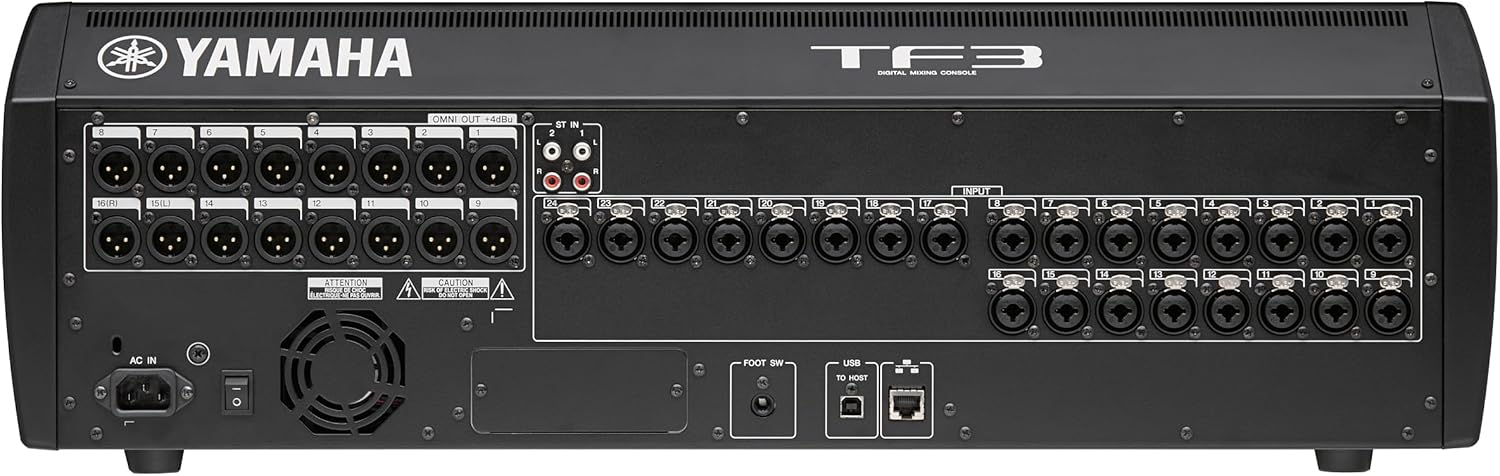
Figure 2: Rear panel of the Yamaha TF3, showing various input and output connectors including XLR, RCA, USB, and the power input.
3. Upute za rad
3.1 Uključivanje i početno postavljanje
After connecting all cables, flip the power switch to the ON position. The console will boot up, displaying the Yamaha logo on the LCD touchscreen. Follow any on-screen prompts for initial setup or calibration.
3.2 Navigacija sučeljem zaslona osjetljivog na dodir
The TF3 features an intuitive touchscreen interface for controlling various parameters. Tap on elements to select them, and use drag gestures to adjust values or scroll through menus. The screen provides visual feedback for EQ, dynamics, and routing.

Slika 3: Krupni plan view of the TF3's touchscreen, demonstrating the intuitive graphical interface for adjusting equalization parameters.
3.3 Fader and Channel Control
The console is equipped with 25 motor faders (24 channels + 1 master). Each channel strip includes dedicated buttons for SEL (select), ON (mute/unmute), and CUE (listen). Adjust faders to control channel levels. The FADER BANKA buttons allow switching between different layers of channels.
3.4 Using Presets and Scenes
The TF3 allows you to save and recall scenes, which store all console settings. This is useful for quick setup changes between different performances or configurations. Utilize the practical presets for various instruments and vocal types to achieve a good starting sound quickly.

Figure 4: An individual preparing a microphone, highlighting the initial steps before utilizing the console's practical presets and scene functions for optimal sound.
3.5 Digital Audio Workstation (DAW) Integration
Connect the TF3 to a computer via USB to use it as an audio interface for multi-track recording and playback with your preferred DAW. This allows for recording practice sessions with effects and saving scenes for live performances.
4. Ključne značajke
- 25 Motor Faders: Including 24 channel faders and 1 master fader for precise control.
- 48 Input Mixing Channels: Comprising 40 mono, 2 stereo, and 2 return channels.
- 20 Aux Buses: (8 mono + 6 stereo) plus Stereo and Sub buses for flexible routing.
- 8 DCA Groups with Roll-out: For efficient group control of multiple channels.
- Analogni ulazi: 24 XLR/TRS combo mic/line inputs and 2 RCA pin stereo line inputs.
- Intuitivni zaslon osjetljiv na dodir: For easy navigation and parameter adjustment.
- USB and Wi-Fi Connectivity: For recording, playback, and remote control.
- QuickPro Presets™: Optimized settings for various microphones and output equipment.
- Memorija scene: Ability to save and recall complete console settings.
5. Održavanje
5.1 Čišćenje
Regularly wipe the console's surface with a soft, dry cloth. For stubborn dirt, use a slightly damp cloth with a mild, non-abrasive cleaner. Avoid using harsh chemicals, solvents, or abrasive materials, as these can damage the finish and electronic components. Keep the touchscreen clean using a microfiber cloth.
5.2 Ventilacija
Ensure that the ventilation openings on the console are not blocked. Proper airflow is crucial to prevent overheating and ensure the longevity of the internal components.
5.3 Ažuriranja softvera
Povremeno provjeravajte Yamahu website for firmware updates. Keeping your console's software up-to-date ensures optimal performance, new features, and bug fixes.
6. Rješavanje problema
6.1 Bez napajanja
- Check if the power cord is securely connected to both the console and the power outlet.
- Provjerite je li utičnica funkcionalna tako da u nju priključite drugi uređaj.
- Ensure the power switch on the console is in the ON position.
6.2 Nema zvuka
- Confirm that the master fader is raised and not muted.
- Check individual channel faders and ensure they are not muted or at minimum level.
- Verify that input sources are connected correctly and are active.
- Inspect output cables and connections to amplifiers ili pojačani zvučnici.
- Ensure correct routing in the console's software interface.
6.3 Zaslon osjetljiv na dodir ne reagira
- Try restarting the console.
- Provjerite je li zaslon čist i bez nečistoća.
- If the issue persists, contact Yamaha support.
7. Specifikacije
| Značajka | Detalj |
|---|---|
| Marka | Yamaha |
| Broj modela | TF3 |
| Broj kanala | 24 (physical inputs), 48 (mixing channels) |
| Dimenzije proizvoda (D x Š x V) | 23.6"D x 28.2"Š x 8.9"V |
| Težina artikla | 17 kilogram |
| Tehnologija povezivanja | USB, Wi-Fi |
| Izvor napajanja | Električni na kabel |
| Vrsta izlaznog priključka | XLR |
| Audio ulaz | XLR/TRS combo, stereo line (RCA) |
| UPC | 086792992891 |
8. Jamstvo i podrška
8.1 Jamstvo proizvođača
The Yamaha TF3 Digital Mixing Console comes with a 1 godine jamstva proizvođača from Yamaha Corporation of America. This warranty applies only to products purchased from an authorized Yamaha retailer within the fifty United States (including the District of Columbia) and used within this area. For complete details and terms, please refer to the official Yamaha limited warranty statement available on the Yamaha webmjesto.
8.2 Korisnička podrška
For technical assistance, troubleshooting, or warranty claims, please contact Yamaha customer support. You can find contact information and additional resources on the official Yamaha webweb mjesto (www.yamaha.com).


