
1. Uvod
This manual provides essential information for the safe and efficient operation of your InFocus IN112a SVGA DLP Projector. Please read it thoroughly before using the projector and retain it for future reference. The InFocus IN112a is designed to deliver clear and bright projections for various applications, featuring SVGA resolution, HDMI connectivity, and 3D support.
2. Sigurnosne informacije
Pridržavajte se sljedećih sigurnosnih mjera opreza kako biste spriječili oštećenje projektora i osigurali sigurnost korisnika:
- Do not look directly into the projector lens kada je lamp je upaljeno. Intenzivno svjetlo može uzrokovati oštećenje oka.
- Osigurajte pravilnu ventilaciju. Ne blokirajte ventilacijske otvore.
- Only qualified service personnel should open the projector casing. Unutra nema dijelova koje korisnik može sam servisirati.
- Koristite samo kabel za napajanje koji je isporučen s projektorom.
- Držite projektor dalje od vode ili vlažnih okruženja.
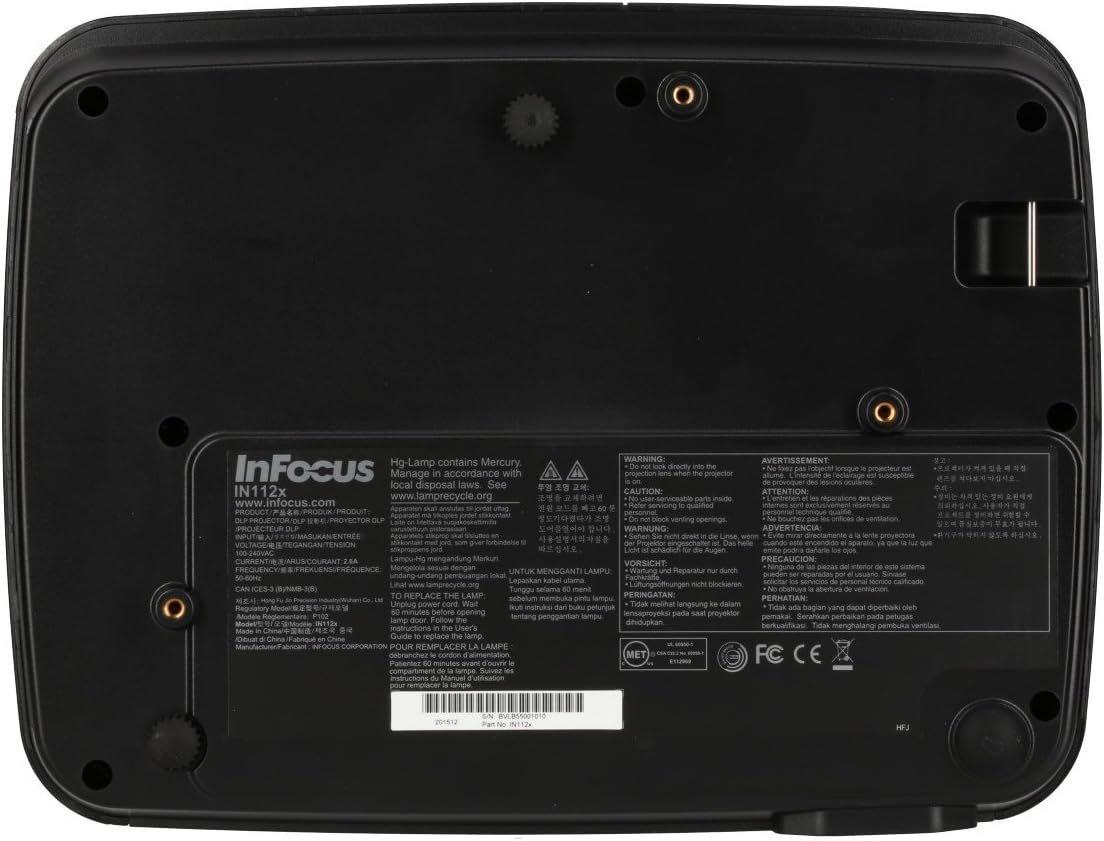
- Projektor lamp contains mercury. Dispose of lamps according to local regulations. Visit www.lampreciklirajte.org za više informacija.

Slika: Donji dio view of the InFocus IN112a projector, displaying various warning labels, regulatory compliance marks (like CE, FCC), and information regarding the mercury content in the lamp and recycling instructions.
3. Proizvod je gotovview
3.1. Projector Dimensions

Slika: prednja strana view of the InFocus IN112a projector, illustrating its physical dimensions. The projector measures approximately 292 mm in width, 220 mm in depth, and 108 mm in height.
3.2. Kontrole na gornjoj ploči
Slika: Vrh view of the InFocus IN112a projector, highlighting the control panel. This panel includes buttons for power, menu access, source selection, and directional navigation for menu adjustments.
The top panel features buttons for power on/off, menu access, input source selection, and navigation arrows for adjusting settings within the on-screen display (OSD) menu. The focus and zoom rings are located near the lens.
3.3. Priključci stražnje ploče

Slika: Stražnja strana view of the InFocus IN112a projector, displaying its comprehensive array of connectivity ports. These include HDMI 1.4, two VGA inputs (Computer 1, Computer 2), a VGA monitor output, S-Video, Composite video, two 3.5mm stereo audio inputs, one 3.5mm stereo audio output, an RS232C control port, and a USB-B port.
The rear panel provides a variety of connection options:
- HDMI1.4: Za digitalni video i audio ulaz.
- VGA (Computer 1, Computer 2): Two inputs for analog computer signals.
- VGA Monitor Out: For connecting an external monitor.
- Kompozitni video: Za video ulaz standardne razlučivosti.
- S-video: For enhanced standard definition video input.
- Audio In (3.5mm x 2): Za stereo audio ulaz.
- Audio izlaz (3.5 mm): For stereo audio output to external speakers.
- RS232C: Za upravljanje projektorom putem računala ili upravljačkog sustava.
- USB-B: Za servis ili ažuriranja firmvera.
4. Postavljanje
4.1. plasman
Position the projector on a stable, flat surface or mount it securely to a ceiling. Ensure there is adequate space around the projector for ventilation. The distance from the screen will determine the image size. Refer to the specifications section for throw ratio details.
4.2. Povezivanje struje
Connect the supplied power cord to the projector's power inlet and then to a grounded electrical outlet. The power LED will illuminate, indicating standby mode.
4.3. Spajanje video izvora
Connect your video source (e.g., computer, Blu-ray player, cable box) to the appropriate input port on the projector's rear panel using a compatible cable. For best quality, use the HDMI input.
- HDMI: Connect an HDMI cable from your source to the projector's HDMI port.
- VGA: Connect a VGA cable from your computer to either the Computer 1 or Computer 2 port.
- Kompozitni/S-Video: Connect the respective cable for older video sources.
4.4. Spajanje zvuka
If using VGA, Composite, or S-Video inputs, connect an audio cable from your source's audio output to one of the projector's 3.5mm Audio In ports. HDMI carries both video and audio, so a separate audio connection is not typically needed for HDMI sources.
4.5. Adjusting Focus and Zoom
After powering on the projector and displaying an image, rotate the Prsten za fokus around the lens until the image is sharp and clear. Use the Zoom prsten to adjust the image size to fit your screen.
5. Operacija
5.1. Uključivanje/isključivanje
- Za uključivanje: Press the Power button on the projector's top panel or the remote control. The power indicator will turn green.
- Za isključivanje: Press the Power button twice. The projector will enter a cooling cycle, and the power indicator will turn red (standby) once complete.
5.2. Odabir ulaznog izvora
Press the "Source" button on the projector or remote control repeatedly to cycle through available input sources (HDMI, VGA1, VGA2, S-Video, Video). The projector will automatically detect an active signal if "Auto Source" is enabled in the menu.
5.3. Navigacija izbornikom
Press the "Menu" button to access the On-Screen Display (OSD) menu. Use the directional arrows to navigate through menu options and the "Enter" button to select. Press "Menu" again to exit.
5.4. 3D Content Playback
The IN112a supports 3D content from Blu-ray players, cable boxes, dish services (over HDMI), and PC-based 3D content at 120Hz. To view 3D content, you will need 144 Hz DLP Link 3D glasses (sold separately).
- Ensure your 3D source is connected via HDMI.
- Play 3D content from your source.
- Turn on your 144 Hz DLP Link 3D glasses. The projector should automatically detect the 3D signal.
6. Održavanje
6.1. Cleaning the Projector Lens
Nježno obrišite leću mekom krpom koja ne ostavlja dlačice, posebno namijenjenom za optičke površine. Nemojte koristiti abrazivna sredstva za čišćenje ili pretjeranu silu jer to može ogrebati leću.
6.2. Lamp Zamjena
Projektor lamp has a lifespan of up to 10,000 hours. When the lamp life is nearing its end, a warning message may appear, or the lamp indicator LED may illuminate. Refer to the full service manual for detailed lamp upute za zamjenu. Upozorenje: lamp sadrži živu. Iskorišteno zbrinuti lampu skladu s lokalnim propisima o zaštiti okoliša.
6.3. Čišćenje zračnih filtera
Regularly clean the air filters to ensure proper ventilation and prevent overheating. Dust and debris can accumulate, reducing cooling efficiency. Gently remove the filter cover and clean the filter with a soft brush or vacuum cleaner. Replace the filter cover securely.
7. Rješavanje problema
| Problem | Mogući uzrok | Otopina |
|---|---|---|
| Nema prikazane slike |
|
|
| Slika je mutna |
|
|
| Nema zvuka |
|
|
| Projektor se pregrijava i gasi |
|
|
8. Specifikacije
| Značajka | Detalj |
|---|---|
| Broj modela | IN112X |
| Tehnologija zaslona | DLP |
| Izvorna razlučivost | SVGA (800 x 600) |
| Svjetlina | Do 3200 lumena |
| Omjer kontrasta | 15,000:1 |
| Lamp Život | Do 10,000 sati |
| Povezivost | HDMI 1.4, VGA x 2, Composite video, S-Video, 3.5 mm stereo in x 2, 3.5mm stereo out, VGA monitor out, RS232C, USB-B |
| 3D podrška | Yes (requires 144 Hz DLP Link 3D glasses) |
| Omjer bacanja | 1.9 - 2.09 (prikaz, stručni). |
| Dimenzije proizvoda | 14.25 x 12 x 7.75 inča (otprilike 36.2 x 30.5 x 19.7 cm) |
| Težina artikla | 5.4 funti (otprilike 2.45 kg) |
| Preporučena uporaba | Unutarnji/Ovanjski |
| Posebna značajka | Ugrađeni zvučnici |
9. Jamstvo i podrška
For warranty information and technical support, please refer to the documentation included with your purchase or visit the official InFocus webstranicu. Sačuvajte dokaz o kupnji za slučaj reklamacije.