
1. Uvod
The Microsoft Surface 3 is a versatile 10.8-inch tablet designed for productivity and portability. Running on Windows 10 and powered by an Intel Atom processor, it offers a full PC experience in a compact form factor. This manual provides essential information for setting up, operating, maintaining, and troubleshooting your device.

Image: Microsoft Surface 3 Tablet with an attached red Type Cover keyboard and a silver Surface Pen. The screen displays a colorful image with digital annotations, demonstrating its versatility.
2. Što je u kutiji
Upon unboxing your Microsoft Surface 3, verify that all standard components are present:
- Microsoft Surface 3 Tablet
- Power Supply Unit (Charger)
- Kratki vodič (ako je uključen)
Bilješka: The Surface Pen and Type Cover keyboard are optional accessories and are typically sold separately. Ensure you have these if your purchase included them.
3. Uređaj prekoview
Familiarize yourself with the physical features and ports of your Surface 3 tablet.
3.1 Priključci i tipke
- USB 3.0 priključak: Za spajanje USB uređaja kao što su vanjski diskovi, miševi ili tipkovnice.
- Micro USB priključak za punjenje: Koristi se za punjenje uređaja.
- Mini DisplayPort: Za spajanje na vanjske zaslone ili projektore.
- Priključak za slušalice: Za audio izlaz na slušalice ili vanjske zvučnike.
- Utor za microSD karticu: For expanding storage with a microSDXC card.
- Gumbi za glasnoću: Za podešavanje razine zvuka.
- Gumb za napajanje: Za uključivanje/isključivanje uređaja ili njegovo stavljanje u stanje mirovanja.
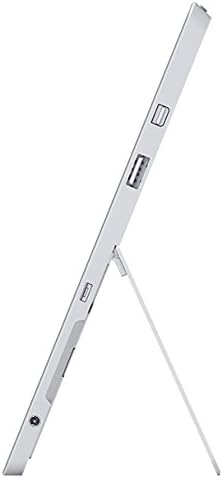
Slika: Bočno view of the Microsoft Surface 3, illustrating the various ports including USB, Mini DisplayPort, and the kickstand in an open position.

Slika: Krupni plan view of the microSD card slot on the Microsoft Surface 3, with a microSD card partially inserted, demonstrating storage expansion capability.
3.2 Kamere
- Stražnja kamera: 8 MP for capturing photos and videos.
- Prednja kamera: 3.5 MP za videopozive i selfije.
4. Postavljanje
4.1 Početna naplata
Before first use, connect the Surface 3 to the power supply using the Micro USB charging port and allow it to charge fully. The battery indicator on the screen will show charging status.
4.2 Uključivanje i postavljanje sustava Windows
- Pritisnite i držite Gumb za napajanje until the Microsoft logo appears on the screen.
- Follow the on-screen prompts to complete the Windows 10 setup process. This includes selecting your language, connecting to a Wi-Fi network, and creating or signing in with a Microsoft account.
- Allow the system to download and install any pending updates for optimal performance and security.
4.3 Attaching Optional Accessories
- Type Cover: Align the Type Cover with the magnetic connector at the bottom edge of the Surface 3 until it clicks into place.
- Surface olovka: The Surface Pen can be magnetically attached to the side of the Surface 3 for storage. For initial pairing, follow the instructions provided with the pen or in Windows settings.
5. Operativni
5.1 Navigacija
- Zaslon osjetljiv na dodir: Use gestures like tap, swipe, pinch-to-zoom for navigation.
- Surface olovka: Use the pen for precise input, drawing, writing, and annotating.
- Type Cover (Optional): Provides a traditional keyboard and trackpad experience.

Image: Microsoft Surface 3 in use with a Type Cover keyboard and Surface Pen, displaying a Windows 10 interface with various applications.
5.2 Značajke sustava Windows 10
- Izbornik Start: Pristupite aplikacijama, postavkama i opcijama napajanja.
- Centar za radnje: Swipe from the right edge of the screen to access quick settings and notifications.
- Zadatak View: View open applications and virtual desktops.
- Način rada tableta: Switch to Tablet Mode for a touch-optimized interface.
5.3 Povezivanje na Wi-Fi
- Otvorite Akcijski centar by swiping from the right edge of the screen or clicking the icon in the taskbar.
- Dodirnite Wi-Fi ikona.
- Odaberite željenu mrežu s popisa i unesite lozinku ako se to od vas zatraži.
6. Održavanje
6.1 Čišćenje
- Koristite meku krpu koja ne ostavlja dlačice dampvodom ili sredstvom za čišćenje ekrana posebno namijenjenim za elektroniku.
- Izbjegavajte jake kemikalije, abrazivne materijale ili prekomjernu vlagu.
- Clean the device exterior with a soft, dry cloth.
6.2 Ažuriranja softvera
Regularly check for and install Windows updates to ensure your device has the latest security patches and performance improvements. Go to Postavke > Ažuriranje i sigurnost > Windows Update.
6.3 Njega baterija
- Izbjegavajte ekstremne temperature jer mogu smanjiti vijek trajanja baterije.
- For optimal battery longevity, avoid consistently draining the battery to 0% or keeping it at 100% for extended periods.
- The Surface 3 has an average battery life of up to 8 hours under typical usage conditions.
7. Rješavanje problema
7.1 Uređaj se ne uključuje
- Ensure the device is charged. Connect the power supply and wait a few minutes before attempting to power on again.
- Perform a force restart by holding the Gumb za napajanje for 10-15 seconds, then release and press it again briefly.
7.2 Problemi s Wi-Fi povezivošću
- Toggle Wi-Fi off and on in the Action Center.
- Restart your Surface 3 and your Wi-Fi router.
- Ensure you are within range of the Wi-Fi network and have the correct password.
7.3 Spore performanse
- Zatvorite nepotrebne aplikacije koje rade u pozadini.
- Provjerite i instalirajte sva ažuriranja za Windows koja su na čekanju.
- Osigurajte da imate dovoljno slobodnog prostora za pohranu.
8. Specifikacije
| Značajka | Detalj |
|---|---|
| Broj modela | 7G6-00014 |
| Veličina zaslona | 10.8 inča |
| Razlučivost zaslona | 1920x1280 piksela |
| Procesor | Intel Atom x7-Z8700 (2.4 GHz) |
| OVAN | 4 GB |
| Skladištenje | SSD od 128 GB |
| Operativni sustav | Windows 10 |
| Grafički koprocesor | Quad-core Intel Atom x7-Z8700 processor |
| Bežična vrsta | 802.11ac Wi-Fi, Bluetooth 4.0 |
| USB priključci | 1x USB 2.0, 1x USB 3.0 |
| Prosječno trajanje baterije | 8 sata |
| Težina artikla | 1.37 funti |
| Dimenzije proizvoda | 14.02 x 8.64 x 1.58 inča |
| Stražnji Webrezolucija kamere | 8 MP |
| Ispred Webrezolucija kamere | 3.5 MP |
9. Jamstvo i podrška
Your Microsoft Surface 3 Tablet is covered by a limited manufacturer's warranty. For detailed warranty information, including terms and conditions, please refer to the documentation provided with your purchase or visit the official Microsoft support webmjesto.
For technical assistance, software updates, and additional resources, please visit the official Microsoft Support website or contact their customer service. Keep your device's serial number (located on the back of the tablet or in Windows settings) readily available when seeking support.