
Solight TE09
Solight TE09 Weather Station User Manual
Model: TE09
Uvod
Thank you for choosing the Solight TE09 Weather Station. This manual provides essential information for the proper setup, operation, and maintenance of your device. Please read it thoroughly before use and retain it for future reference.
Sigurnosne informacije
- Ne izlažite uređaj ekstremnim temperaturama, izravnoj sunčevoj svjetlosti ili visokoj vlažnosti.
- Izbjegavajte ispuštanje ili izlaganje uređaja jakim udarcima.
- Ne pokušavajte rastavljati ili modificirati uređaj. Time ćete poništiti jamstvo.
- Držite baterije izvan dohvata djece. Ako se proguta, odmah potražite liječničku pomoć.
- Istrošene baterije odložite u skladu s lokalnim propisima.
- Uređaj čistite mekom, suhom krpom. Nemojte koristiti abrazivna sredstva za čišćenje ili otapala.
Sadržaj paketa
Molimo provjerite sadržaj paketa prilikom raspakiranja. Ako bilo koji predmet nedostaje ili je oštećen, obratite se prodavaču.
- Solight TE09 Weather Station Unit
- Korisnički priručnik (ovaj dokument)
Proizvod gotovview
The Solight TE09 Weather Station is designed to provide accurate indoor temperature and humidity readings. Its compact design makes it suitable for various indoor environments.
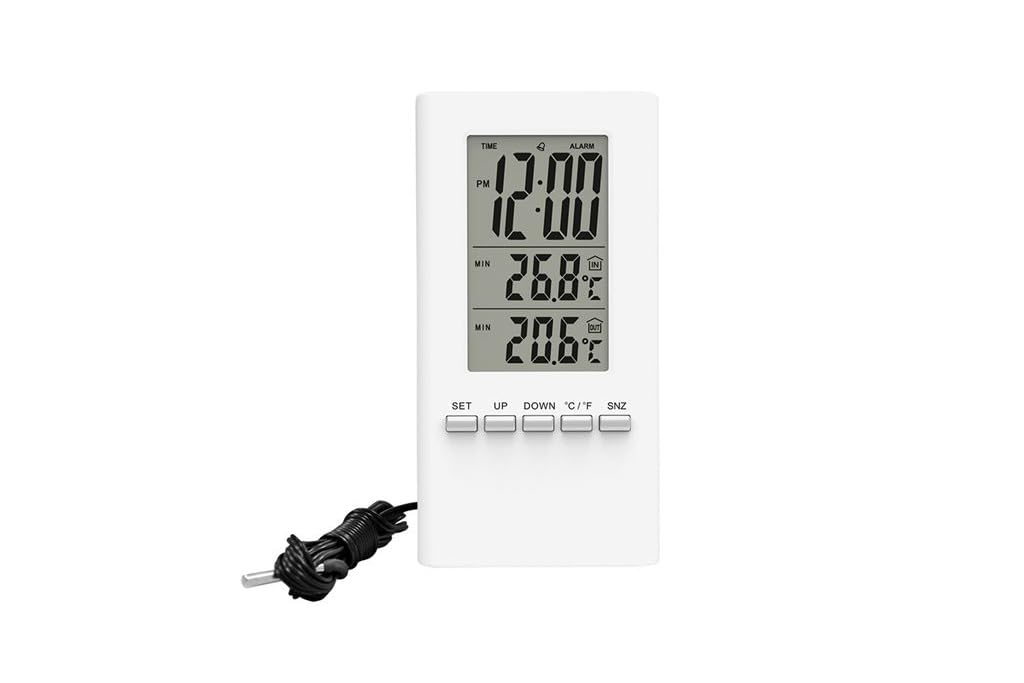
Slika 1: Ispred view of the Solight TE09 Weather Station, displaying its screen and compact white casing.
Ključne komponente:
- LCD zaslon: Shows temperature, humidity, and other relevant information.
- Kontrolni gumbi: For setting time, units, and other functions.
- Odjeljak za baterije: Nalazi se na stražnjoj strani jedinice.
Postavljanje
1. Ugradnja baterije
- Locate the battery compartment cover on the back of the Solight TE09 Weather Station.
- Pomaknite ili otkopčajte poklopac da biste ga otvorili.
- Insert 1.5V AAA alkaline batteries (not included) according to the polarity indicators (+ and -) inside the compartment.
- Čvrsto zatvorite poklopac odjeljka za baterije.
Bilješka: Ensure batteries are inserted correctly. Incorrect insertion may damage the device.
2. Initial Power-On and Placement
- Once batteries are installed, the device will power on automatically and display initial readings.
- Place the weather station in a suitable indoor location, away from direct sunlight, heat sources, and drafts, which could affect temperature and humidity accuracy.
- Allow the device a few minutes to stabilize and display accurate readings after initial setup.
Upute za rad
1. Displaying Temperature and Humidity
The main display continuously shows the current indoor temperature and humidity. No specific action is required to view ova čitanja.
2. Changing Temperature Units (Celsius/Fahrenheit)
Za prebacivanje između Celzijusa (°C) i Fahrenheita (°F):
- Locate the "°C/°F" button, usually on the back or side of the unit.
- Press the button once to toggle between the two temperature units. The display will update accordingly.
3. Setting Time and Date (if applicable)
Bilješka: The Solight TE09 is primarily a temperature and humidity monitor. If your model includes time/date functionality, follow these general steps:
- Press and hold the "SET" or "MODE" button for a few seconds until the time display starts flashing.
- Use the "UP" or "DOWN" buttons to adjust the hour, then press "SET" or "MODE" to confirm and move to minutes.
- Repeat for minutes, then for date (year, month, day) if available.
- Press "SET" or "MODE" again to exit the setting mode.
Održavanje
1. Čišćenje uređaja
- Wipe the exterior of the weather station with a soft, dry, or slightly damp tkanina.
- Do not use abrasive cleaners, alcohol, or corrosive chemicals, as these can damage the surface and internal components.
- Pazite da u uređaj ne uđe tekućina.
2. Zamjena baterije
- When the display becomes dim or the device stops functioning, it's time to replace the batteries.
- Follow the "Battery Installation" steps in the Setup section to replace the old batteries with new 1.5V AAA alkaline batteries.
- Dispose of old batteries responsibly according to local environmental regulations.
3. Skladištenje
If the device will not be used for an extended period, remove the batteries to prevent leakage and store the unit in a cool, dry place.
Rješavanje problema
| Problem | Mogući uzrok | Otopina |
|---|---|---|
| Nema zaslona ili je zaslon taman. | Baterije su prazne ili nepravilno umetnute. | Zamijenite baterije novim 1.5 V AAA alkalnim baterijama, pazeći na ispravan polaritet. |
| Netočna očitanja temperature/vlažnosti. | Device placed near heat sources, direct sunlight, or drafts. | Relocate the weather station to a stable indoor environment away from interfering factors. Allow time for readings to stabilize. |
| Gumbi ne reagiraju. | Privremeni softverski problem ili slaba baterija. | Remove and reinsert batteries to reset the device. If the issue persists, replace batteries. |
Tehnički podaci
- Model: Solight TE09
- Boja: Bijela
- Materijal: Plastični
- Izvor napajanja: Battery (AAA alkaline, 1.5V)
- Uključene baterije: Ne
- GTIN: 08592718012212
- Proizvođač: Svjetlo
- Prvi dostupan datum: 7. listopada 2018
Jamstvo i podrška
Za informacije o jamstvu i tehničkoj podršci, molimo pogledajte dokumentaciju koju ste dobili prilikom kupnje ili se obratite prodavaču. Sačuvajte račun kao dokaz o kupnji.
Povezani dokumentiTE09


Ask a question about this manual
Ask about setup, troubleshooting, compatibility, parts, safety, or missing instructions. Manuals+ will review the question and use this page’s manual context to help answer it.