
1. Početak
1.1 Sadržaj paketa
Verify that all items are present in your Ultimate Ears Boom 2 package:
- Ultimate Ears Boom 2 Bluetooth Speaker
- Micro-USB kabel za punjenje
- Adapter za napajanje (može se razlikovati ovisno o regiji)
1.2 Punjenje vašeg zvučnika
Before initial use, fully charge your Ultimate Ears Boom 2 speaker. Connect the micro-USB cable to the charging port on the speaker and the other end to the power adapter, then plug into a wall outlet. The LED indicator will show charging status.

The Ultimate Ears Boom 2 speaker, ready for charging.
1.3 Bluetooth uparivanje
Za povezivanje zvučnika s uređajem s omogućenom Bluetooth vezom:
- Press and hold the Power button on the top of the speaker until you hear a tone and the LED flashes white.
- Na svom mobilnom uređaju idite na postavke Bluetootha.
- Select 'UE Boom 2' from the list of available devices.
- Once connected, you will hear a confirmation tone from the speaker.

Vrh view of the speaker, highlighting the power and Bluetooth pairing buttons.
1.4 Ultimate Ears App
For enhanced control and additional features, download the Ultimate Ears app from your device's app store (iOS 9.0 or later required for Apple devices, Android compatible). The app allows for remote power control, equalizer adjustments, and PartyUp mode.
2. Speaker Operation
2.1 Uključivanje/isključivanje
Press the Power button located on the top of the speaker to turn it on or off. A distinct sound will indicate the power status.
2.2 Kontrola glasnoće
Adjust the volume using the large '+' and '-' buttons located on the side of the speaker. You can also control the volume from your connected Bluetooth device.
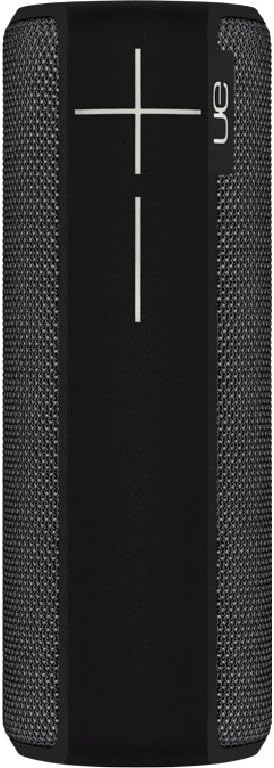
Strana view of the speaker, featuring the prominent volume control buttons.
2.3 Music Control (Tap Gestures)
The Boom 2 features tap controls for music playback:
- Jednokratno dodirivanje: Tap the top of the speaker once to play or pause the current track.
- Dvostruki dodir: Tap the top of the speaker twice to skip to the next track.
2.4 Status baterije
To check the battery level, press both the '+' and '-' volume buttons simultaneously. The speaker will announce the remaining battery percentage.
2.5 Waterproof and Durability Features
The Ultimate Ears Boom 2 is designed to be waterproof (IPX7 rated) and shockproof. It can be immersed in water up to 1 meter for 30 minutes. Ensure the charging port cover is securely closed before exposing the speaker to water.

The speaker's waterproof design allows for use in various environments.

The Ultimate Ears Boom 2 demonstrating its water resistance.
2.6 PartyUp Mode (Connecting Multiple Speakers)
Use the Ultimate Ears app to connect multiple Boom speakers together for a more expansive sound experience. Follow the instructions within the app to activate PartyUp mode.
3. Njega i održavanje
3.1 Upute za čišćenje
Za čišćenje zvučnika koristite meku,amp krpom. Izbjegavajte korištenje jakih kemikalija ili abrazivnih sredstava za čišćenje jer mogu oštetiti završnu obradu zvučnika ili vodootporne brtve. Prije punjenja provjerite je li priključak za punjenje suh.
3.2 Vijek trajanja baterije
To maximize battery life, avoid fully discharging the speaker frequently. Charge the speaker regularly, and if storing for an extended period, ensure it has at least a 50% charge.
3.3 Skladištenje
Store the speaker in a cool, dry place away from direct sunlight and extreme temperatures. Ensure the charging port cover is closed to prevent dust and debris from entering.
4. Vodič za rješavanje problema
4.1 Bez napajanja
- Ensure the speaker is charged. Connect it to the power adapter and allow it to charge for at least 15 minutes before attempting to power on.
- Čvrsto pritisnite i držite gumb za napajanje nekoliko sekundi.
4.2 Problemi s Bluetooth vezom
- Ensure the speaker is in pairing mode (flashing white LED).
- Isključite i uključite Bluetooth na svom mobilnom uređaju.
- Forget 'UE Boom 2' from your device's Bluetooth list and attempt to re-pair.
- Move the speaker closer to your device; the maximum range is approximately 33 meters (100 feet).
4.3 Nema zvuka ili je glasnoća tiha
- Povećajte glasnoću i na zvučniku i na povezanom uređaju.
- Provjerite je li zvučnik ispravno spojen putem Bluetootha.
- Check if the audio source on your device is playing correctly.
4.4 Sound Distortion
- Lower the volume on both the speaker and your connected device.
- Osigurajte zvuk file ili kvaliteta streaminga nije niska.
- Move away from potential sources of interference (e.g., Wi-Fi routers, other Bluetooth devices).
4.5 Problemi s povezivanjem aplikacija
- Ensure your mobile device's operating system meets the app's requirements (iOS 9.0+).
- Restart the app or reinstall it.
- Ensure the speaker's firmware is up to date via the app.
5. Tehničke specifikacije
| Značajka | Specifikacija |
|---|---|
| Naziv modela | Grana 2 |
| Broj modela | 984-000557 |
| ASIN | B0141208EA |
| Tehnologija povezivanja | Bluetooth, USB |
| Bežična komunikacijska tehnologija | Bluetooth |
| Kompatibilni uređaji | Computers, Smartphones (Android, iOS) |
| Trajanje baterije | Do 15 sati |
| Ocjena vodootpornosti | IPX7 (do 1 metra tijekom 30 minuta) |
| Maksimalni domet | 33 metara (100 stope) |
| Izlazna snaga zvučnika | 25 vata |
| Dimenzije proizvoda | 6.7D x 6.7W x 18H cm (approx. 15 x 5 x 5 cm; 0.54 grams) |
| Način audio izlaza | Surround |
| Izvor napajanja | Napajanje na baterije (1 litij-polimerska baterija uključena) |
6. Jamstvo i korisnička podrška
6.1 Ograničeno jamstvo
The Ultimate Ears Boom 2 comes with a Limited Warranty. For specific details regarding warranty coverage, terms, and conditions, please refer to the warranty documentation included with your product or visit the official Ultimate Ears webmjesto.
6.2 Korisnička podrška
If you encounter any issues not covered in this manual or require further assistance, please contact Ultimate Ears customer support through their official website. For return policies or issues related to your purchase, consult the retailer's (e.g., Amazon.it) help pages.