
Uvod
This manual provides detailed instructions for the Inateck Bluetooth 4.1 Sport Headset, Model P20 (BH1001). Please read this guide thoroughly before using the product to ensure proper operation and to maximize your listening experience. This headset is designed for active lifestyles, offering wireless audio with a secure fit and integrated microphone.
1. Postavljanje
1.1 Sadržaj paketa
Provjerite jesu li svi artikli prisutni u paketu:
- Inateck Bluetooth Sport Headset (P20 / BH1001)
- USB kabel za punjenje
- Multiple pairs of silicone ear tips (various sizes)
- Torbica za nošenje
- Korisnički priručnik (ovaj dokument)
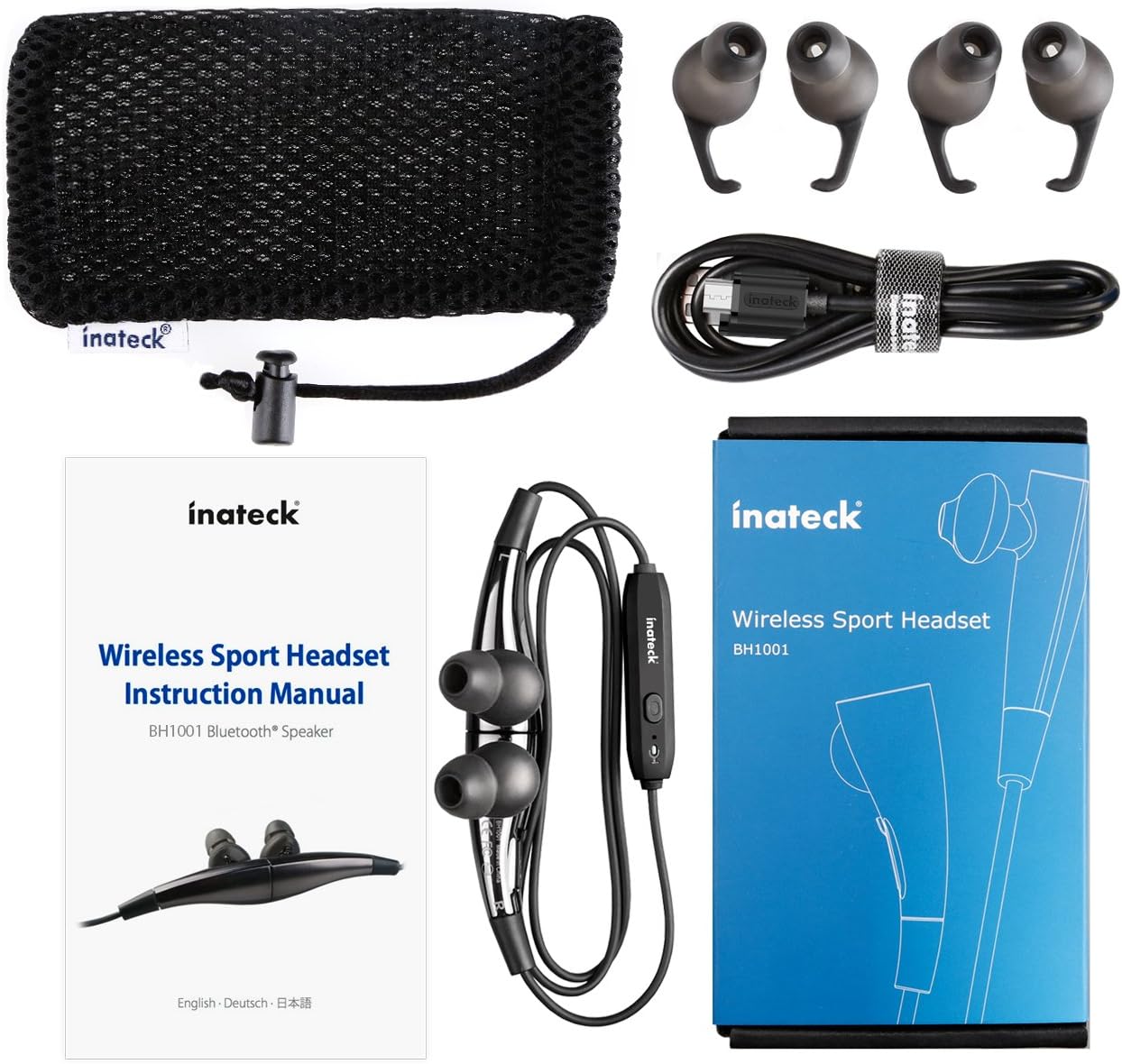
Slika 1.1: Contents of the Inateck Bluetooth Sport Headset package.
1.2 Punjenje slušalica
Before first use, fully charge the headset. A full charge takes approximately 3 hours and provides at least 8 hours of music playback.
- Locate the Micro USB charging port on the headset.
- Connect the small end of the provided USB charging cable to the headset's Micro USB port.
- Spojite veći kraj USB kabela na USB izvor napajanja (npr. USB priključak računala, USB adapter za zid).
- The status indicator light will illuminate during charging. It will change color or turn off once charging is complete.

Slika 1.2: Charging the Inateck Bluetooth Sport Headset via Micro USB.
1.3 Uparivanje s Bluetooth uređajem
To connect your headset to a smartphone or other Bluetooth-enabled device:
- Provjerite jesu li slušalice isključene.
- Press and hold the Multifunction Key (MFB) on the inline control unit for approximately 5-7 seconds until the status indicator light flashes red and blue alternately. This indicates pairing mode.
- Na svom Bluetooth uređaju omogućite Bluetooth i potražite nove uređaje.
- Select "Inateck BH1001" or "Inateck P20" from the list of available devices.
- Once paired, the status indicator light on the headset will flash blue slowly, and you may hear an audible confirmation.
- The headset will automatically attempt to reconnect to the last paired device when turned on.

Slika 1.3: Inateck Headset paired with a mobile device for music playback.
2. Upute za rad
2.1 Kontrole slušalica
The inline control unit provides easy access to various functions:

Slika 2.1: Nadview of the Inateck Headset control unit.
- Multifunction Key (MFB):
- Pritisnite i držite (5-7 s): Uključivanje/Isključivanje, Ulazak u način uparivanja
- Kratki pritisak: Reprodukcija/Pauziranje glazbe, Odgovor/Završetak poziva
- Long press (during incoming call): Reject call
- Volume Up (+) / Next Track:
- Kratki pritisak: Povećajte glasnoću
- Dugi pritisak: Prijeđite na sljedeću pjesmu
- Volume Down (-) / Previous Track:
- Kratki pritisak: Smanjenje glasnoće
- Long press: Go to previous track
- Mikro USB priključak: Za punjenje slušalica.
- Indikator statusa: Prikazuje stanje napajanja, uparivanja i punjenja.
- Mikrofon: Za hands-free pozive.
2.2 Nošenje slušalica
Select the ear tips that provide the most comfortable and secure fit for your ears. The headset is designed to be worn with the cable behind your neck, ensuring stability during physical activity.

Slika 2.2: Proper wearing of the Inateck Sport Headset for active use.
2.3 Magnetic Earbuds Feature
The earbuds feature integrated magnets. When not in use, you can connect the two earbuds together, forming a necklace around your neck. This action automatically pauses music playback and prevents the headset from falling off.

Slika 2.3: Magnetic earbuds feature for secure wearing around the neck.

Slika 2.4: Headset worn as a necklace using the magnetic feature.
3. Održavanje
- Čišćenje: Obrišite slušalice mekom, suhom krpom. Nemojte koristiti abrazivna sredstva za čišćenje ili otapala.
- Savjeti za uho: Redovito skidajte i čistite silikonske nastavke za uši blagim sapunom i vodom. Prije ponovnog pričvršćivanja provjerite jesu li potpuno suhi.
- Skladištenje: When not in use, store the headset in the provided carrying pouch to protect it from dust and damage. Avoid extreme temperatures.
- Vodootpornost: The headset is designed to be water-resistant for sports and exercise (e.g., sweat, light rain). Do not submerge it in water or expose it to heavy rain.
4. Rješavanje problema
4.1 Ne može se uključiti
Ensure the headset is fully charged. Connect it to a power source using the USB cable and allow it to charge for at least 30 minutes before attempting to power on again.
4.2 Nije moguće upariti uređaj
- Ensure the headset is in pairing mode (status indicator flashing red and blue alternately).
- Make sure Bluetooth is enabled on your device and it is within range (typically 10 meters or 33 feet).
- Isključite i uključite Bluetooth funkciju na svom uređaju.
- If previously paired, try "forgetting" or "unpairing" the headset from your device's Bluetooth settings and then re-pair.
- Provjerite da drugi Bluetooth uređaji ne ometaju vezu.
4.3 Nema zvuka ili loša kvaliteta zvuka
- Provjerite razinu glasnoće i na slušalicama i na spojenom uređaju.
- Provjerite jesu li slušalice ispravno uparene i povezane s vašim uređajem.
- Move closer to your device to reduce potential interference or range issues.
- Ensure the ear tips are correctly seated in your ears for optimal sound delivery.
- Reboot both the headset and your connected device.
4.4 Povremena veza
- Ensure there are no physical obstructions between the headset and your device.
- Avoid placing your device in areas where the signal might be blocked (e.g., deep pockets, behind thick walls).
- Minimizirajte smetnje s drugih bežičnih uređaja (Wi-Fi usmjerivača, drugih Bluetooth uređaja).
- Keep the headset and your device within the recommended Bluetooth range.
5. Specifikacije
| Marka | Inateck |
| Naziv modela | P20 |
| Broj modela | BH1001 |
| Tehnologija povezivanja | Bluetooth 4.1 |
| Form Factor | In-ear |
| Postavljanje uha | Intra-aural |
| Utičnica za slušalice | USB (za punjenje) |
| Razina vodootpornosti | Waterproof (suitable for sweat/light rain) |
| Posebne značajke | Sports and exercise, integrated microphone, magnetic earbuds |
| Težina artikla | 78 gram |
| Vrsta kontrole | Volume Control, Multifunction Button |
| Materijal | Plastični |
6. Informacije o jamstvu
Inateck products typically come with a limited warranty. For specific warranty terms and conditions applicable to your Inateck Bluetooth Sport Headset, please refer to the warranty card included in your product packaging or visit the official Inateck webstranicu. Sačuvajte dokaz o kupnji za slučaj reklamacije.
7. Korisnička podrška
If you encounter any issues not covered in this manual or require further assistance, please contact Inateck customer support. You can usually find contact information, FAQs, and additional resources on the official Inateck webstranica:
Webstranica: www.inateck.com
Please have your product model (P20 / BH1001) and purchase details ready when contacting support.