
1. Uvod
This manual provides essential instructions for the installation, operation, maintenance, and troubleshooting of the APC Smart-UPS SRT3000RMXLT 3kVA 208V Rackmount Uninterruptible Power Supply (UPS). Please read this manual thoroughly before installing or operating the equipment to ensure proper usage and safety.
2. Sigurnosne informacije
Pridržavajte se svih upozorenja i uputa za uporabu u ovom priručniku. Nepoštivanje toga može uzrokovati ozljede ili oštećenje opreme.
- Električna sigurnost: Ova jedinica sadrži opasni voltages. Do not attempt to disassemble the UPS. Servicing should only be performed by qualified personnel.
- Sigurnost baterije: Batteries can present a risk of electrical shock and high short-circuit current. Remove watches, rings, or other metal objects before handling batteries. Use tools with insulated handles.
- Težina: The UPS is heavy. Use proper lifting techniques and ensure adequate support during installation.
- Okruženje: Install the UPS indoors in a controlled environment, free from excessive dust, moisture, and extreme temperatures.
3. Sadržaj paketa
Carefully unpack the UPS and inspect for shipping damage. The package should contain the following items:
- APC Smart-UPS SRT3000RMXLT Unit
- Power Supply (Built-In)
- Hardver za montažu na stalak
- CD s dokumentacijom
- USB kabel
- Serijski kabel
4. Postavljanje
4.1 Fizička instalacija
The SRT3000RMXLT is designed for rack installation. Ensure the rack is stable and capable of supporting the UPS weight (approximately 69 pounds).
- Mount the UPS into a standard 19-inch rack using the provided rack-mounting hardware.
- Osigurajte dovoljan protok zraka oko uređaja. Ne blokirajte ventilacijske otvore.

Slika 4.1: Prednja strana view of the APC Smart-UPS SRT3000RMXLT. This image shows the front panel with the display and ventilation grille.
4.2 Spajanje UPS-a
Connect the UPS to the utility power and your equipment.
- Connect the UPS input power cord to a dedicated 208V AC outlet. The UPS uses a Type B - 3 pin (North American) power plug.
- Connect your equipment to the output receptacles on the rear of the UPS. The unit provides 12 IEC 320 C13/C14 outlets.
- For communication, connect the USB cable or serial cable from the UPS to your computer or network management card.
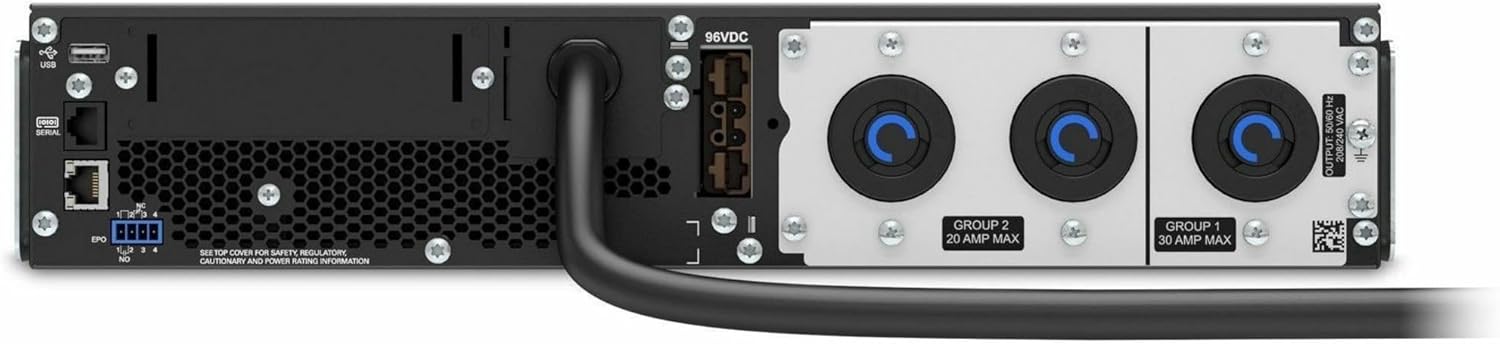
Slika 4.2: Stražnji dio view of the APC Smart-UPS SRT3000RMXLT. This image displays the various input and output ports, including USB, serial, EPO, and the 12 output receptacles, along with the main power input.
4.3 Početno uključivanje
After all connections are secure:
- Pritisnite gumb za napajanje na prednjoj ploči kako biste uključili UPS.
- The UPS will perform a self-test and the display will show the current status.
- Allow the batteries to charge for at least 6 hours before relying on them for extended backup time.
5. Upravljanje UPS-om
5.1 Zaslon i kontrole na prednjoj ploči
The front panel features an LCD display and control buttons for monitoring and configuring the UPS.
- LCD zaslon: Shows real-time status, load, battery charge, input/output voltage, and event logs.
- Gumb ESC: Izlazi iz trenutnog izbornika ili prekida operaciju.
- Gumb OK: Potvrđuje odabir ili ulazi u izbornik.
- Strelice gore/dolje: Navigacija kroz opcije izbornika ili podešavanje postavki.
5.2 Osnovni rad
- Uključivanje: Pritisnite i držite gumb za napajanje dok se zaslon ne osvijetli.
- Isključivanje: Press and hold the power button until the UPS powers down. Ensure all connected equipment is safely shut down first.
- Način rada baterije: U slučaju napajanja outage, the UPS will automatically switch to battery power. The display will indicate 'On Battery'.
- Samotestiranje: Initiate a manual self-test through the front panel menu to verify battery and UPS functionality.
6. Održavanje
6.1 Zamjena baterije
The UPS uses sealed lead-acid batteries. Battery life is typically 3-5 years, depending on environmental conditions and usage. Replace batteries when the UPS indicates a 'Battery Fault' or 'Replace Battery' warning.
- Contact APC support or a certified service technician for battery replacement.
- Always use genuine APC replacement battery cartridges (RBCs) to ensure compatibility and optimal performance.
- Odgovorno reciklirajte stare baterije.
6.2 Čišćenje
Keep the UPS free from dust and debris to ensure proper ventilation.
- Use a soft, dry cloth to clean the exterior of the UPS.
- Ne koristite tekuća sredstva za čišćenje ili otapala.
- Osigurajte da ventilacijski otvori budu slobodni od prepreka.
7. Rješavanje problema
Ovaj odjeljak nudi rješenja za uobičajene probleme. Za složenije probleme obratite se tehničkoj podršci.
| Problem | Mogući uzrok | Otopina |
|---|---|---|
| UPS se ne uključuje | No input power; Battery disconnected or discharged | Check power cord connection; Ensure utility power is present; Allow batteries to charge. |
| UPS neprestano pišti | Napajanje iz baterije; stanje preopterećenja | Check utility power; Reduce connected load. |
| 'Replace Battery' indicator | Baterija se bliži kraju | Naručite i zamijenite baterijski uložak. |
| UPS not providing power to outlets | Output circuit breaker tripped; UPS in fault mode | Reset circuit breaker; Check display for fault codes and consult manual. |
8. Specifikacije
Key technical specifications for the APC Smart-UPS SRT3000RMXLT.
| Značajka | Specifikacija |
|---|---|
| Broj modela | SRT3000RMXLT |
| Marka | Oklopni transporter |
| Izlazna snaga | 3000 VA / 2700 W |
| Nominalni izlaz Voltage | 208 V AC |
| Nominalni ulaz Voltage | 208V AC / 230V AC |
| Ulazna frekvencija | 60 Hz |
| Izlazni priključci | 12 x IEC 320 C13/C14 |
| Vrsta baterije | olovna kiselina |
| Tipično vrijeme punjenja | 6 sata |
| Tipično vrijeme sigurnosne kopije (puno opterećenje) | 4 minuta |
| Form Factor | Stalak |
| Dimenzije (V x Š x D) | 9 x 23 x 34 inča |
| Težina | 69 funti |
| Radna temperatura | 0 - 40 °C (32 - 104 °F) |
9. Jamstvo i podrška
9.1 Informacije o jamstvu
APC provides a standard warranty for this product. Please refer to the warranty card included with your product or visit the official APC webza detaljne uvjete jamstva specifične za vašu regiju.
9.2 Tehnička podrška
For technical assistance, product information, or troubleshooting beyond the scope of this manual, please contact APC customer support. Have your model number (SRT3000RMXLT) and serial number ready when contacting support.
- Posjetite službeni APC webstranica za resurse podrške, često postavljana pitanja i kontakt informacije.
- Online resources often include updated manuals, firmware, and diagnostic tools.