
1. Uvod
This manual provides essential instructions for the proper setup, operation, and maintenance of your CipherLab 1500P HP 1D Corded Barcode Scanner. Please read this manual thoroughly before using the device to ensure optimal performance and to prevent damage.
2. Sigurnosne informacije
- Ne izlažite skener ekstremnim temperaturama, vlazi ili izravnoj sunčevoj svjetlosti.
- Izbjegavajte ispuštanje skenera ili izlaganje jakim udarcima.
- Ne pokušavajte rastavljati ili modificirati skener. Time ćete poništiti jamstvo.
- Za spajanje koristite samo priloženi USB kabel.
- Keep the scanning window clean to ensure accurate barcode reading.
3. Sadržaj paketa
Molimo provjerite sadržaj paketa kako biste bili sigurni da su svi artikli prisutni:
- CipherLab 1500P HP 1D Corded Barcode Scanner
- USB kabel
- Kratki vodič (ako je uključen)
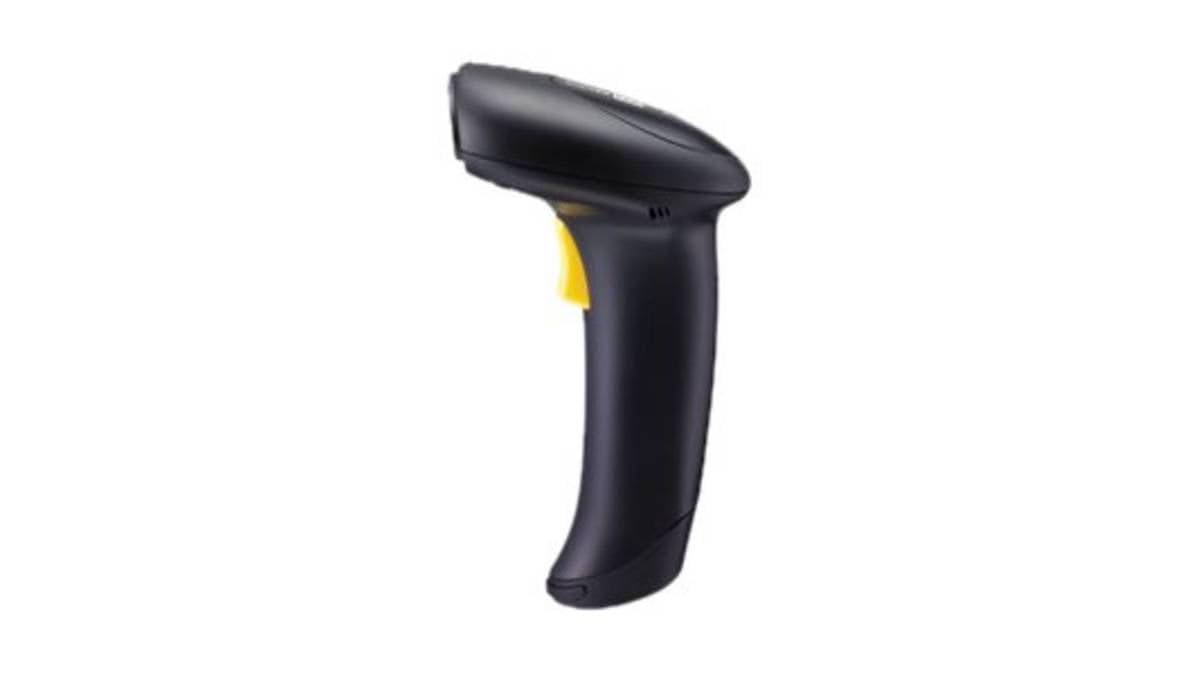
Figure 1: CipherLab 1500P HP 1D Corded Barcode Scanner with USB cable. This image displays the ergonomic design of the scanner and its wired connection.
4. Postavljanje
4.1 Spajanje skenera
- Locate an available USB port on your computer or host device.
- Connect the smaller end of the USB cable to the port at the base of the CipherLab 1500P HP scanner.
- Spojite veći kraj USB kabela na USB priključak na računalu.
- The scanner will power on automatically. Most operating systems will detect and install the necessary drivers automatically (Plug-and-Play).
4.2 Početni test
After connecting, open a text editor (e.g., Notepad, Word) or any application that accepts keyboard input. Scan a known barcode. The data should appear in the application. If not, refer to the Troubleshooting section.
5. Upravljanje skenerom
5.1 Osnovno skeniranje
- Držite skener udobno u ruci.
- Usmjerite prozor za skeniranje prema barkodu koji želite pročitati.
- Pritisnite i držite okidač. Pojavit će se crvena linija za ciljanje.
- Center the aiming line over the entire barcode.
- Once the barcode is successfully read, the scanner will emit a beep and the LED indicator will flash. Release the trigger button.
5.2 Scanning Feedback
- Uspješno čitanje: A short beep and a green LED flash.
- Neuspješno čitanje: No beep or flash, or a different error tone (refer to troubleshooting).
6. Održavanje
6.1 Čišćenje skenera
To maintain optimal scanning performance, keep the scanning window clean:
- Koristite meku krpu koja ne ostavlja dlačice dampoprati vodom ili blagom, neabrazivnom otopinom za čišćenje.
- Pažljivo obrišite prozor za skeniranje i vanjski dioasing.
- Ne koristite jake kemikalije, otapala ili abrazivne materijale jer mogu oštetiti skener.
6.2 Skladištenje
Kada se ne koristi, skener čuvajte na čistom i suhom mjestu, dalje od izravne sunčeve svjetlosti i ekstremnih temperatura.
7. Rješavanje problema
| Problem | Mogući uzrok | Otopina |
|---|---|---|
| Skener se ne uključuje. | USB kabel nije pravilno spojen ili je USB priključak neispravan. | Ensure the USB cable is securely connected to both the scanner and the computer. Try a different USB port. |
| Skener ne čita barkodove. | Barcode damaged, scanning window dirty, incorrect scanning angle, or scanner not configured for barcode type. | Ensure the barcode is clear and undamaged. Clean the scanning window. Adjust the scanning angle. Refer to the full programming manual for advanced configuration. |
| Skenirani podaci se prikazuju netočno. | Keyboard layout mismatch or incorrect data formatting. | Ensure your computer's keyboard layout matches the scanner's default or programmed layout. Consult the full programming manual for data formatting options. |
8. Specifikacije
- Broj modela: A1500PCBSU001
- Tehnologija povezivanja: USB kabel
- Izvor napajanja: USB kabel
- Kompatibilni uređaji: Stolno računalo, Prijenosno računalo
- Težina artikla: 10.93 funti
- Dimenzije paketa: 8 x 8 x 8 inča
- Proizvođač: CipherLab
9. Informacije o jamstvu
CipherLab products are manufactured to high quality standards. This product is covered by a limited warranty against defects in materials and workmanship. For specific warranty terms and conditions, please refer to the warranty card included with your product or visit the official CipherLab webmjesto.
10. Korisnička podrška
If you encounter issues not covered in this manual or require further assistance, please contact your vendor or visit the official CipherLab support website for up-to-date resources, FAQs, and contact information.