
Uvod
This manual provides detailed instructions for the installation, operation, and maintenance of your Venstar T1900 Residential Slimline Platinum Thermostat. Please read this manual thoroughly before attempting to install or operate the thermostat to ensure proper function and to avoid potential damage.
Važne sigurnosne informacije
- Uvijek isključite napajanje sustava grijanja/hlađenja na glavnom prekidaču ili kutiji s osiguračima prije ugradnje ili servisiranja termostata.
- Ovaj termostat radi na 24 V izmjenične struje. Ne spajajte ga na mrežu.tage (120V ili 240V).
- Installation should be performed by a qualified technician if you are unfamiliar with electrical wiring.
- Do not short circuit the terminals on the gas valve or at the system control to test the thermostat. This will damage the thermostat and void the warranty.
- Ensure all wiring connections are secure and insulated to prevent short circuits.
Sadržaj paketa
Provjerite sadrži li vaš paket sljedeće stavke:
- Venstar T1900 termostatska jedinica
- Pribor za montažu (vijci i tiple za zid)
- Korisnički priručnik (ovaj dokument)
Proizvod gotovview
The Venstar T1900 is a 7-day programmable digital thermostat designed for residential use. It offers precise temperature control and energy-saving scheduling capabilities. This thermostat is compatible with heat/cool, heat pump, and dual-fuel systems, controlling up to three heat stages i dva cool stages.
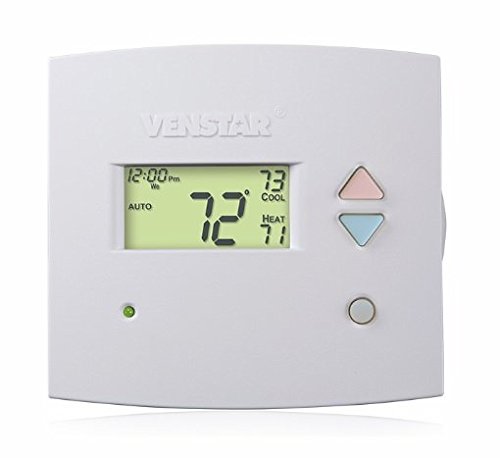
Slika 1: Ispred view of the Venstar T1900 Thermostat. This image displays the thermostat's LCD screen and control buttons, indicating its slimline design.
Ključne karakteristike:
- 7-dnevna programabilnost: Allows for customized heating and cooling schedules for each day of the week.
- Kompatibilnost sustava: Works with heat/cool, dual-fuel, and heat pump systems.
- Multi-Stage Kontrola: Manages up to three heat stages i dva cool stages.
- Mogućnost daljinskog upravljanja: Controllable by phone using an optional add-on (sold separately).
- Automatic or Manual Operation: Provides flexibility for scheduled or on-demand temperature adjustments.
Vodič za instalaciju
Potrebni alati:
- Odvijač (Phillips i/ili ravni)
- Drill with appropriate drill bit (if installing new wall anchors)
- Žica striptizete
- Olovka
- Razina (nije obavezno)
1. Isključite napajanje
Locate the circuit breaker or fuse box that controls your heating and cooling system. Turn off the power completely before proceeding with any wiring.
2. Uklonite stari termostat (ako je primjenjivo)
- Pažljivo uklonite poklopac starog termostata.
- Za referencu, fotografirajte postojeće ožičenje.
- Label each wire with the terminal designation it was connected to (e.g., R, G, Y, W).
- Disconnect the wires and remove the old thermostat's mounting plate from the wall.
3. Montirajte novo postolje termostata
- Separate the front cover of the T1900 thermostat from its base plate.
- Position the base plate on the wall where you want to install the thermostat. Ensure it is level.
- Olovkom označite rupe za pričvršćivanje.
- Po potrebi izbušite pilot rupe i umetnite sidra u zid.
- Secure the thermostat base plate to the wall using the provided screws.
4. Ožičenje
Connect the wires from your HVAC system to the corresponding terminals on the T1900 thermostat base. Refer to the wiring diagram provided with your specific HVAC system for precise connections. Ensure wires are stripped approximately 3/8 inch and securely fastened under the terminal screws.
Uobičajene oznake terminala:
- R/Rc/Rh: 24V Power (Heating/Cooling)
- C: Common (24V return)
- G: Ventilator
- Y/Y1: Kompresor Stage 1 (hlađenje)
- Y2: Kompresor Stage 2 (hlađenje)
- W/W1: Zagrijte Stage 1 (grijanje)
- W2: Zagrijte Stage 2 (grijanje)
- O / B: Reversing Valve (Heat Pumps)
Note: The T1900 supports various system types. Consult the detailed wiring diagrams in the full installation manual for specific configurations (e.g., heat pump with auxiliary heat, conventional multi-stage sustavi).
5. Pričvrstite termostat na bazu
Once wiring is complete and verified, carefully align the thermostat front cover with the mounted base plate and snap it into place.
6. Vratite napajanje
Return to your circuit breaker or fuse box and restore power to your heating and cooling system.
Početno postavljanje
Upon initial power-up, the thermostat may prompt you to configure basic settings. Follow the on-screen instructions to set the current date, time, and system type (e.g., Conventional, Heat Pump).
System Type Configuration:
It is crucial to correctly configure the thermostat for your specific HVAC system. Incorrect settings can lead to improper operation or damage. Access the installer settings menu (refer to the full installation guide for specific button sequences) to select:
- Vrsta sustava: Heat/Cool, Heat Pump, Dual Fuel
- Broj Heat Stages
- Broj Cool Stages
- Reversing Valve Operation: O (Cooling) or B (Heating)
Upute za rad
Razumijevanje zaslona:
The LCD screen displays the current temperature, set temperature, system mode, fan mode, time, and programming status. Refer to the icons and indicators on the screen for current operational status.
Setting System Mode:
Pritisnite tipku NAČIN RADA gumb za kretanje kroz dostupne načine rada sustava:
- TOPLINA: The system will operate to maintain the heating setpoint.
- HLAĐENJE: The system will operate to maintain the cooling setpoint.
- AUTOMOBIL: The thermostat automatically switches between heating and cooling as needed to maintain the set temperature range.
- OFF: Sustav grijanja i hlađenja je isključen.
Setting Fan Mode:
Pritisnite tipku FAN button to cycle through fan modes:
- AUTOMOBIL: Ventilator radi samo kada je aktivno uključen sustav grijanja ili hlađenja.
- NA: Ventilator radi neprestano, bez obzira na zahtjeve za grijanje ili hlađenje.
Podešavanje temperature:
Koristite UP i DOLJE arrow buttons to adjust the desired temperature setpoint. In programmable modes, this will temporarily override the schedule until the next scheduled change.
Raspored programa (7 dana):
The T1900 allows for 7-day programming, enabling different schedules for each day of the week. This feature helps save energy by adjusting temperatures when you are away or asleep.
- Pritisnite tipku PROGRAM gumb za ulazak u način programiranja.
- Koristite DAN button to select the day or group of days you wish to program (e.g., Mon-Fri, Sat-Sun, or individual days).
- Koristite VRIJEME button to cycle through the four available periods: Wake, Leave, Return, Sleep.
- Koristite UP i DOLJE arrow buttons to set the desired temperature for each period.
- Koristite DRŽI button to exit programming mode or save changes.
Refer to the detailed programming section in the full user guide for advanced options and specific button sequences.
Remote Control (Optional Add-on):
The Venstar T1900 thermostat can be controlled remotely via a phone using an optional add-on module (sold separately). This module connects to the thermostat and allows for remote access and control through a dedicated application. Installation and setup instructions for the remote control module are provided with the module itself.
Održavanje
Cleaning the Thermostat:
To maintain the appearance and functionality of your thermostat, periodically wipe the exterior with a soft, damp krpom. Nemojte koristiti abrazivna sredstva za čišćenje, otapala ili kemijske sprejeve jer mogu oštetiti plastiku i elektroničke komponente.
Zamjena baterije:
The Venstar T1900 thermostat does not require batteries for operation as it is powered by the 24V AC system.
Rješavanje problema
If you experience issues with your Venstar T1900 thermostat, consult the following common problems and solutions:
| Problem | Mogući uzrok | Otopina |
|---|---|---|
| Zaslon termostata je prazan | Nema napajanja termostata. | Check the circuit breaker for your HVAC system. Ensure all wiring connections are secure. |
| Sustav grijanja/hlađenja ne reagira | Incorrect system mode selected; wiring issue; system lockout. | Verify the system mode (HEAT/COOL/AUTO). Check wiring connections. Wait 5 minutes for system lockout to reset. |
| Očitavanje temperature čini se netočnim | Položaj termostata; začepljenost senzora. | Ensure the thermostat is not exposed to direct sunlight, drafts, or heat sources. Clean any dust from the thermostat vents. |
| Programming schedule is not working | Program not saved; temporary override active; incorrect time/day setting. | Ensure programs are saved. Check if a temporary override is active and cancel it. Verify current time and day settings. |
| Ventilator radi neprestano u AUTO načinu rada | Fan mode set to ON; wiring issue. | Press the FAN button to ensure it is set to AUTO. Check fan wiring. |
If these solutions do not resolve the issue, please contact customer support or a qualified HVAC technician.
Tehnički podaci
| Značajka | Specifikacija |
|---|---|
| Marka | Venstar |
| Naziv modela | Venstar T1900 |
| Vrsta kontrolera | Pritisni gumb |
| Posebna značajka | Programabilan |
| Boja | Bijela |
| Specifične namjene proizvoda | Heat Pump, Heater |
| Vrsta kontrole temperature | Programmable, Smart/Remote (with add-on) |
| Voltage | 24 V AC |
| Vrsta zaslona | LCD ili LED |
| Metoda kontrole | Remote (with add-on) |
| Pozadinsko osvjetljenje | Da |
| Dimenzije proizvoda | 5.3 x 2 x 2 inča |
| Težina artikla | 0.01 unci |
| Potrebne baterije? | Ne |
Informacije o jamstvu
Venstar products are manufactured to high-quality standards. This product is covered by a limited warranty against defects in materials and workmanship. The specific terms and duration of the warranty may vary. Please refer to the warranty card included with your product or visit the official Venstar webstranicu za detaljne informacije o jamstvu i postupke registracije.
Korisnička podrška
For technical assistance, troubleshooting, or warranty inquiries, please contact Venstar customer support. You can typically find contact information, including phone numbers and email addresses, on the official Venstar webweb mjesto (www.venstar.com) ili na pakiranju proizvoda.
When contacting support, please have your thermostat model number (T1900) and any relevant purchase information ready.