
Važne sigurnosne upute
PRIJE UPOTREBE PAŽLJIVO PROČITAJTE SVE UPUTE.
- Uvijek isključite ventilator iz utičnice prije čišćenja, servisiranja ili premještanja.
- Ne gurajte prste ili bilo koje druge predmete kroz rešetku dok ventilator radi.
- Nemojte koristiti ventilator s oštećenim kabelom ili utikačem. Bacite ventilator ili ga vratite u ovlašteni servis na pregled i/ili popravak.
- Nemojte provlačiti kabel ispod tepiha. Nemojte pokrivati kabel prostirkama, stazama ili sličnim pokrivalima. Postavite kabel dalje od područja prometa i na mjesto gdje se neće spotaknuti.
- Ne koristite ventilator na mokrom ili damp mjesta kao što su kupaonice ili praonice rublja.
- Ovaj ventilator je namijenjen samo za unutarnju upotrebu. Ne koristite ga na otvorenom.
- Keep the fan away from curtains, drapes, or any objects that may get caught in the fan blades.
- Nadzirite djecu dok je ventilator u upotrebi.
Proizvod gotovview
The Optimus 18-inch High Velocity Industrial Floor Fan is designed to provide powerful air circulation in various indoor environments. Its robust construction and high-velocity motor make it suitable for workshops, garages, and large rooms.
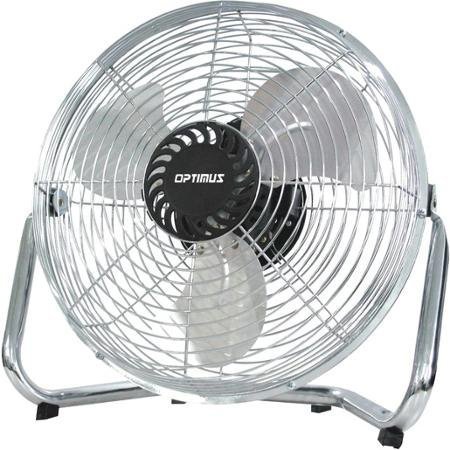
Image: Optimus 18-inch High Velocity Industrial Floor Fan. This image shows the fan with its silver metallic finish and sturdy floor stand.
Ključne karakteristike:
- 18-inch diameter for wide air distribution.
- Industrial-grade high velocity airflow.
- Durable metallic finish.
- Floor standing design for stable placement.
- Multiple power levels for adjustable airflow.
Upute za postavljanje
- Raspakirajte ventilator: Carefully remove the fan and all components from the packaging. Retain packaging for future storage or transport.
- Assemble the Floor Stand:
- Attach the fan head to the floor stand using the provided screws and tools. Ensure all connections are secure.
- Verify the fan head can pivot smoothly on the stand.
- Plasman: Place the fan on a firm, level surface. Ensure there is adequate space around the fan for proper air circulation and to prevent obstruction of the air intake/output. Keep the fan at least 3 feet away from walls or furniture.
- Priključak za napajanje: Ensure the fan is in the "OFF" position before plugging it into a standard 120V AC electrical outlet.
Upute za rad
This fan features push-button controls for easy operation. A remote control may also be included for convenience.
- Uključivanje/isključivanje: Locate the power button on the control panel. Press the button once to turn the fan ON. Press it again to turn the fan OFF.
- Podešavanje brzine ventilatora: The fan has 4 power levels. After turning the fan ON, repeatedly press the speed control button to cycle through the available speed settings (Low, Medium, High, Max). The fan will operate at the selected speed.
- Podešavanje smjera strujanja zraka: The fan head can be tilted manually to direct airflow upwards or downwards. Gently tilt the fan head to the desired angle. Do not force the fan head beyond its intended range of motion.
Održavanje
Regular cleaning and maintenance will ensure optimal performance and extend the life of your fan.
- Čišćenje ventilatora:
- Prije čišćenja uvijek isključite ventilator iz struje.
- Koristite meku, damp krpom za brisanje vanjskih površina ventilatora. Nemojte koristiti abrazivna sredstva za čišćenje ili jake kemikalije jer mogu oštetiti završnu obradu.
- To clean the fan blades, carefully remove the front grille (if detachable, refer to assembly instructions for details). Wipe the blades with a soft cloth. Ensure the grille is securely reattached before operating the fan.
- Prije ponovnog spajanja ventilatora provjerite jesu li svi dijelovi potpuno suhi.
- Skladištenje: Kada se ventilator ne koristi dulje vrijeme, čuvajte ga na hladnom i suhom mjestu. Preporučuje se čuvanje u originalnoj ambalaži kako biste ga zaštitili od prašine i oštećenja.
Rješavanje problema
| Problem | Mogući uzrok | Otopina |
|---|---|---|
| Ventilator se ne uključuje. | Not plugged in; power outlet not working; fan switch is off. | Ensure fan is securely plugged into a working outlet. Check household fuse/circuit breaker. Press the power button to turn the fan on. |
| Nizak protok zraka. | Fan speed set too low; obstructed intake/output; dirty blades. | Increase fan speed. Clear any obstructions. Clean fan blades and grilles as per maintenance instructions. |
| Neobična buka ili zveckanje. | Loose parts; fan not on a level surface; foreign object in blades. | Unplug the fan and check for any loose screws or components. Place the fan on a stable, level surface. Carefully inspect for and remove any foreign objects. |
Tehnički podaci
| Značajka | Detalj |
|---|---|
| Marka | Optimus |
| Naziv modela | Velika brzina |
| Broj modela artikla | 306c1b92-f36b-4ccc-ac62-2ad33d5c9efb |
| Promjer | 18 inča |
| Boja | Srebro |
| Stil | Industrijski |
| Izvor napajanja | Električni na kabel |
| Broj razina snage | 4 |
| Metoda kontrole | Kontrola gumba |
| Unutarnja/vanjska upotreba | Zatvoreni |
| Uključene komponente | Floor Stand, Remote Control |
| Specifikacija ispunjena | OSHA |
Jamstvo i podrška
Optimus products are manufactured to high-quality standards. This product is covered by a limited warranty against defects in materials and workmanship from the date of purchase. Please refer to the warranty card included with your product for specific terms and conditions.
For technical support, troubleshooting assistance, or warranty claims, please contact Optimus customer service. Contact information can typically be found on the product packaging or the official Optimus webmjesto.
Molimo sačuvajte dokaz o kupnji u svrhu jamstva.