
Uvod
Hvala na kupnjiasing the QUMOX L165U 2.4GHz Wireless Gamepad. This high-quality game controller is designed for use with PC and Android devices, offering a reliable 2.4GHz wireless connection for an enhanced gaming experience. Please read this manual carefully to ensure proper setup and operation of your new gamepad.

Figure 1: QUMOX L165U Gamepad with included USB adapter and OTG connection kit.
Sadržaj paketa
Provjerite jesu li svi artikli prisutni u vašem paketu:
- 1x QUMOX L165U Gamepad
- 1x 2.4GHz USB Wireless Adapter
- 1x OTG Connection Kit (Micro USB to USB-A adapter)
Postavljanje
1. Ugradnja baterije
The QUMOX L165U Gamepad is powered by 2 AAA batteries (not included). To install the batteries:
- Locate the battery compartment on the back of the gamepad.
- Otvorite poklopac baterije.
- Umetnite 2 AAA baterije, pazeći na ispravan polaritet (+/-).
- Čvrsto zatvorite poklopac baterije.

Figure 2: Open battery compartment for AAA battery installation.
2. Spajanje na PC
- Plug the 2.4GHz USB Wireless Adapter into an available USB port on your PC.
- Turn on the gamepad by pressing the 'START' button. The gamepad will automatically attempt to connect.
- The PC should recognize the gamepad and install necessary drivers automatically.
- If the gamepad does not connect, press the 'MODE' button on the gamepad to cycle through connection modes until it is recognized by your PC.
3. Connecting to an Android Device (with OTG support)
- Connect the OTG Connection Kit to your Android device's Micro USB port.
- Plug the 2.4GHz USB Wireless Adapter into the USB-A end of the OTG Connection Kit.
- Turn on the gamepad by pressing the 'START' button. The gamepad will automatically attempt to connect.
- Your Android device should recognize the gamepad.
- If the gamepad does not connect, press the 'MODE' button on the gamepad to cycle through connection modes until it is recognized by your Android device.
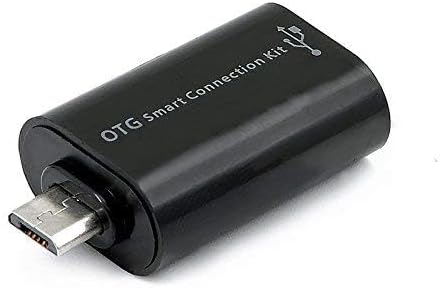
Figure 3: OTG Connection Kit for Android device connectivity.
Upute za rad
Once connected, your QUMOX L165U Gamepad is ready for use. The layout is standard for most game controllers.
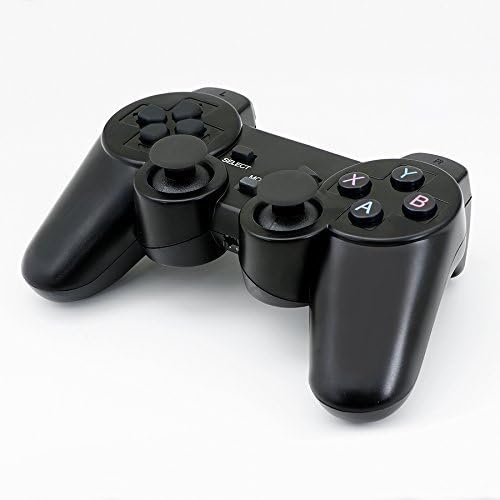
Slika 4: Vrh view of the QUMOX L165U Gamepad, highlighting button layout.
- Smjerna tipka (D-Pad): Za precizan smjerni unos.
- Analogne upravljačke palice: Dva analogna sticka za kretanje od 360 stupnjeva i upravljanje kamerom.
- Akcijski gumbi (A, B, X, Y): Standardne akcijske tipke za naredbe u igri.
- Shoulder Buttons (L1, R1) & Triggers (L2, R2): Located on the top of the gamepad for additional actions.
- Tipka ODABERI/NATRAG: Obično se koristi za navigaciju izbornikom ili specifične funkcije u igri.
- Gumb START: Used to pause games or confirm selections.
- Gumb MODE: Cycles through different operating modes (e.g., Android, PC) if automatic detection fails.
Video demonstracija
Video 1: Prodavatelj osigurava više odview of a 2-pack wireless controller, demonstrating its features and compatibility. While showing a similar product, it illustrates general wireless controller usage and setup.
Održavanje
- Čišćenje: Za čišćenje kontrolera za igre koristite meku, suhu krpu. Izbjegavajte upotrebu jakih kemikalija ili abrazivnih materijala.
- Skladištenje: Gamepad čuvajte na hladnom i suhom mjestu, dalje od izravne sunčeve svjetlosti i ekstremnih temperatura.
- Njega baterije: Izvadite baterije ako se gamepad neće koristiti dulje vrijeme kako biste spriječili curenje.
Rješavanje problema
| Problem | Mogući uzrok | Otopina |
|---|---|---|
| Gamepad does not connect. | Low batteries, incorrect mode, adapter not properly inserted. | Replace batteries. Press the 'MODE' button to cycle through modes. Ensure USB adapter is fully inserted into PC or OTG adapter. |
| Gumbi ili joystickovi ne reagiraju. | Connection issue, game incompatibility, physical damage. | Reconnect the gamepad. Check game settings for controller support. If issue persists, contact support. |
| Android device does not recognize gamepad. | Android device lacks OTG support, OTG adapter issue. | Verify your Android device supports OTG. Ensure OTG adapter is functioning correctly. |
Tehnički podaci
| Značajka | Detalj |
|---|---|
| Broj modela | L165U |
| Tehnologija povezivanja | 2.4GHz Wireless (via USB Adapter) |
| Kompatibilni uređaji | PC, Android (with OTG support) |
| Izvor napajanja | 2x AAA baterije |
| Težina artikla | 5.3 unci |
| Dimenzije paketa | 8.07 x 5.63 x 2.95 inča |
| Boja | Crna |
Jamstvo i podrška
For warranty information or technical support, please refer to the contact details provided with your purchase or visit the official QUMOX webstranicu. Sačuvajte dokaz o kupnji za bilo kakve reklamacije u jamstvenom roku.