
1. Uvod
The Imperial DABMAN i400 is a versatile audio adapter designed to enhance your existing stereo system with modern radio and streaming capabilities. It provides access to thousands of internet radio stations, digital radio (DAB+), and traditional FM radio. Additionally, it supports audio streaming via Bluetooth, UPnP/DLNA, and USB, offering a comprehensive listening experience.
2. Sigurnosne upute
- Napajanje: Koristite samo priloženi adapter za napajanje. Provjerite glasnoćutage odgovara vašoj lokalnoj opskrbi strujom.
- Voda i vlaga: Ne izlažite uređaj kiši, vlazi ili kapanju/prskanju tekućina. Ne stavljajte predmete napunjene tekućinama, poput vaza, na uređaj.
- Ventilacija: Ensure adequate ventilation. Do not block ventilation openings. Avoid placing the device on soft surfaces that may obstruct airflow.
- Izvori topline: Uređaj držite dalje od izvora topline kao što su radijatori, grijalice, peći ili drugi uređaji koji proizvode toplinu.
- Čišćenje: Isključite napajanje prije čišćenja. Koristite meku, suhu krpu. Nemojte koristiti tekuća ili aerosolna sredstva za čišćenje.
- Servisiranje: Ne pokušavajte sami servisirati ovaj proizvod. Sve servise prepustite kvalificiranom servisnom osoblju.
3. Sadržaj paketa
Molimo provjerite jesu li svi artikli prisutni u paketu:
- Imperial DABMAN i400 Internet Digital Radio
- Adapter napajanja
- Telescopic Antenna with F-connector
- Wire Antenna with F-connector
- RCA kabel
- Audio kabel (3.5 mm priključak)
- Daljinski upravljač
- Korisnički priručnik (ovaj dokument)

Image: Imperial DABMAN i400 with its power adapter, telescopic antenna, wire antenna, RCA cable, 3.5mm audio cable, and remote control.
4. Proizvod je gotovview
Ispred View

Image: The front of the Imperial DABMAN i400, showing its display and control buttons on the top edge.
The front of the DABMAN i400 features a clear 3.2-inch LCD display for navigation and information. Control buttons are located on the top edge of the device for easy access to functions like power, mode selection, volume, and station presets.
Stražnji View i Veze
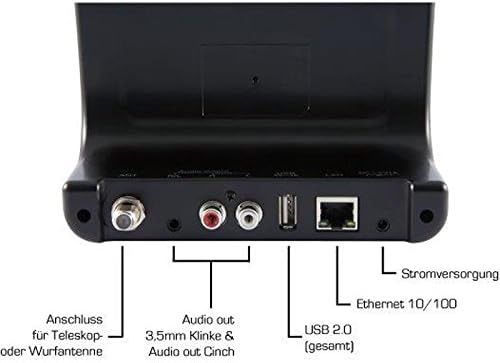
Image: The rear panel of the Imperial DABMAN i400, detailing its various connection ports. From left to right: Antenna connection (ANT), Audio output (RCA L/R and 3.5mm jack), USB 2.0 ports, Ethernet 10/100 (LAN), and Power supply (DC 5V/1A).
- MRAV: F-connector for connecting the telescopic or wire antenna for DAB+/FM reception.
- Audio Output (R/L): RCA (Cinch) stereo audio output for connecting to an amplifier ili stereo sustav.
- Audio izlaz (3.5 mm priključak): 3.5mm stereo audio output for connecting to other audio devices.
- USB 2.0: USB port for playing media from a USB storage device.
- LAN: Ethernet port (RJ45) for wired network connection.
- DC 5V/1A: Ulaz za napajanje za priloženi adapter za napajanje.
5. Postavljanje
- Spojite antenu: Screw the telescopic antenna or connect the wire antenna to the MRAV F-connector on the rear panel. Extend the telescopic antenna for optimal reception.
- Povežite se s audio sustavom: Use the provided RCA cable to connect the Audio Output (R/L) on the DABMAN i400 to an available audio input (e.g., AUX, CD, LINE IN) on your amplifier or stereo system. Alternatively, use the 3.5mm audio cable if your system has a compatible input.
- Mrežna veza:
- Žični (LAN): Spojite Ethernet kabel s vašeg rutera na LAN port on the rear of the DABMAN i400.
- Wireless (WLAN): The device will prompt you to set up Wi-Fi during the initial startup wizard. Select your network and enter the password.
- Priključite napajanje: Priključite strujni adapter u DC 5V/1A input on the rear panel, then plug the adapter into a wall outlet. The device will power on automatically or enter standby mode.
- Čarobnjak za početno postavljanje: Upon first power-on, the device will guide you through an initial setup process, including language selection, time/date settings, and network configuration. Follow the on-screen instructions.
6. Upute za rad
Osnovna navigacija
Use the control buttons on the top of the device or the remote control to navigate menus, select options, adjust volume, and change modes.
Odabir načina rada
Press the 'Mode' button (or equivalent on remote) to switch between available modes:
- Internet radio: Access thousands of online radio stations worldwide. Browse by genre, location, or search for specific stations.
- DAB+ digitalni radio: Enjoy high-quality digital radio broadcasts. The device will scan for available stations in your area.
- FM radio: Slušajte tradicionalne analogne FM radio stanice.
- Bluetooth: Stream audio wirelessly from your Bluetooth-enabled smartphone, tablet, or computer.

Image: Bluetooth connectivity icon.
To pair: Select Bluetooth mode on the DABMAN i400. On your external device, search for available Bluetooth devices and select 'DABMAN i400'.
- UPnP/DLNA: Strimirajte glazbu files from compatible devices on your local network (e.g., a network-attached storage (NAS) drive or a computer running a media server).

Image: UPnP (Universal Plug & Play) icon.
- USB reprodukcija: Reproduciraj zvuk files (e.g., MP3) from a USB flash drive connected to the USB port on the rear of the device.

Image: MP3 music file ikona.
Unaprijed postavljene postavke
Save your favorite stations as presets for quick access. Refer to the on-screen menu for instructions on how to save and recall presets.
Air Music Control App
Control your DABMAN i400 using the Air Music Control App available for smartphones and tablets. This app allows for convenient remote control and browsing of stations.

Image: Air Music Control App icon.
7. Održavanje
- Čišćenje: Wipe the device with a soft, dry, lint-free cloth. Do not use abrasive cleaners, waxes, or solvents.
- Ažuriranja softvera: Periodically check for available software updates through the device's system settings menu to ensure optimal performance and access to new features.
- Skladištenje: Ako uređaj skladištite dulje vrijeme, isključite ga iz struje i pohranite ga na hladnom i suhom mjestu.
8. Rješavanje problema
- Bez napajanja:
- Provjerite je li adapter za napajanje sigurno spojen na uređaj i ispravnu utičnicu.
- Pokušajte s drugom utičnicom.
- Nema zvuka:
- Check the volume level on both the DABMAN i400 and your connected audio system.
- Ensure the audio cables are correctly connected to the appropriate input on your audio system.
- Verify that your audio system is set to the correct input source.
- Cannot Connect to Wi-Fi/Internet:
- Provjerite je li vaš Wi-Fi ruter uključen i ispravno radi.
- Dvaput provjerite lozinku za Wi-Fi.
- Try moving the device closer to your Wi-Fi router or use a wired LAN connection.
- Restart your router and the DABMAN i400.
- Loš DAB+/FM prijem:
- Ensure the antenna is fully extended and positioned for optimal reception.
- Try repositioning the device or antenna.
- Check if you are in an area with good DAB+ or FM coverage.
- Problemi s Bluetooth uparivanjem:
- Ensure the DABMAN i400 is in Bluetooth pairing mode.
- Provjerite je li Bluetooth na vašem vanjskom uređaju omogućen i vidljiv.
- Move your external device closer to the DABMAN i400.
- Pokušajte odvojiti i ponovno upariti uređaje.
9. Specifikacije
| Značajka | Specifikacija |
|---|---|
| Marka | Carski |
| Broj modela | 22-241-00 |
| Boja | Crna |
| Veličina zaslona | 3.2 inča |
| Tehnologija povezivanja | Bluetooth, LAN (Ethernet), WLAN (Wi-Fi), RCA (Cinch) L/R, 3.5mm Audio Jack |
| Posebne značajke | Portable (as an adapter), Internet Radio, DAB+, FM, UPnP/DLNA |
| Ukupno USB priključaka | 1 |
| Kompatibilni uređaji | Bluetooth devices, UPnP/DLNA compatible devices |
| Izvor napajanja | AC (via power adapter) |
| Podržani radio opsezi | FM, DAB, DAB+, internetski radio |
| Dimenzije proizvoda | 15 D x 8.1 Š x 14 V centimetara |
| Uključene komponente | Power Adapter, Telescopic Antenna, Wire Antenna, RCA Cable, Audio Cable, Remote Control, User Manual |
| Podržani jezici | German, English, French, Dutch |
10. Jamstvo i podrška
Jamstvo proizvođača
The Imperial DABMAN i400 comes with a manufacturer's warranty. Please refer to the warranty card included in your package or the manufacturer's official website for specific terms and conditions. Spare parts availability is guaranteed for 1 year.
Korisnička podrška
For technical assistance, troubleshooting beyond this manual, or warranty claims, please contact Imperial customer support. Contact information can typically be found on the manufacturer's webmjestu ili pakiranju proizvoda.