
Instapark PWT-07
Instapark PWT-07 Digital Programmable Water Timer User Manual
Model: PWT-07
Uvod
This manual provides detailed instructions for the setup, operation, maintenance, and troubleshooting of your Instapark PWT-07 Digital Programmable Water Timer. Please read this manual thoroughly before using the device to ensure proper function and longevity.
Sigurnosne informacije
- Use only 1.5V AA alkaline batteries. Do not mix old and new batteries, or different battery types.
- Provjerite je li odjeljak za baterije sigurno zatvoren kako biste održali vodootpornost IP66.
- Do not expose the timer to extreme temperatures or direct sunlight for prolonged periods, which may affect battery life and device performance.
- Disconnect the timer from the faucet and drain it before freezing temperatures to prevent damage.
- This device is designed for outdoor use with standard ¾” (GHS) threaded faucets.
Sadržaj paketa
Provjerite jesu li svi artikli prisutni u paketu:
- Instapark PWT-07 Water Timer
- Korisnički priručnik (ovaj dokument)
- Jamstveni list
Note: 2 AA alkaline batteries are required and not included.
Značajke proizvoda
- Single-station digital programmable faucet water timer.
- Impulse solenoid valve for reliable operation.
- Compatible with standard ¾” (GHS) threaded outdoor hose faucets.
- User-friendly interface with a single oversized rotary dial and 4 pushbuttons.
- Large, easy-to-read LCD display (2.1” x 1”).
- Ocjena vodootpornosti: IP66.
- Built-in rain delay function (24, 48, or 72 hours).
- Manual watering option without interrupting programmed schedules.
- Detachable battery compartment for easy battery replacement.
- Low power consumption, up to 4,000 on/off cycles per battery set.
Postavljanje
1. Ugradnja baterije
The Instapark PWT-07 requires two (2) 1.5V AA alkaline batteries (not included).
- Pronađite odjeljak za baterije na stražnjoj strani timera.
- Pomaknite poklopac odjeljka za baterije prema dolje da biste ga otvorili.
- Umetnite dvije nove AA alkalne baterije, pazeći na ispravan polaritet (+/-).
- Vratite poklopac odjeljka za baterije na mjesto dok ne klikne sigurno.
- The LCD display should illuminate, indicating successful battery installation. If the display shows a low battery indicator, remove the batteries, wait for the screen to go completely dark, then reinsert them.
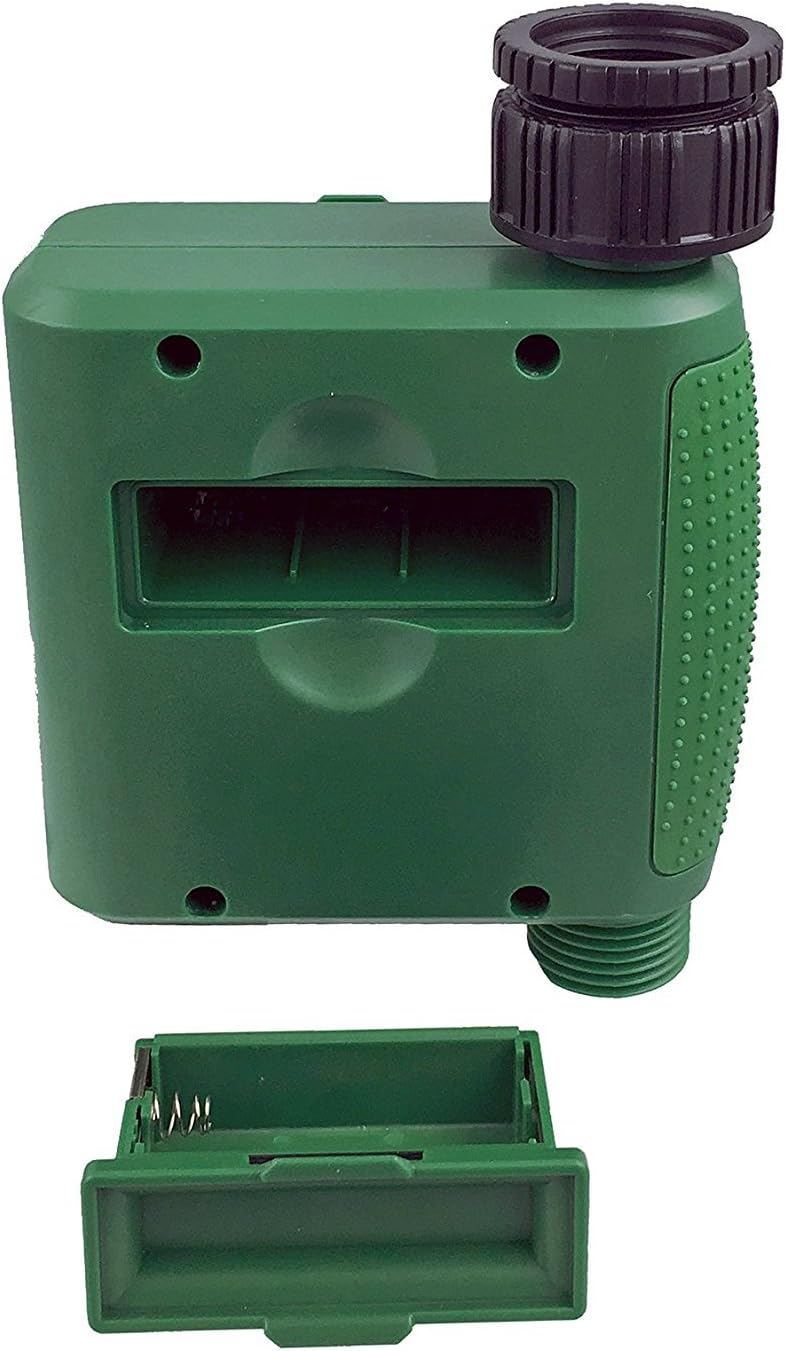
Slika 1: Pretinac za baterije s uklonjenim poklopcem.
2. Mounting the Timer
Attach the timer to your outdoor faucet:
- Ensure the faucet is clean and free of debris.
- Screw the timer's inlet (top connector) onto a standard ¾” (GHS) outdoor hose faucet. Hand-tighten only to prevent damage. Do not overtighten.
- Connect your garden hose or irrigation system to the timer's outlet (bottom connector). Hand-tighten securely.
- Turn on the faucet fully. The timer is designed to operate under pressure.

Figure 2: Instapark PWT-07 mounted on a faucet.
Upute za rad
The timer features a large rotary dial and four buttons: SET, +, -, i PRIRUČNIK.

Figure 3: Control panel and LCD display.
1. Postavljanje trenutnog vremena
- Okrenite okretni regulator na POSTAVITE SAT.
- Koristite + i - buttons to adjust the current hour. Press SET potvrditi.
- Koristite + i - buttons to adjust the current minute. Press SET potvrditi.
2. Programming Watering Schedule
The timer allows you to set a start time, duration, and frequency for watering.
Postavite vrijeme početka:
- Okrenite okretni regulator na VRIJEME POČETKA.
- Koristite + i - buttons to set the desired watering start hour. Press SET potvrditi.
- Koristite + i - buttons to set the desired watering start minute. Press SET potvrditi.
Postavi koliko dugo (Trajanje):
- Okrenite okretni regulator na KOLIKO DUGO.
- Koristite + i - buttons to set the watering duration (from 5 seconds to 360 minutes). Press SET potvrditi.
Postavi koliko često (Učestalost):
- Okrenite okretni regulator na KOLIKO ČESTO.
- Koristite + i - buttons to select the watering frequency (e.g., every 10 seconds, 30 seconds, 1 minute, 3 minutes, 5 minutes, 1 hour, 2 hours, 4 hours, 12 hours, 1 day, 2 days, 3 days, 4 days, 5 days, 6 days, 7 days). Press SET potvrditi.
After setting all parameters, turn the rotary dial to TRČANJE za aktiviranje programiranog rasporeda.
3. Ručno zalijevanje
To water manually without affecting your programmed schedule:
- Provjerite je li brojčanik postavljen na TRČANJE or ISKLJUČENO.
- Pritisnite tipku PRIRUČNIK button. The display will show a default manual watering duration.
- Koristite + i - buttons to adjust the desired manual watering duration.
- Pritisnite SET to start manual watering. The timer will run for the selected duration and then automatically shut off.
- Za prerano zaustavljanje ručnog zalijevanja pritisnite PRIRUČNIK ponovno gumb.
4. Funkcija odgode kiše
The rain delay function allows you to pause your watering schedule for a set period without losing your program settings.
- Provjerite je li brojčanik postavljen na TRČANJE.
- Pritisnite i držite - button for 3 seconds. The display will show "DELAY" and a default delay duration.
- Koristite + i - buttons to select a delay duration of 24, 48, or 72 hours.
- Pritisnite SET to activate the rain delay. The timer will resume its programmed schedule after the delay period ends.
- To cancel the rain delay, press and hold the - ponovno pritisnite gumb na 3 sekundi.
Održavanje
- Zamjena baterije: Replace batteries when the low battery indicator appears on the LCD. Always use new AA alkaline batteries.
- Čišćenje: Obrišite mjerač vremena s oglasomamp tkanina. Nemojte koristiti abrazivna sredstva za čišćenje ili otapala.
- Zimovanje: Before the first frost, disconnect the timer from the faucet. Remove the batteries and store the timer indoors in a dry, frost-free location. Failure to do so may result in damage from freezing water.
- Zaslon filtera: Periodically check the filter screen inside the inlet connector for debris. Clean if necessary to ensure proper water flow.
Rješavanje problema
| Problem | Mogući uzrok | Otopina |
|---|---|---|
| Timer does not turn on / LCD is blank. | Prazne ili nepravilno instalirane baterije. | Replace with new AA alkaline batteries, ensuring correct polarity. If still blank, remove batteries, wait for screen to fully clear, then reinsert. |
| Water does not turn on at scheduled time. |
|
|
| Water does not turn off. |
|
|
| Curenje vode iz spojeva. |
|
|
| Low battery indicator flashes even with new batteries. | Firmware not booting correctly after battery change. | Remove batteries, wait for the LCD screen to go completely dark (may take a few minutes), then reinsert new batteries. |
Tehnički podaci
| Model | PWT-07 |
| Izvor napajanja | 2 x 1.5 V AA alkalne baterije (nisu uključene) |
| Vrsta ventila | Impulsni solenoidni ventil |
| Radni pritisak vode | 14.5 do 116 psi |
| Struja pripravnosti | <100 µA |
| Watering Frequency Settings | 10s, 30s, 1m, 3m, 5m, 1h, 2h, 4h, 12h, 1d, 2d, 3d, 4d, 5d, 6d, 7d (16 settings) |
| Watering Duration Settings | 5s, 10s, 15s, 20s, 25s, 30s, 35s, 40s, 45s, 50s, 55s, 1-360m |
| Format prikaza vremena | 24 sat |
| Ocjena vodootpornosti | IP66 |
| Materijal | ABS plastika |
| Dimenzije proizvoda | 4.25"D x 6"Š x 2.6"V |
| Težina artikla | 14.2 unci |
Jamstvo i podrška
The Instapark PWT-07 Digital Programmable Water Timer is backed by a standard 1-year manufacturer's warranty from the date of purchase. This warranty covers defects in materials and workmanship under normal use.
For warranty claims, technical support, or any questions regarding your product, please contact Instapark customer service. Please have your purchase receipt and product model number (PWT-07) available when contacting support.
Contact information for Instapark customer service can typically be found on the manufacturer's webstranicu ili vašu dokumentaciju o kupnji.
Ask a question about this manual
Ask about setup, troubleshooting, compatibility, parts, safety, or missing instructions. Manuals+ will review the question and use this page’s manual context to help answer it.