
Uvod
This manual provides comprehensive instructions for the setup, operation, and maintenance of your GPX Digital AM/FM Clock Radio, model C224B. Please read this manual thoroughly before using the device to ensure proper functionality and to maximize your user experience. Keep this manual for future reference.
Proizvod gotovview
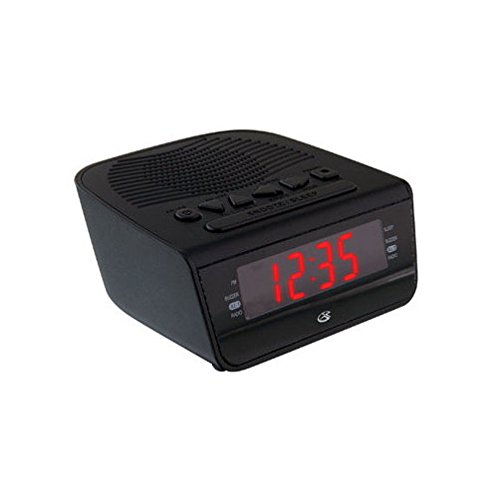
Slika 1: Ispred view of the GPX Digital AM/FM Clock Radio. This image shows the compact black unit with its digital display and control buttons.
The GPX Digital AM/FM Clock Radio (C224B) is designed for reliable timekeeping and audio entertainment. Key features include a clear multi-display clock, AM/FM radio tuner, dual alarm functionality, and a battery backup option to ensure continuous operation during power interruptions. Its compact and modern design makes it suitable for various indoor settings.
Postavljanje
1. Raspakiranje
Carefully remove the clock radio from its packaging. Ensure all components are present: the clock radio unit and the power adapter.
2. Priključak za napajanje
- Plug the power adapter into the DC input jack located on the back of the clock radio.
- Plug the other end of the power adapter into a standard wall outlet (AC 120V, 60Hz).
- Zaslon će se osvijetliti, što označava da uređaj prima napajanje.
3. Ugradnja rezervne baterije (opcionalno)
Za rezervno napajanje tijekom vanjsketages, install batteries (not included).
- Pronađite odjeljak za baterije na dnu uređaja.
- Otvorite poklopac odjeljka za baterije.
- Insert the required batteries (e.g., 2 x AAA, check unit for specific type) according to the polarity markings (+ and -).
- Čvrsto zatvorite poklopac odjeljka za baterije.
Bilješka: Batteries are for backup only and will not power the display or radio functions continuously. They preserve time and alarm settings during a power interruption.
Upute za rad
1. Postavljanje vremena
- Pritisnite i držite POSTAVLJENO VRIJEME gumb dok zaslon ne zatreperi.
- Koristite SAT i MINUTA tipke za podešavanje vremena.
- Pritisnite POSTAVLJENO VRIJEME ponovno za potvrdu i izlaz iz načina podešavanja vremena.
2. Postavljanje alarma (Alarm 1 i Alarm 2)
This unit features dual alarms, allowing you to set two independent wake-up times.
- Pritisnite i držite ALARM 1 SET (ili ALARM 2 SET) button until the alarm time flashes.
- Koristite SAT i MINUTA buttons to adjust the desired alarm time.
- Pritisnite ALARM 1 SET (ili ALARM 2 SET) again to confirm the time.
- Immediately after confirming the time, use the NAČIN ALARMA button to select the alarm source: ZVUČNIK or RADIO.
- The alarm icon (e.g., AL1 or AL2) will appear on the display, indicating the alarm is active.
To turn off an alarm, press the corresponding ALARM 1 ON/OFF (ili ALARM 2 ON/OFF) button. The alarm icon will disappear.
3. Rad AM/FM radija
- Pritisnite tipku RADIO UKLJUČIVANJE/ISKLJUČIVANJE gumb za uključivanje radija.
- Pritisnite tipku BAND gumb za prebacivanje između AM i FM frekvencijskih područja.
- Koristite UGODITE + or TUNE - tipke za ručno podešavanje željene stanice.
- To automatically scan for the next available station, press and hold UGODITE + or TUNE - na nekoliko sekundi.
- Podesite glasnoću pomoću VOLUMEN + or GLASNOĆA - gumbi.
- Da biste isključili radio, pritisnite RADIO UKLJUČIVANJE/ISKLJUČIVANJE ponovno gumb.
4. Funkcija odgode alarma
Kada se oglasi alarm, pritisnite tipku DRIJEMEŽ gumb za privremeno utišavanje alarma na otprilike 9 minuta. Alarm će se ponovno oglasiti nakon razdoblja odgode.
5. Funkcija spavanja
Funkcija spavanja omogućuje radiju da svira određeno vrijeme prije automatskog isključivanja.
- Dok radio svira, pritisnite tipku SPAVATI više puta pritisnite tipku za odabir dostupnih vremena spavanja (npr. 90, 60, 30, 15 minuta, ISKLJUČENO).
- Radio će se automatski isključiti nakon odabranog vremena.
Održavanje
1. Čišćenje
To clean the unit, wipe the exterior with a soft, slightly damp cloth. Do not use abrasive cleaners or solvents, as these may damage the finish. Ensure the unit is unplugged before cleaning.
2. Zamjena baterije
If the battery backup function is not working, or if the unit loses time during a power outage, the backup batteries may need replacement. Follow the "Battery Backup Installation" steps in the Setup section to replace them.
Rješavanje problema
| Problem | Mogući uzrok | Otopina |
|---|---|---|
| Jedinica se ne uključuje. | Adapter za napajanje nije spojen ili je utičnica neispravna. | Provjerite je li adapter za napajanje sigurno priključen u uređaj i ispravnu zidnu utičnicu. Pokušajte s drugom utičnicom. |
| Alarm se ne oglašava. | Alarm nije postavljen, glasnoća alarma je preniska ili je alarm isključen. | Verify alarm time and source (buzzer/radio) are set correctly. Ensure alarm is activated (icon visible). Increase radio volume if alarm source is radio. |
| Loš radio prijem. | Slab signal ili smetnje. | Adjust the position of the unit or the antenna (if external). Move away from other electronic devices that may cause interference. |
| Izgubljeno vrijeme/postavke nakon nestanka strujetage. | Rezervne baterije su prazne ili nisu instalirane. | Install fresh backup batteries or replace existing ones. |
Tehnički podaci
- Model: C224B
- Izvor napajanja: AC 120V, 60Hz (main); Battery Powered (backup)
- Vrsta zaslona: LED digitalni zaslon
- Radio pojasevi: AM/FM
- Dimenzije (cca): 5.12" Š x 5.12" V
- Težina (približno): 3 funti
- Boja: Crna
- Materijal: Plastični
Jamstvo i podrška
Za informacije o jamstvu ili tehničku podršku, pogledajte jamstveni list koji je priložen uz vaš proizvod ili posjetite službenu GPX stranicu. website. Do not attempt to repair this unit yourself, as this may void your warranty.
GPX Official Webstranica: www.gpx.com