
1. Uvod
This manual provides essential information for setting up, operating, maintaining, and troubleshooting your Microsoft Surface Pro Model 1796. The Surface Pro is a versatile 2-in-1 device designed to function as both a high-performance laptop and a portable tablet. Please read these instructions carefully to ensure optimal use and longevity of your device.
2. Proizvod je gotovview
The Microsoft Surface Pro Model 1796 features a 12.3-inch PixelSense multi-touch display, an Intel Core i5 processor, 4GB of RAM, and a 128GB SSD. It operates on Windows 10 Pro, offering a full desktop experience in a portable form factor. The device supports a detachable keyboard (Surface Pro Signature Type Cover) and a digital pen (Surface Pen), both sold separately, to enhance its functionality.

Figure 2.1: Microsoft Surface Pro in tablet mode, displaying the lock screen.
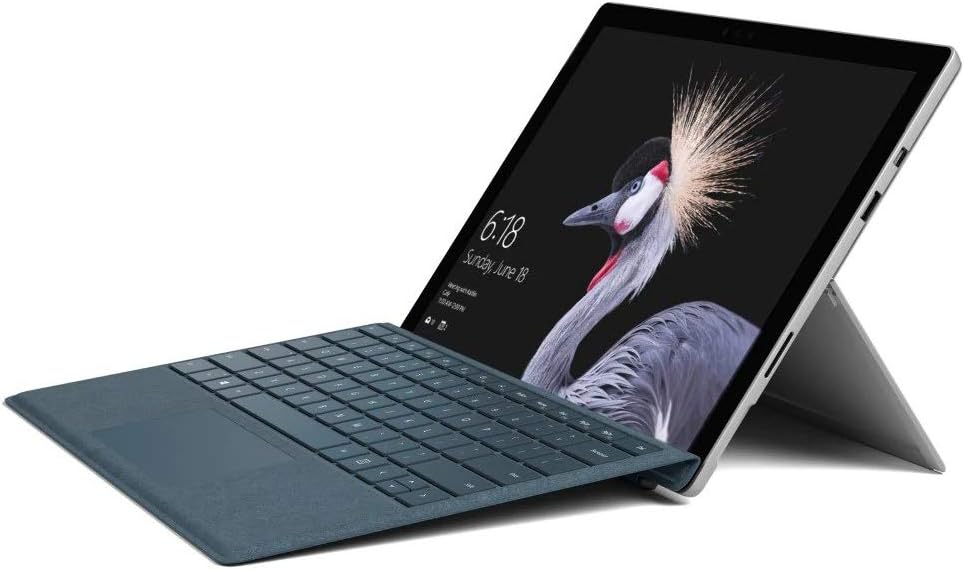
Figure 2.2: Microsoft Surface Pro with Signature Type Cover attached, configured as a laptop.

Figure 2.3: Microsoft Surface Pro tablet and detached Signature Type Cover.
3. Postavljanje
3.1 Početno uključivanje
- Connect the power supply to the Surface Pro and a power outlet.
- Pritisnite gumb za napajanje koji se nalazi na gornjem rubu uređaja.
- Slijedite upute na zaslonu da biste dovršili početno postavljanje sustava Windows 10 Pro, uključujući odabir jezika, mrežnu vezu i stvaranje korisničkog računa.
3.2 Spajanje dodatne opreme
- Surface Pro Signature Type Cover: Align the Type Cover with the magnetic connector along the bottom edge of the Surface Pro until it clicks into place.
- Surface olovka: The Surface Pen connects via Bluetooth. Go to Postavke > Uređaji > Bluetooth i ostali uređaji to pair the pen.
3.3 Punjenje uređaja
Use the provided power adapter to charge your Surface Pro. The charging port is located on the right side of the device. A full charge provides approximately 13 hours of typical device usage.
4. Upute za rad
4.1 Osnovna navigacija
- Dodir: Use multi-touch gestures on the PixelSense display for navigation, zooming, and scrolling.
- Type Cover: Utilize the keyboard and trackpad for traditional laptop input.
- Surface olovka: Write, draw, and annotate directly on the screen.
4.2 Značajke sustava Windows 10 Pro
Your Surface Pro comes with Windows 10 Pro, offering features such as:
- Windows Pozdrav: For fast, secure, password-free sign-in using facial recognition.
- Cortana: Your personal digital assistant.
- Microsoft Edge: Zadana vrijednost web preglednik.
- Način rada tableta: Automatically or manually switch to a touch-optimized interface when the Type Cover is detached.
4.3 Postavke zaslona
The 12.3-inch PixelSense display has a resolution of 2736 x 1824 pixels. You can adjust display settings such as brightness, resolution, and scaling through Postavke > Sustav > Zaslon.
5. Održavanje
5.1 Čišćenje uređaja
- Koristite meku krpu koja ne ostavlja dlačice dampened with water or an approved screen cleaner to clean the display.
- For the device body, use a soft, dry cloth. Avoid harsh chemicals or abrasive materials.
5.2 Ažuriranja softvera
Regularly check for and install Windows updates to ensure your device has the latest security patches and features. Go to Postavke > Ažuriranje i sigurnost > Windows Update.
5.3 Njega baterija
- Izbjegavajte ekstremne temperature jer mogu smanjiti vijek trajanja baterije.
- Za optimalno stanje baterije, izbjegavajte njezino stalno potpuno pražnjenje ili dulje držanje na 100% napunjenosti.
6. Rješavanje problema
6.1 Uobičajeni problemi
- Uređaj se ne uključuje: Ensure the device is charged. Try holding the power button for 10-15 seconds to perform a force restart.
- Zaslon ne reagira: Restart the device. If the issue persists, check for driver updates.
- Problemi s performansama: Close unnecessary applications, check for Windows updates, or run a disk cleanup.
6.2 Kontaktiranje podrške
For more complex issues or technical assistance, please visit the official Microsoft Support website or contact their customer service. Have your device's model number (FJU-00001) and serial number ready.
7. Specifikacije
| Značajka | Specifikacija |
|---|---|
| Naziv modela | FJU-00001 |
| Veličina zaslona | 12.3 inča |
| Razlučivost zaslona | 2736 x 1824 piksela |
| Procesor | Intel Core i5 (2.6 GHz) |
| OVAN | 4 GB DDR3 |
| Skladištenje | SSD od 128 GB |
| Grafički koprocesor | Intel HD Graphics 620 |
| Operativni sustav | Windows 10 Pro |
| Bežična vrsta | 802.11b, 802.11g, 802.11n |
| Prosječno trajanje baterije | 13 sata |
| Težina artikla | 1.7 funti |
| Dimenzije proizvoda | 11.5 x 0.33 x 7.93 inča |
| Stražnji Webrezolucija kamere | 5 MP |
8. Jamstvo i podrška
Your Microsoft Surface Pro Model 1796 is covered by a limited hardware warranty provided by Microsoft. For detailed warranty terms and conditions, please refer to the documentation included with your purchase or visit the official Microsoft support webstranicu. Sačuvajte dokaz o kupnji za slučaj reklamacije.
For technical support, driver downloads, and service information, please visit support.microsoft.com. You may need to provide your device's serial number and model information.