
1. Uvod
The Sengled Smart Light Bulbs A19 are Zigbee-compatible LED bulbs designed for integration into smart home systems. These bulbs provide soft white (2700K) illumination, are dimmable, and offer control via voice commands or a mobile application when connected to a compatible Zigbee hub. This manual provides instructions for installation, setup, operation, and troubleshooting.

Image 1.1: Sengled Smart Light Bulbs A19 (4-Pack)
2. Sigurnosne informacije
- Električna sigurnost: Always ensure power is turned off at the switch before installing or removing bulbs.
- Samo za unutarnju upotrebu: These bulbs are designed for indoor use in dry locations. Do not expose to water or excessive humidity.
- Radna temperatura: Do not install in enclosed fixtures that restrict airflow, as this may reduce bulb lifespan.
- Kompatibilnost dimmera: These bulbs are dimmable via the smart home system. Do not use with standard incandescent dimmers.
- Odlaganje: Elektronički otpad odložite odgovorno u skladu s lokalnim propisima.
3. Sadržaj paketa
Paket uključuje:
- 4 x Sengled Smart LED Light Bulbs (A19, Soft White 2700K)
4. Specifikacije
| Značajka | Detalj |
|---|---|
| Broj modela | E21-N13A |
| Vrsta žarulje | LED |
| Veličina žarulje | A19 |
| Baza žarulje | E26 |
| Wattage | 9 vata |
| Žarulja ekvivalent | 60 vata |
| Svjetlina | 800 lumena |
| Temperatura boje | 2700 Kelvina (meka bijela) |
| Voltage | 120 volti (100-120 V, 60 Hz) |
| Metoda kontrole | Glas, Aplikacija |
| Povezivost | Zigbee Protocol (Hub Required) |
| Prosječan život | 25,000 sata |
| Unutarnja/vanjska upotreba | Zatvoreni |
| Dimenzije | 2.4 cm Š x 4.5 cm V |
5. Upute za postavljanje
These Sengled Smart Light Bulbs require a compatible Zigbee hub for full functionality. Compatible hubs include Sengled Smart Hub, Amazon Echo devices with a built-in Zigbee hub (e.g., Echo 4th Gen, Echo Plus, Echo Show 10, Echo Studio), SmartThings Hub, Wink Hub, or Hubitat Hub.
5.1. Početni koraci postavljanja
- Instalirajte žarulju: Screw the Sengled Smart Light Bulb into a standard E26 light socket. Ensure the power to the fixture is turned off before installation.
- Uključivanje: Uključite napajanje rasvjetnog tijela. Žarulja bi trebala svijetliti.
- Preuzmite aplikaciju: Download the Sengled Home App from the Apple App Store or Google Play Store. Alternatively, use the app for your chosen compatible hub (e.g., Amazon Alexa App, SmartThings App).
- Registriraj se/Prijavi se: Open the app and register for an account or log in if you already have one.
- Dodaj uređaj: Follow the in-app instructions to add a new device. This typically involves scanning a QR code on the bulb or packaging, or initiating a device search within the app.
- Poveži se s Hubom: The bulb will connect to your Zigbee hub. This process usually completes within one minute.
5.2. Hub-Specific Setup Options
The following images illustrate common setup configurations:

Image 5.1: Setup with Sengled Smart Hub

Image 5.2: Setup with Samsung SmartThings Hub

Image 5.3: Setup with Amazon Echo (Built-in Hub)
6. Operacija
Once successfully paired with your smart hub, the Sengled Smart Light Bulbs offer various control options.
6.1. Glasovno upravljanje
Control your lights hands-free using voice commands with compatible assistants like Amazon Alexa or Google Home Assistant.

Image 6.1: Voice control example with Alexa
6.2. Dimming and Remote Control
Adjust the brightness from 1% to 100% and control your lights from anywhere using the Sengled Home App or your smart home platform's app.
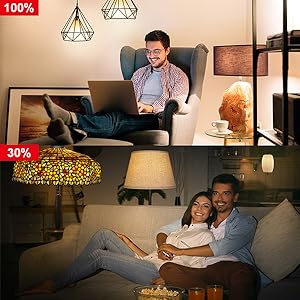
Image 6.2: Dimming functionality from 100% to 30%

Image 6.3: Remote control from any location
6.3. Raspored i rutine
Set schedules for your lights to turn on/off or adjust brightness at specific times, such as dusk or sunrise. Create routines for automated lighting scenarios.
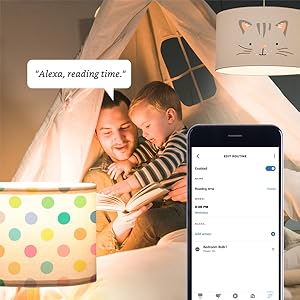
Image 6.4: Setting up a reading time routine
6.4. Grupna kontrola
Add multiple smart bulbs (up to 64) to your smart hub system and control them individually or as a group within the app.
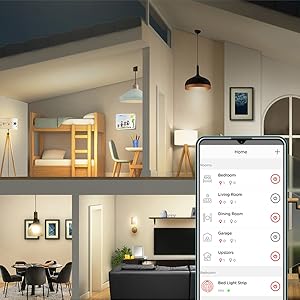
Image 6.5: Managing lights by room for group control
7. Održavanje
- Čišćenje: Prije čišćenja provjerite je li žarulja isključena i ohlađena. Obrišite mekom, suhom krpom. Nemojte koristiti tekuća sredstva za čišćenje.
- Skladištenje: Ako skladištite žarulje, čuvajte ih na hladnom i suhom mjestu, dalje od izravne sunčeve svjetlosti i ekstremnih temperatura.
- Nema dijelova koje može servisirati korisnik: Do not attempt to disassemble or repair the bulb. This will void the warranty.
8. Rješavanje problema
8.1. Bulb Not Responding/Connecting
- Provjerite snagu: Ensure the light fixture switch is in the ON position and the bulb is receiving power.
- Hub Connection: Verify that your Zigbee hub is powered on and connected to your network.
- Blizina: Ensure the bulb is within range of your Zigbee hub or another Zigbee device acting as a repeater.
- Ponovno uparivanje: If the bulb loses connection, try removing it from your app and re-pairing it according to the setup instructions. Power cycling the bulb (turning it off and on 5 times) can sometimes reset it for re-pairing.
- Ažuriranje aplikacije: Ensure your Sengled Home App or smart home platform app is updated to the latest version.
8.2. Problemi s glasovnim upravljanjem
- Assistant Link: Confirm that your Sengled account (or smart hub) is correctly linked to your voice assistant (Alexa, Google Home).
- Otkrivanje uređaja: Ask your voice assistant to "Discover devices" to ensure all bulbs are recognized.
- Command Clarity: Speak commands clearly and ensure the device name used in the command matches the name in your app.
8.3. Unstable Connection
- Zigbee Network: A strong Zigbee mesh network is crucial. Adding more Zigbee devices (like smart plugs or other bulbs) can strengthen the network.
- smetnje: Keep your Zigbee hub away from Wi-Fi routers, microwaves, or other devices that might cause wireless interference.
9. Informacije o jamstvu
Sengled Smart Light Bulbs are covered by a 3-godišnje ograničeno jamstvo from the date of purchase. This warranty covers defects in materials and workmanship under normal use. For warranty claims or detailed terms, please refer to the official Sengled webstranicu ili se obratite korisničkoj podršci.
10. Korisnička podrška
For further assistance, technical support, or to report issues, please visit the official Sengled support website or contact their customer service department. Contact information can typically be found on the Sengled website or within the Sengled Home App.