
Realspace Winsley
Realspace Modern Comfort Series Winsley Mid-Back Chair User Manual
Model: Winsley | Brand: Realspace
1. Proizvod je gotovview
The Realspace Modern Comfort Series Winsley Mid-Back Chair is designed for comfort and style in any workspace. Featuring a sleek gray bonded leather upholstery and chic silver framing, this chair offers a modern aesthetic combined with ergonomic support.
Ključne karakteristike:
- Presvlake od vezane kože: Durable and easy-to-clean gray bonded leather.
- Built-in Lumbar Support: Designed to improve posture and provide comfort during extended use.
- Pneumatic Seat-Height Adjustment: Customize your seating position with ease.
- Adjustable Tilt Mechanism: Allows for adjustment of tilt angle, lock, and tension.
- Čvrst metalni okvir: Osigurava trajnost i stabilnost.
- Kotači koji se glatko kotrljaju: For effortless mobility across various floor surfaces.
- ANSI/BIFMA Compliant: Tested and verified for rigorous performance and safety standards.
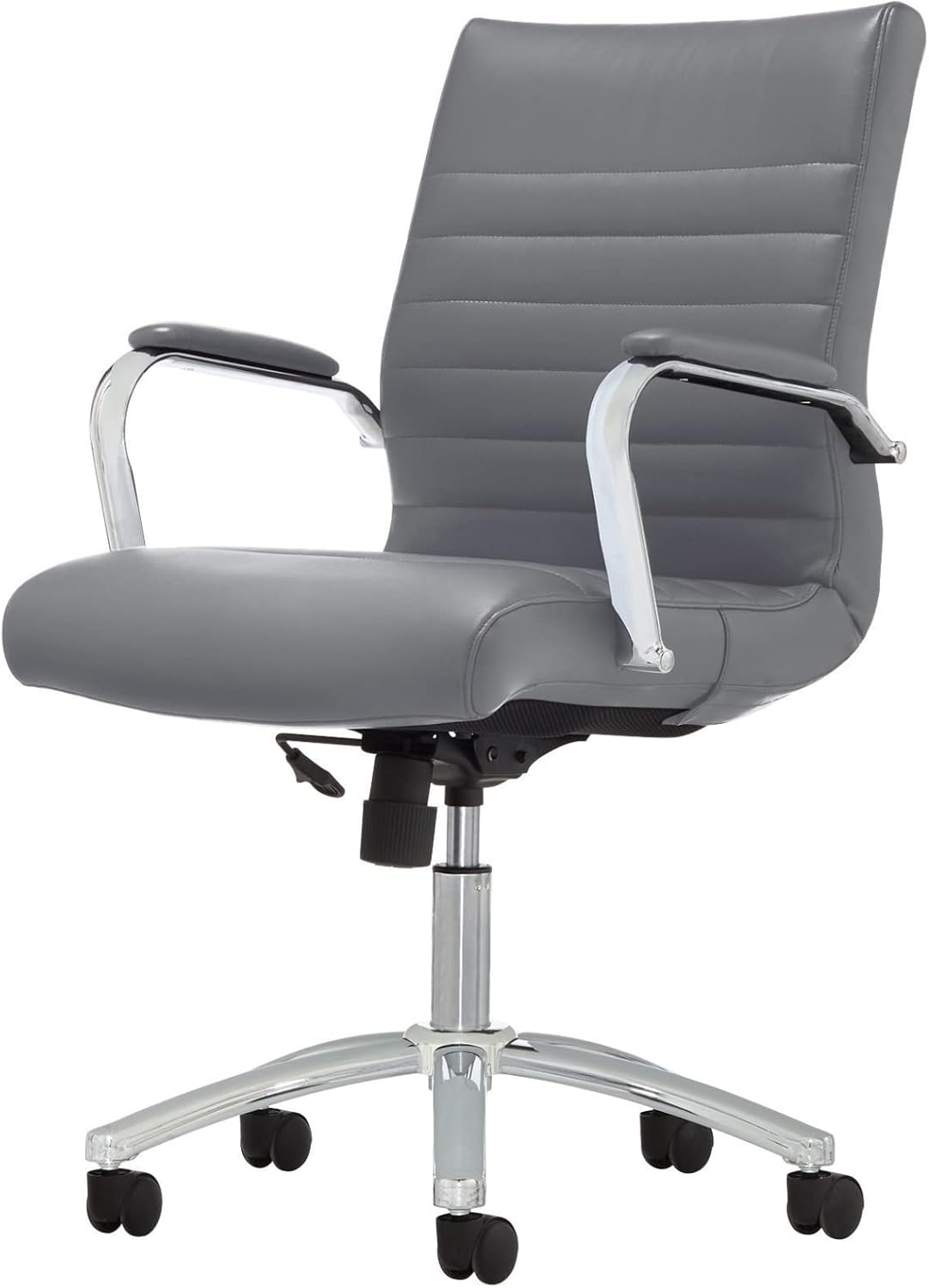
Figure 1: Realspace Winsley Mid-Back Chair, showcasing its sleek design and gray bonded leather.
2. Postavljanje i sastavljanje
This chair is designed for DIY assembly. Please follow these steps carefully to ensure proper setup and stability. It is recommended to assemble the chair on a soft, clean surface to prevent damage.
Koraci sastavljanja:
- Pričvrstite kotačiće na bazu: Insert each caster into the holes at the end of each leg of the chair base until securely fitted.
- Umetnite plinski cilindar za podizanje: Place the large end of the gas lift cylinder into the center hole of the assembled base.
- Pričvrstite mehanizam sjedala: Pričvrstite mehanizam sjedala na donju stranu jastuka sjedala pomoću priloženih vijaka. Pazite da je prednji dio mehanizma poravnat s prednjim dijelom sjedala.
- Pričvrstite ruke: Fasten the armrests to both the seat cushion and the backrest using the appropriate screws. Do not overtighten initially.
- Connect Seat Assembly to Cylinder: Carefully place the assembled seat and backrest onto the top of the gas lift cylinder. Apply downward pressure to secure.
- Završno zatezanje: Once all components are in place, tighten all screws firmly.

Slika 2: View of the chair's base and adjustment lever, crucial for assembly and operation.
3. Upute za rad
Familiarize yourself with the chair's adjustment features to optimize your comfort and ergonomic support.
Prilagodbe:
- Podešavanje visine sjedala: To raise the seat, lift the lever located under the right side of the seat while taking your weight off the chair. To lower the seat, lift the lever while seated. Release the lever at your desired height.
- Mehanizam nagiba: The chair features an adjustable tilt.
- Zaključavanje nagiba: Push the lever inwards to lock the chair in an upright position. Pull the lever outwards to allow the chair to recline.
- Napetost nagiba: Rotate the round knob located under the front-center of the seat to adjust the resistance of the tilt. Turn clockwise to increase tension (stiffer tilt) and counter-clockwise to decrease tension (looser tilt).
- Okretanje i mobilnost: The chair offers 360-degree swivel and smooth-rolling casters for easy movement around your workspace.

Figure 3: Detail of the chair's adjustable tilt mechanism and height adjustment lever.
4. Njega i održavanje
Proper care will extend the life and appearance of your Realspace Winsley chair.
- Čišćenje presvlake: For general cleaning, spot clean the bonded leather with a damp cloth and a mild soap solution. Avoid harsh chemicals or abrasive cleaners, as these can damage the material.
- Okvir i baza: Wipe metal parts with a soft, dry cloth. For stubborn marks, a slightly damp može se koristiti krpa, nakon čega slijedi odmah sušenje.
- Kotačići: Periodically check casters for accumulated dust, hair, or debris. Clean them to ensure smooth rolling and prevent floor damage.
- Pričvršćivači: Regularly inspect all screws and bolts to ensure they are tight. Retighten as necessary to maintain stability and safety.
5. Rješavanje problema
Ako naiđete na bilo kakve probleme sa svojom stolicom, pogledajte sljedeće uobičajene probleme i rješenja:
| Problem | Mogući uzrok | Otopina |
|---|---|---|
| Stolica se ne podešava po visini. | Kvar cilindra plinskog podizača ili ručica nije učvršćena. | Provjerite je li poluga za podešavanje visine potpuno učvršćena. Ako problem i dalje postoji, možda je potrebno zamijeniti plinski cilindar. |
| Stolica se ljulja ili je nestabilna. | Labavi vijci ili nepravilna montaža. | Check and tighten all assembly screws, especially those connecting the seat, back, and arms to the mechanism and base. |
| Kotačići se ne kotrljaju glatko. | Otpad zaglavljen u kotačićima ili oštećeni kotačići. | Turn the chair over and remove any hair, dust, or debris from the casters. If damaged, casters may need replacement. |
| Stolica škripi prilikom kretanja. | Friction between moving parts or loose connections. | Apply a small amount of silicone lubricant to moving parts, especially where metal components meet. Check and tighten all screws. |
6. Specifikacije
| Značajka | Detalj |
|---|---|
| Marka | Realspace |
| Naziv modela | Winsley |
| Dimenzije proizvoda | 27.76"D x 23.82"Š x 39.37"V |
| Preporuka za maksimalnu težinu | 250 funti |
| Materijal | Bonded Leather (Upholstery), Metal (Frame) |
| Boja | Sivo |
| Posebne značajke | Built-in Lumbar Support, Pneumatic Seat-Height Adjustment, Adjustable Tilt Mechanism, Swivel, Casters |
| Usklađenost | Usklađeno s ANSI/BIFMA standardima |

Figure 4: Product dimensions for the Realspace Winsley Mid-Back Chair.
7. Informacije o jamstvu
For detailed warranty information regarding your Realspace Modern Comfort Series Winsley Mid-Back Chair, please refer to the documentation included with your purchase or contact Realspace customer support directly. Warranty terms and conditions may vary.
8. Korisnička podrška
If you require further assistance, have questions about assembly, operation, or maintenance, please contact Realspace customer support. Contact details can typically be found on the manufacturer's webweb-mjestu ili na vašem računu.
Također možete posjetiti Realspace Store on Amazon za više informacija o proizvodu.
Ask a question about this manual
Ask about setup, troubleshooting, compatibility, parts, safety, or missing instructions. Manuals+ will review the question and use this page’s manual context to help answer it.