
Uvod
This manual provides detailed instructions for the installation, configuration, and operation of your Multilaser RE085 Dual Band Wireless Router. Please read this guide carefully to ensure proper setup and optimal performance of your device. The RE085 router offers dual-band connectivity (2.4GHz and 5GHz) with speeds up to 750 Mbps, featuring three external antennas and four LAN ports for reliable network access.
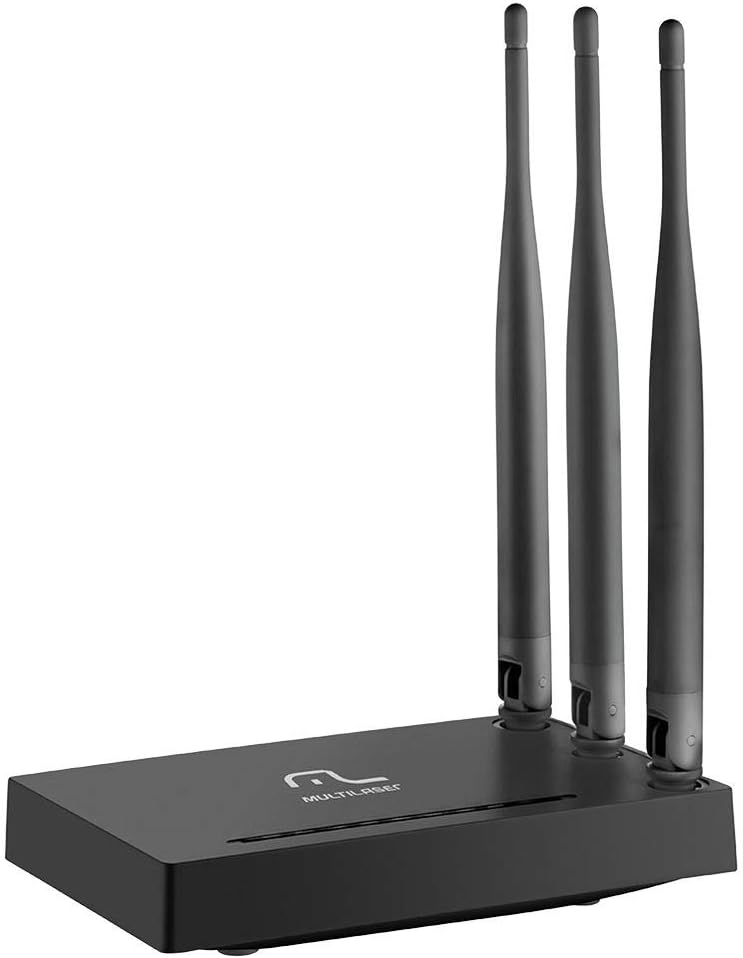
Slika: prednja strana view of the Multilaser RE085 router with its three external antennas in an upright position, showcasing njegov kompaktni dizajn.
Sadržaj paketa
Prije nego što nastavite s instalacijom, provjerite sadrži li vaš paket sljedeće stavke:
- Multilaser RE085 Dual Band Wireless Router
- Adapter napajanja
- Ethernet kabel
- Quick Installation Guide (this document serves as a comprehensive guide)
Postavljanje i instalacija
Follow these steps to set up your Multilaser RE085 router:
1. Fizička veza
- Pozicioniranje: Postavite ruter na središnje mjesto u svom domu ili uredu, dalje od prepreka i uređaja koji mogu uzrokovati smetnje (npr. bežični telefoni, mikrovalne pećnice).
- Spojite antene: Ensure the three external antennas are securely attached and oriented for optimal signal coverage.
- Spojite na napajanje: Plug the power adapter into the router's power port and then into a wall outlet. The power indicator LED on the router should light up.
- Spajanje na modem: Connect one end of the provided Ethernet cable to the WAN port (often colored differently, e.g., blue) on the Multilaser RE085 router. Connect the other end to the LAN port on your modem or existing internet source.
- Spojite uređaje (nije obavezno): For wired connections, connect one end of an Ethernet cable to any of the four LAN ports (usually yellow) on the router and the other end to your computer or other network device.

Slika: Stražnja strana view of the Multilaser RE085 router, highlighting the WAN port (typically blue) and four yellow LAN ports for wired connections.
2. Početna konfiguracija (Web Sučelje)
- Spojite se na ruter: Connect your computer to the router either via an Ethernet cable (to a LAN port) or wirelessly using the default Wi-Fi network name (SSID) printed on the router's label.
- Pristup Web preglednik: Otvori a web browser (e.g., Chrome, Firefox, Edge) and type the default IP address of the router into the address bar. This is typically
192.168.0.1or192.168.1.1. Refer to the label on your router for the exact address. - Prijava: Enter the default username and password. Common defaults are
adminfor both username and password. If these do not work, check the router's label or the quick installation guide. - Pokrenite čarobnjaka za postavljanje: Upon successful login, you will likely be prompted to run a Quick Setup Wizard. Follow the on-screen instructions to configure your internet connection type (e.g., PPPoE, Dynamic IP, Static IP). Your Internet Service Provider (ISP) can provide this information if you are unsure.
- Konfigurirajte bežične postavke:
- SSID (naziv mreže): Change the default Wi-Fi network names for both 2.4GHz and 5GHz bands to something unique and easily identifiable.
- Password (Security Key): Set a strong, secure password for each Wi-Fi network. Use a combination of uppercase and lowercase letters, numbers, and symbols.
- Vrsta sigurnosti: WPA2-PSK (AES) is recommended for optimal security.
- Spremi postavke: After configuring, save your settings. The router may restart to apply the changes.
Upute za rad
Once your Multilaser RE085 router is set up, you can connect your devices and manage your network.
Povezivanje uređaja
- Bežični uređaji: On your smartphone, tablet, laptop, or smart TV, search for available Wi-Fi networks. Select the SSID you configured (e.g., "MyHomeNetwork_2.4GHz" or "MyHomeNetwork_5GHz") and enter the password.
- Žičani uređaji: Connect devices like desktop computers, gaming consoles, or smart TVs directly to the router's LAN ports using Ethernet cables for a stable and fast connection.
Dual Band Functionality
The RE085 supports both 2.4GHz and 5GHz wireless bands:
- Pojas od 2.4 GHz: Offers wider coverage and better penetration through walls, suitable for general internet use, browsing, and devices further away from the router.
- Pojas od 5 GHz: Provides faster speeds and lower latency, ideal for bandwidth-intensive activities like online gaming, 4K video streaming, and devices closer to the router.
You can connect different devices to the band that best suits their needs and location.
Mreža za goste
The router allows you to create up to 6 additional guest networks. This feature provides internet access to guests while isolating them from your main network, enhancing security. Access the router's web interface to configure guest networks.
Funkcija repetitora
The Multilaser RE085 can also function as a wireless repeater, extending the range of an existing Wi-Fi network. Refer to the advanced settings in the router's web interface for repeater mode configuration.
Održavanje
Redovito održavanje pomaže u osiguravanju dugovječnosti i optimalnih performansi vašeg rutera.
- Redovno ponovno pokretanje: Periodically restart your router (unplug from power for 10 seconds, then plug back in) to clear its memory and refresh network connections. This can resolve minor performance issues.
- Ažuriranja firmvera: Check the Multilaser official website for firmware updates. Keeping your router's firmware up-to-date can improve performance, add new features, and enhance security. Follow the instructions provided by Multilaser carefully when performing updates.
- Fizičko čišćenje: Keep the router free from dust. Use a soft, dry cloth to gently clean the exterior. Ensure ventilation holes are not blocked.
- Upravljanje lozinkama: Change your Wi-Fi and router login passwords periodically for enhanced security.
Rješavanje problema
If you encounter issues with your Multilaser RE085 router, try the following troubleshooting steps:
Nema internetske veze
- Provjerite kabele: Ensure all Ethernet cables (WAN, LAN) are securely connected to both the router and your modem/devices.
- Provjerite modem: Provjerite radi li vaš modem ispravno i ima li aktivnu internetsku vezu. Pokušajte ponovno pokrenuti modem.
- Statusna svjetla rutera: Check the LED indicators on the front of the router. The internet/WAN light should be solid or blinking, indicating an active connection.
- Ponovno pokrenite usmjerivač: Power cycle the router (unplug, wait 10 seconds, plug back in).
- Postavke internetskog servisa: Confirm your internet connection type and settings (PPPoE, Dynamic IP, Static IP) in the router's web sučelje odgovara onima koje pruža vaš davatelj internetskih usluga.
Weak or Unstable Wi-Fi Signal
- Položaj usmjerivača: Move the router to a more central location, away from walls, large metal objects, and other electronic devices that may cause interference.
- Orijentacija antene: Adjust the antennas for better signal direction.
- Odabir benda: For devices closer to the router, try connecting to the 5GHz band for faster speeds. For devices further away, the 2.4GHz band might offer better range.
- smetnje: Identify and minimize sources of interference (e.g., microwaves, cordless phones, Bluetooth devices).
- Odabir kanala: U ruteru web sučelje, pokušajte promijeniti Wi-Fi kanal za oba pojasa, 2.4 GHz i 5 GHz, na manje opterećeni.
Forgotten Wi-Fi Password or Router Login Password
- Check Router Label: The default Wi-Fi password and router login credentials are often printed on a label on the bottom or back of the router.
- Vraćanje na tvorničke postavke: Ako ne možete pristupiti ruteru web interface or have forgotten your Wi-Fi password and cannot retrieve it, you may need to perform a factory reset. Locate the small reset button (often recessed) on the router. With the router powered on, use a paperclip or pin to press and hold the reset button for about 10-15 seconds until the lights flash. The router will restart with its factory default settings, including default Wi-Fi names and passwords. You will then need to reconfigure it from scratch.
Tehnički podaci
Key technical specifications for the Multilaser RE085 Dual Band Wireless Router:
| Značajka | Specifikacija |
|---|---|
| Marka | Multilaser |
| Broj modela | RE085 |
| Standard bežične komunikacije | 802.11ac |
| Klasa frekvencijskog pojasa | Dvopojasni (2.4 GHz i 5 GHz) |
| Brzina prijenosa podataka | Do 750 megabita u sekundi |
| Broj priključaka | 4 (LAN) |
| Tehnologija povezivanja | Wi-Fi |
| Kompatibilni uređaji | Igraće konzole, tableti, pametni televizori |
| Preporučena uporaba | Dom |
Jamstvo i podrška
For warranty information, technical support, or further assistance, please refer to the official Multilaser webweb-mjesto ili se izravno obratite njihovoj korisničkoj službi. Sačuvajte račun kao dokaz o kupnji za slučaj zahtjeva za jamstvo.
Multilaser Official Webstranica: www.multilaser.com.br