
1. Uvod
Thank you for choosing the Multilaser TC190 2.4 GHz Wireless Keyboard with Integrated Touchpad. This device is designed to provide a convenient and efficient input solution for your PC or Smart TV, combining a full keyboard with a multi-touch touchpad. This manual will guide you through the setup, operation, and maintenance of your new keyboard to ensure optimal performance and longevity.
2. Sigurnosne informacije
- Držite uređaj dalje od vode, vlage i ekstremnih temperatura.
- Ne pokušavajte sami rastavljati ili popravljati uređaj. Sve servisne radove prepustite kvalificiranom osoblju.
- Use only specified batteries (if applicable) and dispose of them properly.
- Izbjegavajte ispuštanje ili izlaganje uređaja jakim udarcima.
- Uređaj čistite mekom, suhom krpom. Nemojte koristiti tekuća sredstva za čišćenje ili aerosole.
3. Sadržaj paketa
Molimo pažljivo provjerite sadržaj pakiranja. Ako bilo koji predmet nedostaje ili je oštećen, obratite se prodavaču.
- Multilaser TC190 Wireless Keyboard with Integrated Touchpad
- USB 2.4 GHz Receiver
- korisnički priručnik
- (Batteries may or may not be included depending on the region/retailer)
4. Proizvod je gotovview
Familiarize yourself with the components of your Multilaser TC190 keyboard.
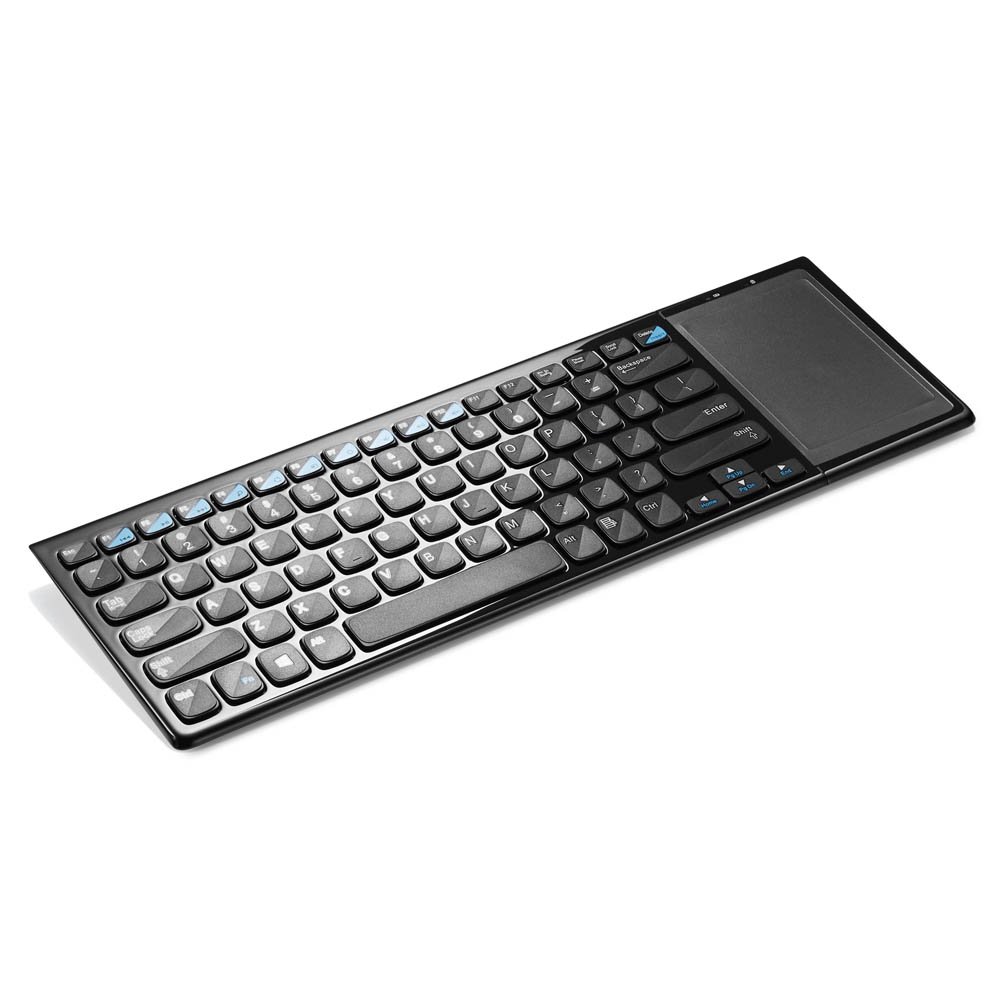
Slika 1: Multilaser TC190 Wireless Keyboard with Integrated Touchpad. This image shows the full keyboard layout with the touchpad located on the right side, indicating its compact design and integrated functionality.
- Raspored tipkovnice: Standard QWERTY layout with multimedia function keys.
- Integrirana dodirna ploha: Located on the right side, supporting multi-touch gestures.
- Odjeljak za USB prijemnik: Usually located in the battery compartment for storage.
- Prekidač za napajanje: On/Off switch to conserve battery life.
- Odjeljak za baterije: For inserting required batteries.
5. Postavljanje
- Instalirajte baterije: Open the battery compartment cover on the back of the keyboard. Insert the required batteries (typically AAA, refer to the compartment for exact type and polarity). Close the cover securely.
- Spojite USB prijemnik: Locate the USB 2.4 GHz receiver, usually stored inside the battery compartment. Plug the USB receiver into an available USB port on your PC or Smart TV.
- Uključivanje: Slide the power switch on the keyboard to the "ON" position.
- Automatsko povezivanje: The keyboard should automatically connect to your device within a few seconds. No additional drivers are typically required for most operating systems.
6. Upute za rad
6.1. Funkcije tipkovnice
The Multilaser TC190 features a standard keyboard layout. Use the keys as you would with any conventional keyboard for typing text, navigating menus, and executing commands.
- Funkcijske tipke (Fn): Some keys may have secondary functions (e.g., volume control, media playback) accessible by pressing the Fn tipku istovremeno sa željenom funkcijskom tipkom.
- Multimedijske tipke: Dedicated multimedia keys (if present) allow quick access to media controls.
6.2. Funkcije dodirne podloge
The integrated multi-touch touchpad replaces a traditional mouse. Below are common gestures:
- Dodir jednim prstom: Kliknite lijevom tipkom miša.
- Dodir s dva prsta: Desni klik.
- Povlačenje jednim prstom: Pomaknite kursor.
- Pomicanje s dva prsta: Scroll up or down in documents and web stranice.
- Stisnite prste za zumiranje: Use two fingers to zoom in or out (application dependent).
7. Održavanje
- Čišćenje: Use a soft, lint-free cloth to wipe the keyboard and touchpad. For stubborn dirt, slightly dampen the cloth with water or a mild, non-abrasive cleaner. Ensure no liquid enters the device.
- Zamjena baterije: When the keyboard's performance degrades or it stops responding, replace the batteries. Always use fresh batteries of the correct type.
- Skladištenje: If storing the keyboard for an extended period, remove the batteries to prevent leakage. Store in a cool, dry place.
8. Rješavanje problema
| Problem | Moguće rješenje |
|---|---|
| Keyboard is unresponsive. |
|
| Touchpad is not working correctly. |
|
| Connection issues / Lag. |
|
9. Specifikacije
| Značajka | Detalj |
|---|---|
| Marka | Multilaser |
| Model | TC190 |
| Povezivost | 2.4 GHz bežično (USB prijemnik) |
| Kompatibilni uređaji | PC, Smart TV |
| Opis tipkovnice | Multimedija |
| Posebne značajke | Wireless, Integrated Multi-touch Touchpad |
| Izvor napajanja | Napajanje na baterije |
| Težina artikla | 800 gram |
10. Jamstvo i podrška
Multilaser products are manufactured to high-quality standards. For information regarding warranty terms and conditions, please refer to the warranty card included with your product or visit the official Multilaser website. For technical support or customer service, please contact Multilaser customer support through their official channels.
Službenik Webstranica: www.multilaser.com.br (Molimo provjerite za svoju regionalnu webweb mjesto)