
Uvod
The Mercusys MW150US N150 Wireless Nano USB Adapter is a compact and convenient device designed to provide wireless internet connectivity to your desktop or laptop computer. With wireless speeds of up to 150 Mbps, it is suitable for essential internet activities such as web browsing, email, and stable online communication. Its miniature design allows it to remain connected to a USB port without obstruction.
This adapter also features a Soft AP function, enabling your computer to act as a Wi-Fi hotspot, sharing its wired internet connection with other wireless devices like smartphones and tablets.
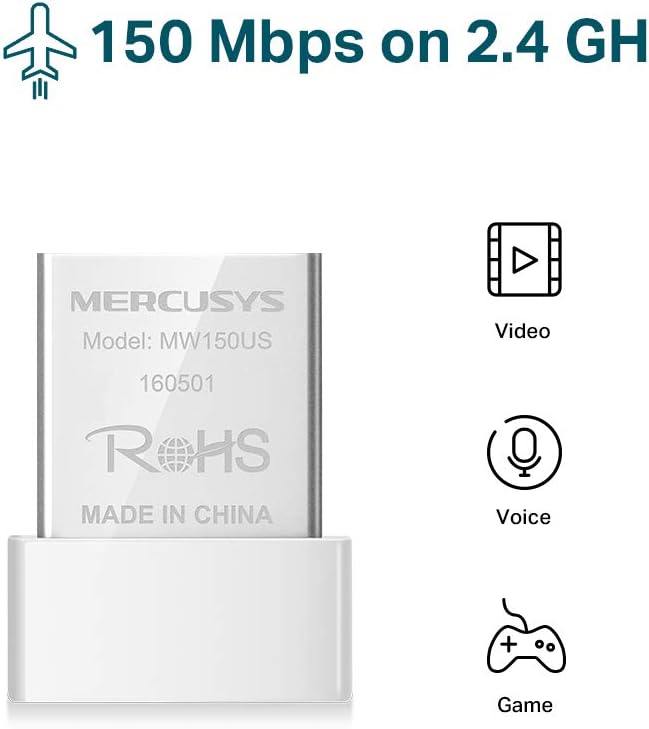
Image: The Mercusys MW150US N150 Wireless Nano USB Adapter, a compact device for wireless connectivity.
Vodič za postavljanje
Follow these steps to install and set up your Mercusys MW150US N150 Wireless Nano USB Adapter:
- Umetnite adapter: Carefully insert the MW150US adapter into an available USB port on your computer.
- Instalirajte upravljačke programe:
- Using the included CD: Insert the driver CD into your computer's CD-ROM drive and follow the on-screen instructions to install the necessary drivers.
- Downloading from Mercusys webstranica: If your computer does not have a CD-ROM drive, or if you prefer the latest drivers, visit the official Mercusys webstranica (npr. www.mercusys.com/en/download/MW150US) to download the drivers for your specific operating system.
- Napomena za korisnike sustava Windows 10: In many cases, Windows 10 may automatically install the necessary drivers upon insertion, making manual installation unnecessary.
- Povežite se na mrežu: After driver installation, your computer should detect available Wi-Fi networks. Select your desired network from the list and enter the password to connect.

Image: Visual guide for the three easy setup steps: insert, install software, and connect to Wi-Fi.

Image: The Mercusys MW150US adapter is compatible with Windows 10, 8.1, 8, 7, and XP.
Upute za rad
Spajanje na Wi-Fi mrežu
Once the adapter is installed and drivers are loaded, you can connect to any available Wi-Fi network.
- Kliknite ikonu Wi-Fi u programskoj traci računala (obično u donjem desnom kutu za Windows).
- A list of available wireless networks will appear. Select the name (SSID) of your desired network.
- Click "Connect" and enter the network's security key or password when prompted.
- Once connected, the Wi-Fi icon will indicate a successful connection, and you can access the internet.
Using Soft AP Function (Wi-Fi Hotspot)
The Soft AP function allows your computer to share its wired internet connection wirelessly. This feature requires your computer to have a wired internet connection.
- Provjerite je li vaše računalo spojeno na internet putem Ethernet kabela.
- Open the Mercusys utility software (usually installed with the drivers).
- Locate and enable the "Soft AP" or "Hotspot" function within the utility.
- Configure the hotspot's name (SSID) and password.
- Other wireless devices can now connect to your computer's Wi-Fi hotspot using the configured SSID and password.
Održavanje
The Mercusys MW150US adapter is designed for durability and requires minimal maintenance.
- Držati čistim: Periodically wipe the adapter with a soft, dry cloth to remove dust. Avoid using liquid cleaners.
- Štiti od oštećenja: While its nano size is convenient, avoid bending or applying excessive force to the adapter when it's plugged into a USB port.
- Skladištenje: When not in use, store the adapter in a clean, dry place away from extreme temperatures.

Image: The miniature design of the Mercusys MW150US adapter, highlighting its compact size for portability and convenience.
Rješavanje problema
If you encounter issues with your Mercusys MW150US adapter, refer to the following common solutions:
- Adapter nije otkriven:
- Ensure the adapter is fully inserted into a working USB port. Try a different USB port.
- Verify that the drivers are correctly installed. Check Device Manager (Windows) for any yellow exclamation marks next to the network adapter. Reinstall drivers if necessary.
- Ponovno pokrenite računalo.
- Ne mogu se povezati s Wi-Fi mrežom:
- Dvaput provjerite lozinku za Wi-Fi.
- Provjerite je li vaš Wi-Fi ruter uključen i emitira li signal.
- Približite se Wi-Fi ruteru kako biste poboljšali jačinu signala.
- Restart your Wi-Fi router and your computer.
- Spora brzina interneta:
- Ensure you are within a reasonable range of your Wi-Fi router.
- Provjerite ima li potencijalnih smetnji od drugih elektroničkih uređaja (npr. mikrovalnih pećnica, bežičnih telefona).
- Verify that your internet service provider (ISP) is delivering the expected speed.
- Update the adapter's drivers to the latest version from the Mercusys webmjesto.
Tehnički podaci
| Marka | MERKUSIJE |
| Broj modela | MW150US |
| Hardversko sučelje | USB |
| Brzina prijenosa podataka | 150 Mbps |
| Kompatibilni uređaji | Desktop, Laptop, Smartphone (for Soft AP) |
| Kompatibilni operativni sustavi | Windows (XP, 7, 8, 8.1, 10) |
| Težina artikla | 50 gram |
| Boja | crvena |
Informacije o jamstvu
The Mercusys MW150US N150 Wireless Nano USB Adapter comes with a Jamstvo 4 godine directly from the manufacturer. Please retain your proof of purchase for warranty claims.
podrška
For technical assistance, driver downloads, or warranty inquiries, please contact Mercusys customer support directly. Support services are provided by the manufacturer.
You can typically find contact information and support resources on the official Mercusys webstranica: www.mercusys.com.