
Uvod
This manual provides essential instructions for the safe and efficient use of your Lepro Industrial LED Desk Lamp. Ovaj svestrani lamp features an adjustable arm and a sturdy clamp, making it suitable for various environments such as study desks, office workstations, or bedside tables. It is designed to accommodate an E27 bulb (not included), allowing you to choose the light source that best fits your needs.
Molimo vas da prije instalacije i rada pažljivo pročitate ovaj priručnik te ga sačuvate za buduću upotrebu.

Image: The Lepro Industrial LED Desk Lamp providing illumination on a modern desk setup.
Sigurnosne upute
- Read all instructions carefully before using the lamp.
- Ensure the power supply is disconnected before installing, cleaning, or replacing the bulb.
- Koristite samo žarulje s grlom E27 s maksimalnom snagomtage od 40W.
- Nemojte koristiti lamp s oštećenim kabelom za napajanje ili utikačem.
- Ovaj proizvod je namijenjen samo za unutarnju upotrebu. Ne izlagati vodi ili visokoj vlazi.
- Zadrži lamp dalje od zapaljivih materijala.
- Ne pokušavajte rastaviti ili popraviti lamp sami. Za servis se obratite kvalificiranom osoblju.
Sadržaj paketa
Molimo provjerite paket za sljedeće stavke:
- Lepro Industrial LED Desk Lamp (main unit with clamp)
- korisnički priručnik
Note: The E27 bulb is not included and must be purchased separately.
Postavljanje i instalacija
Follow these steps to assemble and install your desk lamp:
- Pričvrstite Clamp: Čvrsto pričvrstite clamp to a desk or shelf edge. The clamp can accommodate surfaces up to 5.4 cm thick. Tighten the screw until the clamp is firmly in place, ensuring stability for both vertical and horizontal mounting.
- Sastavite Lamp glava: Ugradite lamp cover onto the upper part of the main unit. Twist the cover in the direction indicated (usually clockwise) to tighten it securely.
- Umetnite ruku: Pažljivo umetnite lamp arm into the designated joint on the clamp base. Ensure it clicks or locks into place for stable positioning.
- Instalirajte žarulju: Osigurajte lamp is unplugged from the power outlet. Screw an E27 base bulb (not included) into the lamp utičnicu. Nemojte previše zategnuti.
- Spojite na napajanje: Priključite lamp's power cord into a suitable electrical outlet.

Image: The bidirectional clamp allows for both vertical and horizontal mounting on surfaces up to 5.4 cm thick.

Slika: The lamp requires an E27 bulb, which is not included. Various E27 bulb types can be used.
Upute za rad
Uključivanje/isključivanje: Locate the rocker switch on the power cord. Press the switch to turn the lamp uključeno ili isključeno.
Podešavanje kuta svjetla: Lamp features a highly flexible and adjustable arm with multiple joints. You can rotate the lamp head up to 300 degrees and adjust the arm at various angles (e.g., 120 degrees at the main joints, 360 degrees at the base clamp) to direct light precisely where needed. The spring-balanced arm ensures the lamp stays in your desired position.
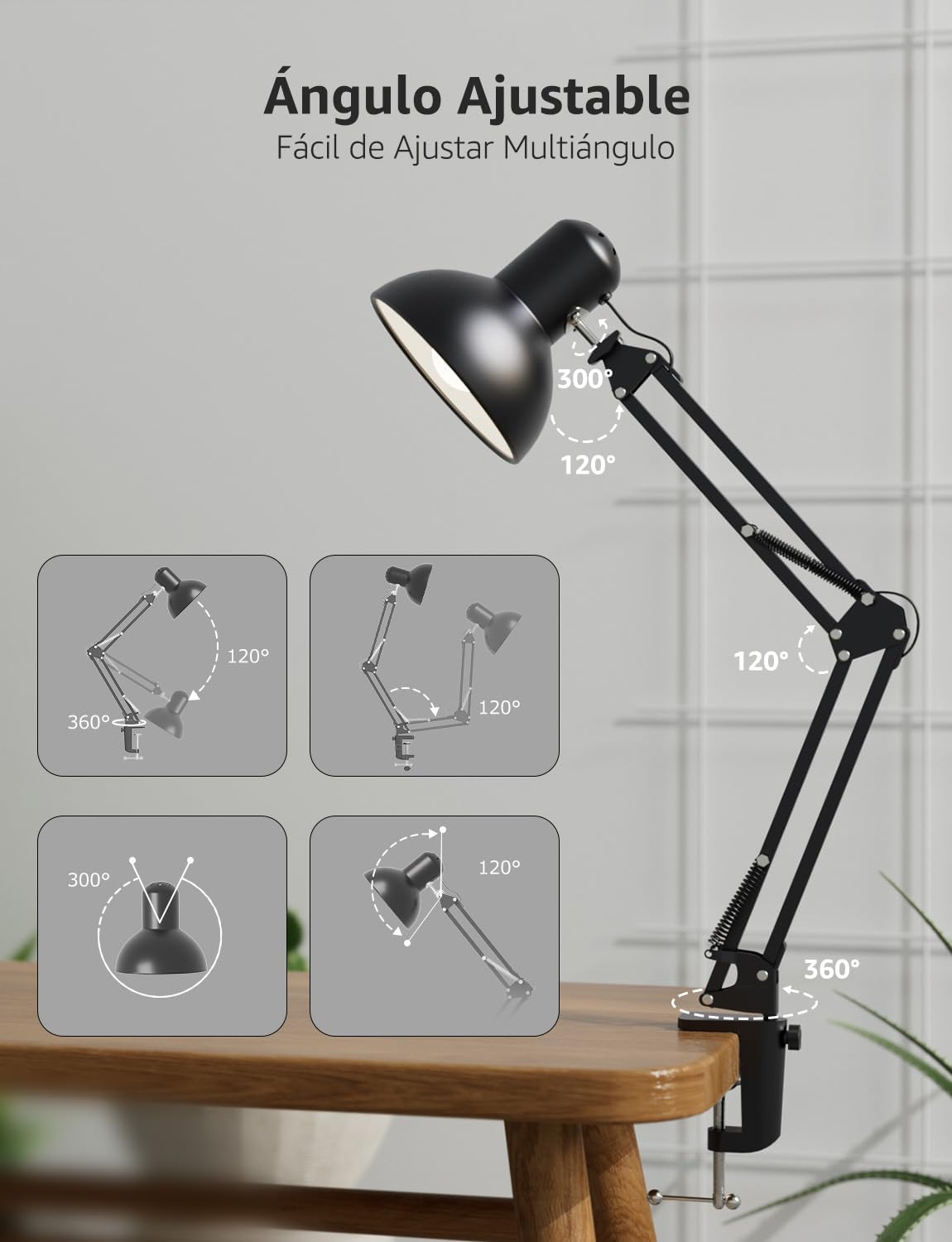
Slika: The lamp's flexible arm and head allow for multi-angle adjustment to optimize lighting.
Održavanje
Čišćenje: Za čišćenje lamp, ensure it is unplugged and cool. Wipe the surfaces with a soft, dry cloth. Do not use abrasive cleaners, solvents, or liquids, as these may damage the finish or electrical components.
Zamjena žarulje: Before replacing the bulb, ensure the lamp is unplugged and the old bulb has cooled down completely. Carefully unscrew the old E27 bulb and screw in a new E27 bulb (maximum 40W). Ensure the new bulb is securely seated before plugging the lamp natrag unutra.
Rješavanje problema
- Lamp ne pali se:
- Provjerite je li kabel za napajanje čvrsto uključen u utičnicu.
- Ensure the rocker switch on the cord is in the 'ON' position.
- Verify that the E27 bulb is correctly installed and not faulty. Try testing with a known working bulb.
- Provjerite utičnicu tako da u nju priključite drugi uređaj.
- Svjetlost treperi:
- Pazite da je žarulja čvrsto uvrnuta.
- The bulb may be faulty or incompatible. Replace it with a new E27 bulb.
- Check for loose connections in the power cord or outlet.
- Lamp je nestabilan:
- Osigurajte clamp is tightened securely to the desk or surface.
- Verify that the surface thickness is within the maximum 5.4 cm limit for the clamp.
- Provjerite je li lamp arm is properly inserted into the clamp spojnica.
Tehnički podaci
| Značajka | Specifikacija |
|---|---|
| Broj modela | 3100027-DW-EU |
| Dimenzije (D x Š x V) | 38 x 15 x 27 cm |
| Težina | 900 g |
| Baza žarulje | E27 |
| Max Wattage | 40 vata |
| Izvor napajanja | Električni na kabel |
| Materijal | Metal |
| Tip prekidača | Prekidač na preklop |
| Voltage | 240 volti |
| Max Clamp Debljina | 5.4 cm |
| Duljina kabela za napajanje | Cca. 1.6 metara |

Image: Product dimensions and key features like E27 bulb base and power cord length.
Jamstvo i podrška
Jamstvo: This Lepro Industrial LED Desk Lamp comes with a 1-year warranty for replacement parts in the EU, covering manufacturing defects from the date of purchase. This warranty does not cover damage caused by misuse, accidents, unauthorized modifications, or normal wear and tear.
Korisnička podrška: For technical assistance, troubleshooting, or warranty claims, please contact Lepro customer support through the retailer where the product was purchased or visit the official Lepro website for contact information. Please have your model number (3100027-DW-EU) and proof of purchase ready when contacting support.