
Capcom Resident Evil 5 PS4
Resident Evil 5 (PS4) Official Instruction Manual
Capcom
Uvod
Welcome to the world of Resident Evil 5. This manual provides essential information to help you get started and navigate the game's challenging environments. Prepare to face new bio-organic threats as you uncover a global conspiracy.

Image: The official game cover for Resident Evil 5 on PlayStation 4, featuring protagonists Chris Redfield and Sheva Alomar.
Postavljanje i instalacija
To install Resident Evil 5 on your PlayStation 4 console, follow these steps:
- Insert the Resident Evil 5 game disc into the PlayStation 4 console's disc drive.
- Sustav će automatski započeti proces instalacije. Slijedite sve upute na zaslonu.
- Ensure your PlayStation 4 is connected to the internet to download any available game updates or patches for optimal performance.
- Once installation is complete, select the Resident Evil 5 icon from your PlayStation 4 home screen to launch the game.
Zahtjevi sustava
- Konzola PlayStation 4
- Minimum 18 GB available storage space
- Internet connection for updates and online features
Operating the Game: Basic Controls
Resident Evil 5 utilizes the standard PlayStation 4 controller layout. Familiarize yourself with the basic controls before beginning your mission.
| Ulaz kontrolera | Akcijski |
|---|---|
| Lijevi analogni štapić | Move Character |
| Desni analogni štap | Upravljajte kamerom |
| X gumb | Confirm / Action |
| Gumb kruga | Otkaži / Izbjegni |
| Kvadratni gumb | Reload Weapon |
| Trokutasti gumb | Access Inventory |
| R2 tipka | Vatreno oružje |
| L2 tipka | Aim Weapon |
| R1 tipka | Melee Attack |
| L1 tipka | Partner Command |
Detailed control schemes and customizable options can be found within the game's settings menu.
Igra gotovaview
Resident Evil 5 is a third-person shooter with survival horror elements. Players control Chris Redfield, accompanied by his partner Sheva Alomar, as they investigate a bioterrorism threat in Africa. The game emphasizes cooperative play, with an AI partner or another player controlling Sheva.
Ključne karakteristike:
- Cooperative Gameplay: Work together with your partner to overcome challenges, solve puzzles, and defeat enemies.
- Upravljanje resursima: Strategically manage your limited ammunition, health items, and weapons.
- Enemy Variety: Encounter a diverse range of infected humans and mutated creatures.
- Weapon Upgrades: Collect currency to upgrade your weapons and unlock new ones.

Image: Chris Redfield and Sheva Alomar surveying a desolate village environment, typical of the game's setting.

Image: An intense combat scene where characters are engaging multiple infected enemies in a confined space.
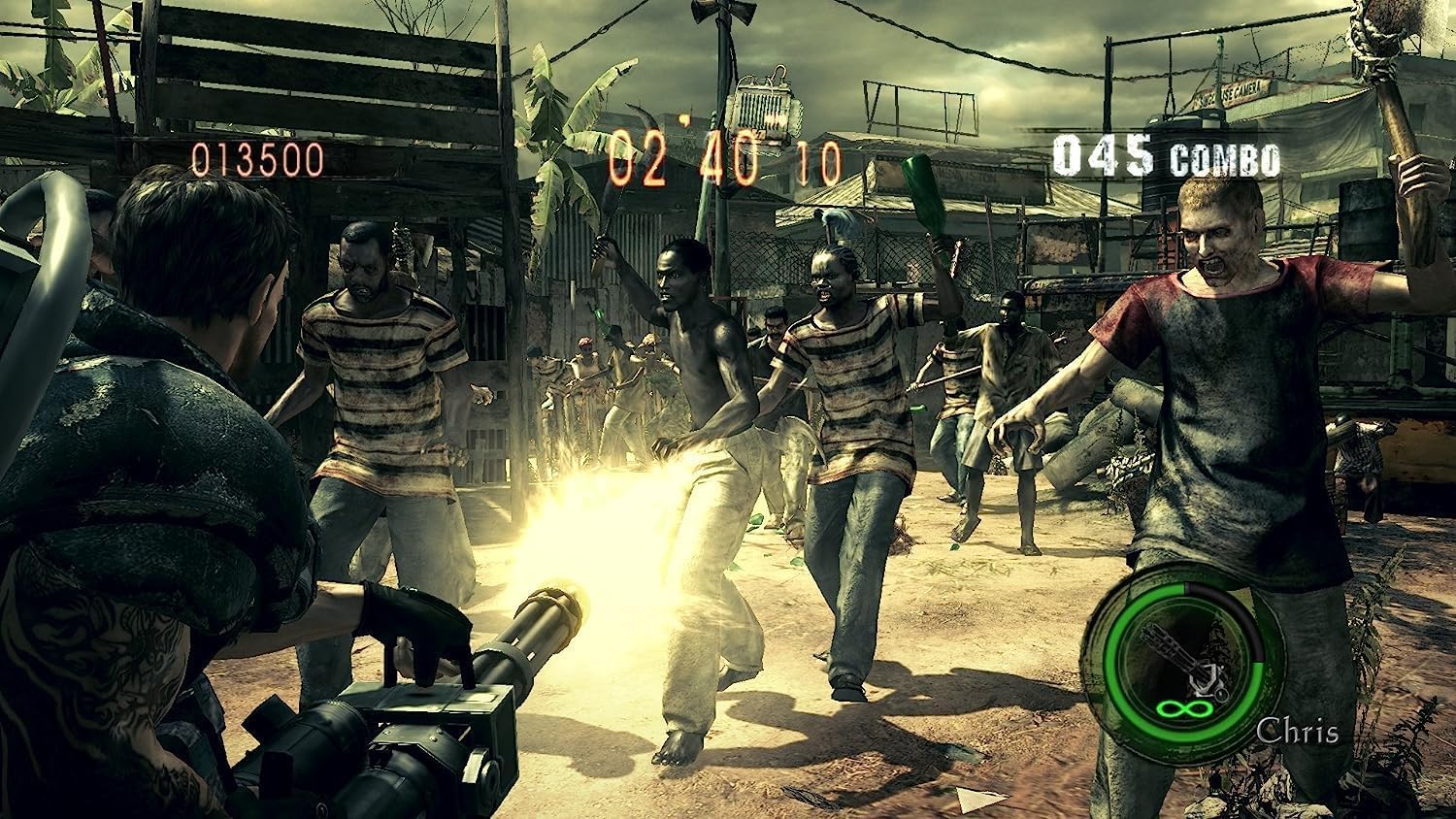
Image: Chris Redfield wielding a powerful minigun against a horde of approaching enemies.

Image: Chris and Sheva exploring a dark, cavernous area, encountering a mutated creature.

Image: Excella Gionne observing as zombies approach in a futuristic-looking facility.

Image: Chris and Sheva engaging in combat against flying, mutated enemies in an outdoor environment.
Održavanje i njega
To ensure the longevity of your Resident Evil 5 game disc and optimal performance:
- Uvijek držite disk igre za rubove kako biste izbjegli otiske prstiju i ogrebotine.
- Disk čuvajte u originalnoj kutiji kada ga ne koristite.
- Keep the disc away from direct sunlight, extreme temperatures, and humidity.
- Ako se disk zaprlja, nježno ga obrišite mekom krpom koja ne ostavlja dlačice od središta prema van. Nemojte koristiti abrazivna sredstva za čišćenje.
- Ensure your PlayStation 4 console's disc drive is clean and free of dust.
Rješavanje problema
If you encounter issues while playing Resident Evil 5, refer to the following common solutions:
- Game Not Starting / Disc Read Error:
- Check the game disc for scratches or smudges. Clean if necessary.
- Ensure the disc is inserted correctly into the console.
- Ponovno pokrenite PlayStation 4 konzolu.
- Verify that your console's system software is up to date.
- Freezing / Crashing:
- Close the game application and restart it.
- Ensure there is sufficient free space on your console's hard drive.
- Check for and install any available game updates.
- Online Connectivity Issues:
- Provjerite je li vaša internetska veza stabilna.
- Check PlayStation Network (PSN) status for any service outages.
- Ponovno pokrenite ruter/modem.
For persistent issues, consult the official Capcom support website or the PlayStation support resources.
Tehnički podaci
| Atribut | Detalj |
|---|---|
| Naziv proizvoda | Resident Evil 5 (PS4) |
| Proizvođač | Capcom |
| Platforma | PlayStation 4 |
| ASIN | B07831LNP3 |
| Ocjena ESRB-a | zrelo |
| Dimenzije proizvoda | 13.49 x 1.4 x 17.2 cm; 68 g (Disc and Case) |
Jamstvo i podrška
For information regarding product warranty, technical support, or customer service for Resident Evil 5, please refer to the official Capcom support channels.
- Capcom Official Webstranica: Posjetiti www.capcom.com for general information and news.
- Capcom Support: For technical assistance, FAQs, and troubleshooting guides, please visit the dedicated support section on the Capcom website. Specific support details may vary by region.
- Podrška za PlayStation: For console-related issues or PlayStation Network support, visit the official PlayStation support webmjesto na www.playstation.com/support.
Molimo sačuvajte dokaz o kupnji za bilo kakve reklamacije u jamstvenom roku.
Ask a question about this manual
Ask about setup, troubleshooting, compatibility, parts, safety, or missing instructions. Manuals+ will review the question and use this page’s manual context to help answer it.