
Sephia A11
Sephia A11 Portable Bluetooth Speaker
korisnički priručnik
Uvod
Thank you for choosing the Sephia A11 Portable Bluetooth Speaker. This manual provides essential information for setting up, operating, and maintaining your speaker to ensure optimal performance and longevity. The Sephia A11 offers versatile connectivity options, including Bluetooth, USB, Micro SD, and AUX input, delivering clear and powerful audio in a compact design.
Što je u kutiji
- Sephia A11 Bluetooth Speaker
- Kabel za punjenje
- Aux kabel
- Korisnički priručnik (ovaj dokument)

Image: The Sephia A11 Portable Bluetooth Speaker, showcasing njegovim elegantnim crnim dizajnom i prednjom maskom.
Proizvod gotovview
Familiarize yourself with the buttons and ports on your Sephia A11 speaker.
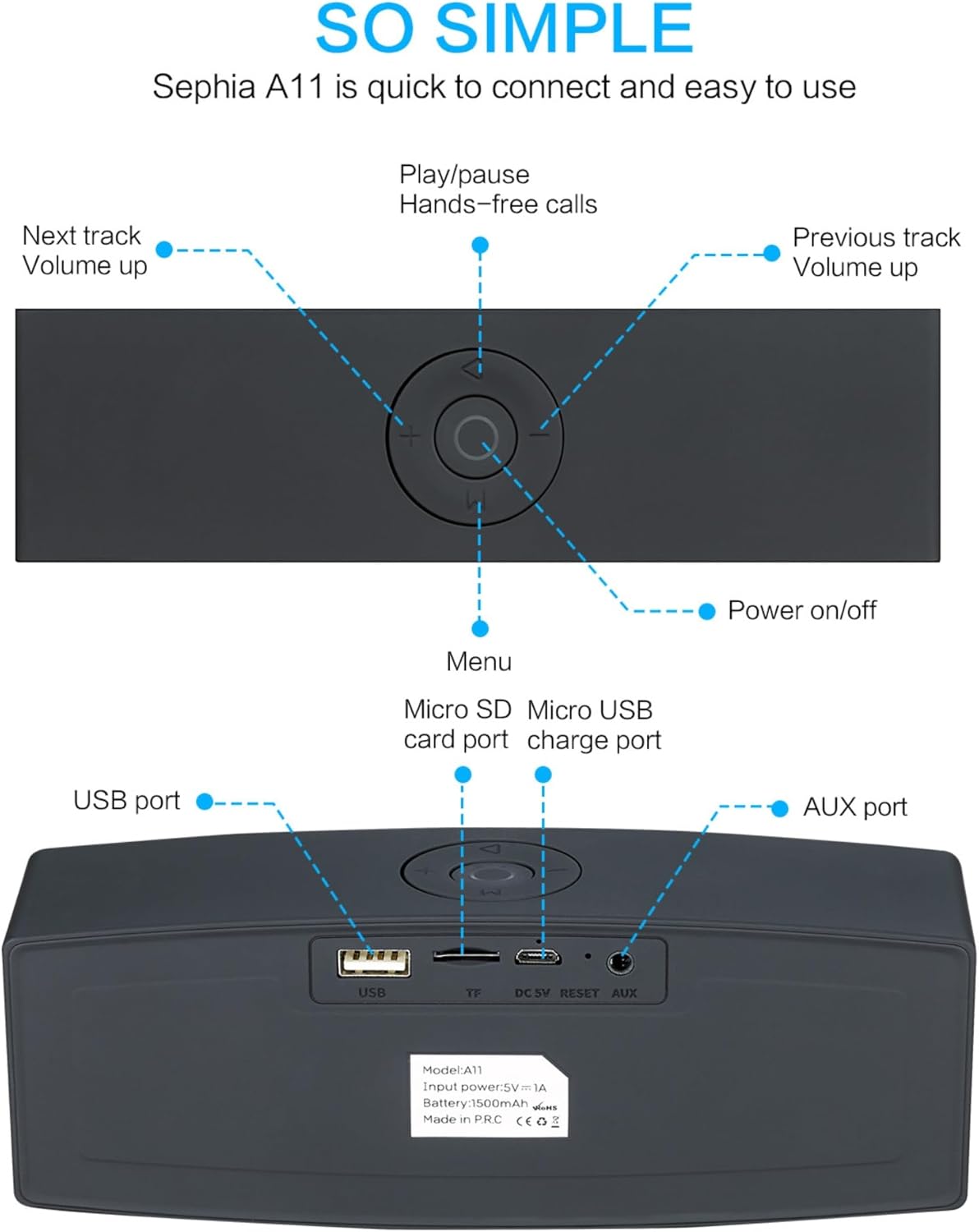
Image: Detailed diagram illustrating the top control panel and rear input/output ports of the Sephia A11 speaker.
Glavne kontrole:
- Gumb za uključivanje/isključivanje: Pritisnite i držite za uključivanje ili isključivanje zvučnika.
- Gumb za reprodukciju/pauzu: Press to play or pause audio. Also used for hands-free calls (answer/end).
- Previous Track / Volume Down Button (-): Kratki pritisak za prethodnu pjesmu, dugi pritisak za smanjenje glasnoće.
- Next Track / Volume Up Button (+): Kratki pritisak za sljedeću pjesmu, dugi pritisak za povećanje glasnoće.
- Gumb izbornika (M): Press to switch between input modes (Bluetooth, USB, Micro SD, AUX).
Stražnji priključci:
- USB priključak: For playing audio from a USB drive or charging external devices.
- Utor za Micro SD karticu (TF): Za reprodukciju zvuka s Micro SD kartice.
- Micro USB Charge Port (DC 5V): Za punjenje zvučnika.
- Gumb za resetiranje: Mala rupica za resetiranje uređaja ako je potrebno.
- AUX priključak: Za žičanu audio vezu koristite priloženi 3.5 mm AUX kabel.
Postavljanje
1. Punjenje zvučnika
- Connect the supplied charging cable to the Micro USB Charge Port (DC 5V) on the rear of the speaker.
- Drugi kraj kabela za punjenje spojite na USB adapter za napajanje (nije uključen) ili USB priključak računala.
- The charging indicator light will illuminate. Once fully charged, the light will change or turn off (refer to specific model behavior if indicated by LED). A full charge provides up to 8 hours of playtime.
2. Uključivanje/isključivanje
- To power on, press and hold the Power On/Off button on the top panel until you hear an audible prompt or see an indicator light.
- To power off, press and hold the Power On/Off button again until the speaker shuts down.
3. Bluetooth uparivanje
- Ensure the speaker is powered on and in Bluetooth mode. If not, press the 'M' (Menu) button to switch to Bluetooth mode. The speaker will enter pairing mode, indicated by a flashing LED light and an audible prompt.
- Na svom mobilnom uređaju (pametnom telefonu, tabletu, prijenosnom računalu) omogućite Bluetooth i potražite dostupne uređaje.
- Select "Sephia A11" from the list of found devices.
- Once successfully paired, the speaker will provide an audible confirmation, and the LED indicator will stop flashing.
- Zvučnik ima Bluetooth domet do 10 metara (33 stopa).
4. Wired Connections (AUX, USB, Micro SD)
- AUX ulaz: Connect one end of the supplied 3.5mm AUX cable to the AUX port on the speaker and the other end to the audio output of your device (e.g., MP3 player, computer). The speaker will automatically switch to AUX mode or can be selected using the 'M' button.
- USB reprodukcija: Umetnite USB flash pogon koji sadrži zvuk files into the USB port. The speaker will automatically detect and play the audio files.
- Reprodukcija s mikro SD kartice: Umetnite Micro SD karticu koja sadrži audio files into the Micro SD (TF) slot. The speaker will automatically detect and play the audio files.
Rukovanje zvučnikom
Audio reprodukcija
- Reproduciraj/pauziraj: Press the Play/Pause button to toggle between playing and pausing audio.
- Podešavanje glasnoće: Long press the '+' button to increase volume, and long press the '-' button to decrease volume.
- Sljedeća / prethodna pjesma: Short press the '+' button for the next track, and short press the '-' button for the previous track.

Image: A hand demonstrating how to interact with the top control buttons of the Sephia A11 speaker.
Hands-free pozivanje
- When a call comes in while connected via Bluetooth, press the Play/Pause button to answer the call.
- Ponovno pritisnite gumb Reproduciraj/Pauziraj za završetak poziva.
- Ugrađeni mikrofon omogućuje jasnu komunikaciju.
Održavanje
- Čišćenje: Use a soft, dry cloth to clean the speaker's surface. Do not use abrasive cleaners, alcohol, or chemical solvents, as these may damage the finish.
- Skladištenje: Zvučnik čuvajte na hladnom i suhom mjestu, dalje od izravne sunčeve svjetlosti i ekstremnih temperatura.
- Njega baterije: Kako biste produžili vijek trajanja baterije, izbjegavajte često potpuno pražnjenje zvučnika. Redovito punite zvučnik, čak i ako ga ne koristite dulje vrijeme.
- Vodootpornost: Ovaj zvučnik nije vodootporan. Izbjegavajte izlaganje vodi ili prekomjernoj vlazi.
Rješavanje problema
| Problem | Mogući uzrok | Otopina |
|---|---|---|
| Zvučnik se ne uključuje. | Slaba baterija; Tipka za napajanje nije dovoljno dugo pritisnuta. | Potpuno napunite zvučnik. Pritisnite i držite gumb za uključivanje/isključivanje 3-5 sekundi. |
| Nema zvuka iz zvučnika. | Glasnoća je preniska; Nepravilan način unosa; Uređaj nije pravilno spojen. | Increase speaker and device volume. Press 'M' button to select correct input mode. Re-pair Bluetooth or re-connect AUX/USB/SD. |
| Bluetooth uparivanje nije uspjelo. | Zvučnik nije u načinu uparivanja; Uređaj je previše udaljen; Smetnje. | Ensure speaker is in Bluetooth pairing mode (flashing LED). Move speaker closer to device. Turn off other Bluetooth devices. Try forgetting "Sephia A11" on your device and re-pairing. |
| Loša kvaliteta zvuka. | Low battery; Device volume too high (distortion); Interference. | Charge the speaker. Adjust volume on both speaker and device. Move away from sources of interference. |
Tehnički podaci
| Naziv modela | A11 |
| Dimenzije | 18 x 7 x 5 cm |
| Težina | 426 g |
| Tehnologija povezivanja | Bluetooth, USB, Micro SD, AUX |
| Izlazna snaga zvučnika | 6 W (2 x 3 W drivera) |
| Frekvencijski odziv | 20 Hz - 20 kHz |
| Vrsta baterije | Litij ion |
| Vrijeme za igru | Do 8 sati |
| Bluetooth domet | Do 10 metara (33 stope) |
| Posebne značajke | Bass Boost, Portable, Hi-Res Audio, Built-in Microphone, Shockproof |

Image: Visual representation of the Sephia A11 speaker's dimensions.
Jamstvo i podrška
The Sephia A11 Portable Bluetooth Speaker comes with a Jamstvo 12 mjeseci od datuma kupnje, pokrivajući nedostatke u proizvodnji. Molimo sačuvajte dokaz o kupnji za potrebe jamstva.
For technical support, warranty inquiries, or further assistance, please refer to the contact information provided with your purchase or visit the official Sephia webmjesto.
Ask a question about this manual
Ask about setup, troubleshooting, compatibility, parts, safety, or missing instructions. Manuals+ will review the question and use this page’s manual context to help answer it.